
Setting cruise control on the 2021 Nissan Rogue is easy once you know the steps. This guide walks you through every button, setting, and safety tip to help you use cruise control confidently on highways and long trips.
If you’ve recently bought a 2021 Nissan Rogue or are just getting familiar with its features, you might be wondering how to use one of the most helpful tools for long drives: cruise control. This feature lets your car maintain a steady speed without you having to keep your foot on the gas pedal. It’s perfect for highway driving, road trips, or even daily commutes on open roads.
But while cruise control sounds simple, using it correctly—and safely—requires knowing exactly where the buttons are, how they work, and when it’s appropriate to use them. The 2021 Nissan Rogue comes with a well-designed cruise control system that’s intuitive once you get the hang of it. Whether you’re a new driver or upgrading from an older model, this guide will walk you through everything you need to know.
In this article, we’ll cover the location of the cruise control buttons, step-by-step instructions for setting and adjusting speed, safety tips, troubleshooting common issues, and answers to frequently asked questions. By the end, you’ll feel confident using cruise control on your 2021 Nissan Rogue like a pro.
In This Article
- 1 Key Takeaways
- 2 📑 Table of Contents
- 3 Understanding Cruise Control in the 2021 Nissan Rogue
- 4 Locating the Cruise Control Buttons
- 5 Step-by-Step Guide to Setting Cruise Control
- 6 Adjusting and Managing Cruise Control
- 7 Safety Tips and Best Practices
- 8 Troubleshooting Common Issues
- 9 Conclusion
- 10 Frequently Asked Questions
Key Takeaways
- Locate the cruise control buttons: They’re on the right side of the steering wheel, clearly marked and easy to reach.
- Set your speed correctly: Only activate cruise control when driving above 25 mph for safe and effective use.
- Use the SET button to lock speed: Press it once you reach your desired speed to engage the system.
- Resume or adjust speed easily: Tap RES+ to increase or ACCEL to go faster; use CANCEL or brake to disengage.
- Understand safety limits: Cruise control isn’t for rain, snow, or heavy traffic—always stay alert.
- Know when to turn it off: Use the main ON/OFF switch or brake pedal to deactivate quickly.
- Practice in safe conditions: Try cruise control on empty highways before using it regularly.
📑 Table of Contents
Understanding Cruise Control in the 2021 Nissan Rogue
Cruise control is a driver-assist feature that automatically maintains your vehicle’s speed without constant pressure on the accelerator. In the 2021 Nissan Rogue, this system is designed to reduce driver fatigue on long drives and help maintain consistent speeds, which can even improve fuel efficiency when used properly.
The system works by using sensors and the vehicle’s engine control unit (ECU) to monitor speed and adjust throttle input as needed. When you set a speed, the car will hold that speed until you tell it otherwise—whether by braking, pressing cancel, or turning off the system.
It’s important to note that the 2021 Rogue’s cruise control is not adaptive cruise control (ACC), which uses radar to maintain a safe distance from the car ahead. Instead, this is traditional cruise control, meaning you’re responsible for monitoring traffic and adjusting speed manually when needed. That said, it’s still a valuable tool when used correctly.
How Cruise Control Works
When you activate cruise control, the car’s computer takes over throttle management. If you start to go uphill, the system will increase power to maintain your set speed. On downhill slopes, it may reduce throttle or even apply light braking (depending on the system) to prevent speeding.
The system is most effective on flat highways with light traffic. It’s not designed for city driving, winding roads, or adverse weather conditions. Always keep your hands on the wheel and stay alert—even when the car is maintaining speed for you.
Benefits of Using Cruise Control
Using cruise control offers several advantages. First, it reduces leg fatigue on long drives by eliminating the need to constantly press the gas pedal. This can make road trips more comfortable and less tiring.
Second, it helps you maintain a consistent speed, which can improve fuel economy. Rapid acceleration and deceleration waste fuel, so keeping a steady pace helps your engine run more efficiently.
Finally, cruise control can help you avoid unintentional speeding. If you set it to the speed limit, you’re less likely to drift above it—especially on long, monotonous stretches of highway.
Locating the Cruise Control Buttons
Visual guide about How to Set Cruise Control on 2021 Nissan Rogue
Image source: cruisesolutioner.com
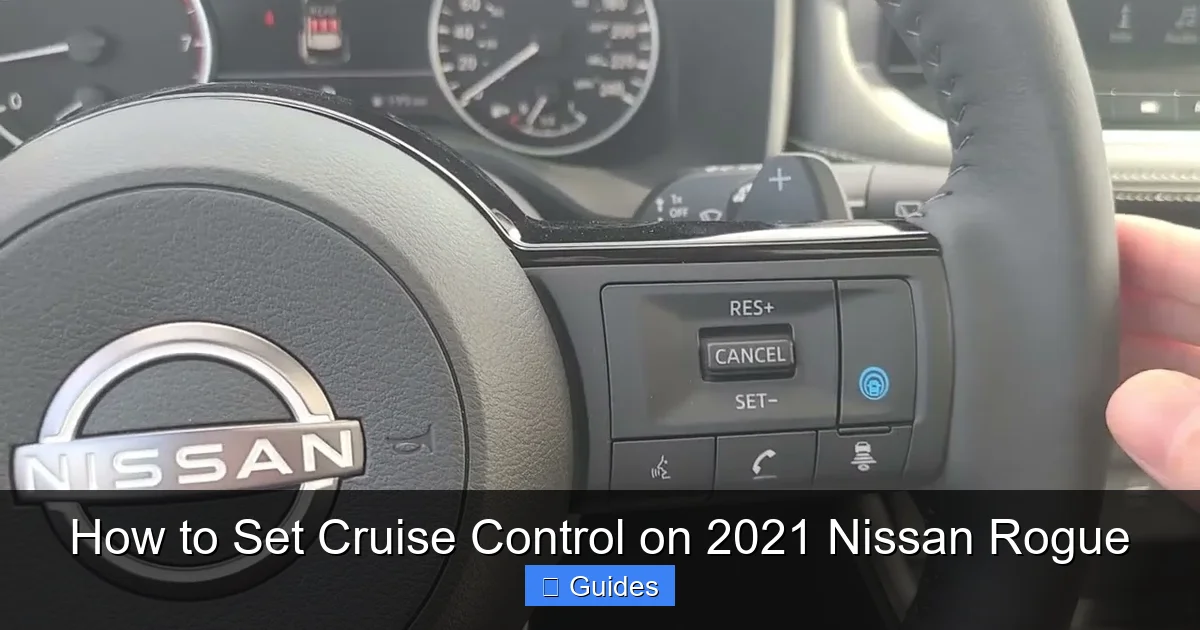
Before you can use cruise control, you need to know where the buttons are. In the 2021 Nissan Rogue, all cruise control functions are located on the right side of the steering wheel. This placement keeps them within easy reach of your right hand while driving.
The buttons are backlit and labeled clearly, so you can see them even in low light. Here’s a breakdown of each button and what it does:
– **MAIN (ON/OFF):** This is the master switch. Press it once to turn the cruise control system on. You’ll see a green cruise indicator light up on your dashboard. Press it again to turn the system off completely.
– **SET/–:** Press this button to set your current speed as the cruise speed. You can also use it to decrease your set speed by 1 mph increments when cruise control is active.
– **RES/+:** This button resumes a previously set speed or increases the current cruise speed by 1 mph increments.
– **CANCEL:** Press this to temporarily disengage cruise control without turning off the system. You can resume your last set speed by pressing RES/+.
– **ACCEL:** This is a less commonly used button that allows for faster acceleration when cruise control is active. It increases speed in larger increments than RES/+.
All these buttons are designed to be pressed with your fingertips while keeping your hand on the wheel. There’s no need to take your eyes off the road for more than a second.
Dashboard Indicators
When cruise control is active, you’ll see a green light on your instrument cluster that looks like a speedometer with a car icon. This confirms the system is engaged. If the light is on but not green (e.g., amber), it may indicate a system issue or that the car is in standby mode.
Always check this light to confirm cruise control is working. If it doesn’t illuminate when you press the MAIN button, there may be a problem with the system or a safety interlock (like the brake pedal being pressed).
Tips for Easy Access
To make using cruise control even easier, get familiar with the button layout before you start driving. Practice reaching for them with one hand while keeping your eyes on the road. Over time, it will become second nature.
Also, note that the buttons are slightly raised and have different shapes, so you can identify them by touch. This helps reduce distraction while driving.
Step-by-Step Guide to Setting Cruise Control
Visual guide about How to Set Cruise Control on 2021 Nissan Rogue
Image source: assets.newatlas.com
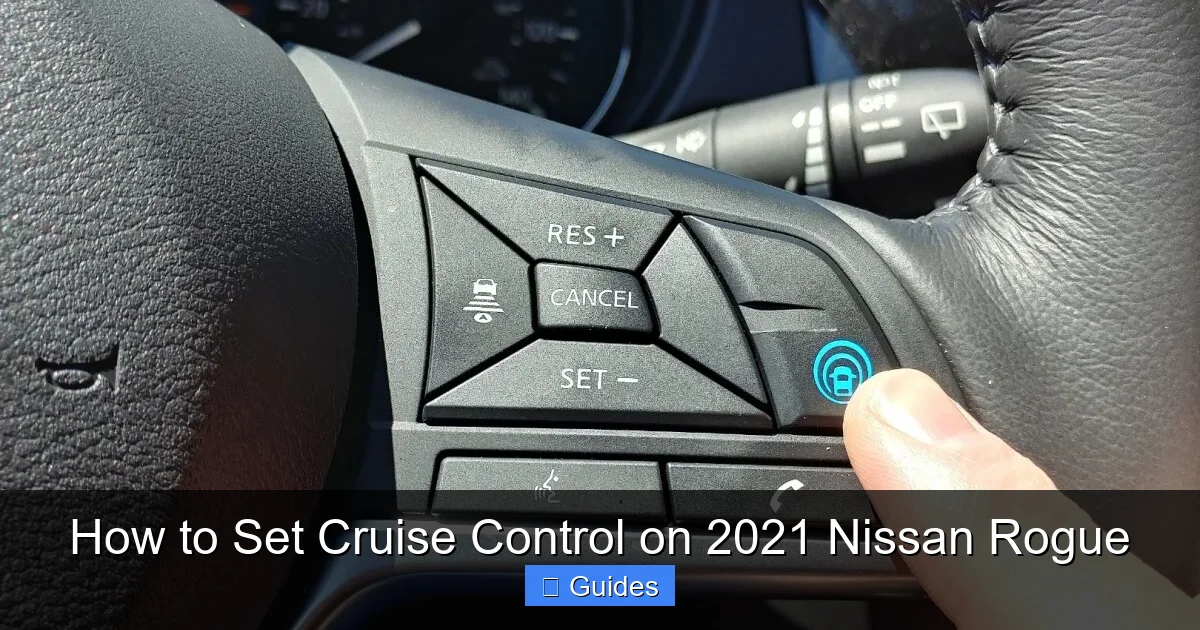
Now that you know where the buttons are, let’s walk through the process of setting cruise control on your 2021 Nissan Rogue. Follow these steps carefully to ensure safe and effective use.
Step 1: Turn On the System
Start by pressing the **MAIN (ON/OFF)** button on the right side of the steering wheel. You’ll see a green cruise control icon appear on your dashboard. This means the system is ready to be activated, but it’s not yet controlling your speed.
At this point, cruise control is in standby mode. You can still drive normally—no speed is set yet.
Step 2: Reach Your Desired Speed
Drive at the speed you want to maintain. Cruise control can only be set when the vehicle is moving at **25 mph or faster**. This is a safety feature to prevent accidental activation at low speeds.
For example, if you’re on the highway and want to cruise at 65 mph, accelerate to that speed using the gas pedal.
Step 3: Press the SET Button
Once you’ve reached your desired speed, press the **SET/–** button once. The car will immediately take over throttle control and maintain that speed. You can now remove your foot from the accelerator.
The green cruise control light will stay on, confirming the system is active.
Step 4: Adjust Speed as Needed
If you need to go faster, press the **RES/+** button. Each press increases speed by about 1 mph. Hold it down for continuous acceleration.
To slow down, press the **SET/–** button. Each press reduces speed by 1 mph. This is useful when approaching a slower zone or preparing to exit the highway.
Step 5: Temporarily Disengage
If you need to slow down temporarily—like when traffic slows or you approach a curve—you can press the **CANCEL** button or simply tap the brake pedal. Cruise control will disengage, but the system remains on.
To resume your last set speed, press **RES/+**. The car will accelerate back to that speed smoothly.
Step 6: Turn Off Cruise Control
When you no longer need cruise control—such as when exiting the highway or entering city traffic—press the **MAIN (ON/OFF)** button to turn the system off completely. The green light will disappear.
Alternatively, pressing the brake pedal will disengage cruise control, but the system stays on. Only use the MAIN button to fully disable it.
Practical Example
Imagine you’re driving on I-95 at 70 mph. You press the MAIN button to turn on cruise control. Once you reach 70 mph, you press SET. The car now holds that speed. A few miles later, traffic slows to 60 mph. You press SET/– ten times to reduce speed. When traffic clears, you press RES/+ to go back to 70 mph. When you approach your exit, you press CANCEL and slow down manually.
This example shows how cruise control adapts to real-world driving conditions.
Adjusting and Managing Cruise Control
Visual guide about How to Set Cruise Control on 2021 Nissan Rogue
Image source: cruisesolutioner.com
Once cruise control is set, you’ll likely need to adjust it during your drive. The 2021 Nissan Rogue makes this easy with intuitive controls.
Increasing Speed
To go faster, use the **RES/+** button. Each tap increases speed by 1 mph. If you hold it down, the car will accelerate continuously until you release it.
For example, if you’re cruising at 65 mph and want to pass a slow truck, press and hold RES/+ until you reach 70 mph. Release it, and the car will maintain 70 mph.
Decreasing Speed
To slow down, press the **SET/–** button. Each press reduces speed by 1 mph. This is helpful when approaching a speed limit change or preparing to exit.
You can also tap the brake pedal to slow down temporarily. Cruise control will disengage, but you can resume your previous speed with RES/+.
Resuming a Previous Speed
If you’ve canceled cruise control (by pressing CANCEL or braking), you can return to your last set speed by pressing **RES/+**. This is useful after slowing for traffic or a curve.
For instance, if you were cruising at 60 mph, braked for a merge, and then traffic cleared, press RES/+ to accelerate back to 60 mph.
Using the ACCEL Button
The **ACCEL** button allows for faster acceleration when cruise control is active. It increases speed in larger increments than RES/+. This is helpful when you need to quickly match highway speeds after exiting a ramp.
Press ACCEL once to increase speed by about 5 mph. Hold it for continuous acceleration.
Tips for Smooth Adjustments
– Make small adjustments to avoid sudden speed changes.
– Always check mirrors and blind spots before accelerating.
– Use cruise control adjustments to match traffic flow, not to speed.
Safety Tips and Best Practices
While cruise control is convenient, it’s not a substitute for attentive driving. Follow these safety tips to use it responsibly.
Only Use on Suitable Roads
Cruise control is best used on highways, interstates, and other roads with consistent speed limits and minimal traffic. Avoid using it in:
– Rain, snow, or icy conditions
– Heavy traffic or stop-and-go driving
– Winding or mountainous roads
– Construction zones or areas with frequent stops
In these situations, manual control is safer and more responsive.
Stay Alert at All Times
Even with cruise control on, you must keep your hands on the wheel and your eyes on the road. The system doesn’t steer or brake for you—it only controls speed.
Stay aware of traffic, road conditions, and speed limits. Be ready to take over at any moment.
Don’t Rely on Cruise Control in Emergencies
If a car suddenly cuts you off or an animal runs into the road, you need to react immediately. Cruise control won’t help in emergencies—only your quick reflexes will.
Always be prepared to brake or steer manually.
Use the Brake Pedal to Disengage
If you need to slow down quickly, press the brake pedal. This automatically disengages cruise control and allows you to slow down safely.
Don’t rely on the CANCEL button in urgent situations—braking is faster and more intuitive.
Turn Off When Not in Use
When you exit the highway or enter city driving, turn off cruise control using the MAIN button. This prevents accidental reactivation and keeps you in full control.
Practice Before Relying on It
If you’re new to cruise control, practice using it on a quiet highway during light traffic. Get comfortable with the buttons and how the car responds.
Start with short sessions and gradually increase your usage as you gain confidence.
Troubleshooting Common Issues
Sometimes, cruise control may not work as expected. Here are common issues and how to fix them.
Cruise Control Won’t Turn On
If the green light doesn’t appear when you press MAIN, check the following:
– Is the brake pedal pressed? Cruise control won’t activate if the brake is engaged.
– Is the vehicle moving above 25 mph? The system requires a minimum speed.
– Is there a fault in the system? Check your owner’s manual or visit a Nissan dealer.
Speed Doesn’t Hold
If the car slows down even with cruise control on, it may be due to:
– A steep uphill grade—cruise control may struggle on very steep hills.
– A malfunctioning sensor or throttle body—have it inspected by a technician.
– Strong headwinds or heavy load—the system has limits.
Buttons Feel Stiff or Unresponsive
If the buttons don’t respond, try cleaning them with a soft cloth. Avoid using liquids near the steering wheel.
If the problem persists, there may be a wiring or switch issue. Contact a Nissan service center.
System Turns Off Unexpectedly
Cruise control may disengage if:
– The brake pedal is pressed (even slightly).
– The clutch is pressed (on manual models—though the Rogue is automatic).
– There’s a system error or low battery voltage.
Check your dashboard for warning lights and consult your owner’s manual.
Conclusion
Using cruise control on the 2021 Nissan Rogue is a simple yet powerful way to make long drives more comfortable and efficient. By following the steps in this guide, you can set, adjust, and manage your speed with confidence.
Remember to use cruise control only in safe conditions—on highways, in good weather, and with light traffic. Always stay alert and ready to take control when needed.
With practice, you’ll find that cruise control becomes a valuable tool in your driving routine. It reduces fatigue, helps maintain consistent speeds, and can even improve fuel economy.
So the next time you’re on the highway, give it a try. Press that MAIN button, set your speed, and enjoy the ride—safely and smoothly.
Frequently Asked Questions
Can I use cruise control in the rain?
No, it’s not recommended to use cruise control in rain, snow, or icy conditions. Wet roads reduce traction, and cruise control can cause wheel spin or loss of control if the car accelerates unexpectedly.
What’s the minimum speed for cruise control on the 2021 Rogue?
You must be driving at least 25 mph to activate cruise control. This safety feature prevents accidental use at low speeds where manual control is safer.
Will cruise control save fuel?
Yes, when used properly, cruise control can improve fuel efficiency by maintaining a steady speed and reducing unnecessary acceleration and braking.
Can I resume speed after braking?
Yes, pressing the RES/+ button after braking will resume your last set speed, as long as cruise control hasn’t been turned off.
Why won’t my cruise control turn on?
Common reasons include pressing the brake pedal, driving below 25 mph, or a system fault. Check your dashboard for warnings and consult your owner’s manual.
Is cruise control the same as adaptive cruise control?
No, the 2021 Rogue’s cruise control is not adaptive. It maintains a set speed but does not automatically adjust for traffic ahead. Adaptive cruise control uses radar and is not standard on this model.

At CarLegit, we believe information should be clear, factual, and genuinely helpful. That’s why every guide, review, and update on our website is created with care, research, and a strong focus on user experience.