
Turning off AWD lock on your Nissan Rogue is simple and essential for normal driving conditions. This guide walks you through the process, explains when to use AWD lock, and offers safety tips to keep your vehicle running smoothly.
If you’ve ever driven your Nissan Rogue through a snowy driveway, muddy trail, or gravel road, you’ve probably used the AWD lock feature. It’s a handy tool that sends more power to all four wheels, giving you better grip and control when traction is low. But here’s the catch: AWD lock isn’t meant to stay on all the time. In fact, leaving it activated during normal driving can cause unnecessary wear on your vehicle’s drivetrain and reduce fuel efficiency.
So, how do you turn off AWD lock on a Nissan Rogue? The good news is it’s incredibly simple—just a button press away. But understanding *when* and *why* to turn it off is just as important as knowing *how*. This guide will walk you through everything you need to know, from locating the AWD lock button to understanding your dashboard indicators. Whether you’re a new Rogue owner or just need a refresher, we’ve got you covered with clear, step-by-step instructions and practical tips.
We’ll also cover common mistakes drivers make, explain how AWD lock works under the hood, and share expert advice on maintaining your all-wheel-drive system. By the end of this article, you’ll feel confident managing your Rogue’s AWD settings like a pro—keeping your vehicle safe, efficient, and ready for any road condition.
In This Article
- 1 Key Takeaways
- 2 📑 Table of Contents
- 3 What Is AWD Lock and How Does It Work?
- 4 How to Turn Off AWD Lock on Nissan Rogue
- 5 Understanding the Dashboard Indicators
- 6 Common Mistakes and How to Avoid Them
- 7 Tips for Maintaining Your AWD System
- 8 When to Seek Professional Help
- 9 Conclusion
- 10 Frequently Asked Questions
Key Takeaways
- Understand AWD Lock Function: AWD lock mode is designed for low-traction situations like snow, mud, or gravel, not for regular highway driving.
- Turn It Off at Speeds Over 35 MPH: Nissan recommends disabling AWD lock once you exceed 35 mph to prevent drivetrain damage.
- Use the AWD Lock Button: Located near the gear shifter, this button activates and deactivates the system with a simple press.
- Dashboard Indicator Matters: Watch for the AWD lock light on your instrument panel—it should turn off when the mode is deactivated.
- Automatic Reversion in Some Models: Certain Rogue trims automatically disable AWD lock at higher speeds, but manual confirmation is still wise.
- Regular Driving = No Lock Needed: For everyday city and highway driving, keep AWD lock off to ensure optimal fuel efficiency and handling.
- Consult Your Owner’s Manual: Always refer to your specific model year’s manual for exact procedures and safety guidelines.
📑 Table of Contents
What Is AWD Lock and How Does It Work?
Before we dive into turning off AWD lock, let’s first understand what it actually does. AWD stands for All-Wheel Drive, and on the Nissan Rogue, it’s an intelligent system that normally sends power to the front wheels most of the time. When the system detects wheel slip—like when you’re accelerating on ice or driving through mud—it automatically sends power to the rear wheels to help maintain traction.
The AWD lock mode takes this a step further. When activated, it forces the system to send a more balanced amount of power to both the front and rear axles, even when there’s no slip detected. This is especially useful in situations where you need consistent grip, such as:
– Driving through deep snow
– Navigating muddy trails
– Pulling a trailer on loose gravel
– Climbing a slippery hill
Think of AWD lock as a “traction boost” mode. It’s not meant for high-speed driving or dry pavement. In fact, using it on dry roads can cause binding in the drivetrain, leading to strange noises, reduced handling, and potential mechanical damage over time.
How the AWD System Responds in Lock Mode
When you press the AWD lock button, the system essentially overrides the default front-wheel bias. Instead of waiting for wheel slip to trigger rear power, it proactively distributes torque more evenly. This gives you better stability in slippery conditions.
However, the system isn’t completely rigid. Even in lock mode, the Rogue’s AWD system can still make minor adjustments based on driving conditions. But the key point is: it’s designed for short-term use in low-traction scenarios—not for daily commuting.
When Should You Use AWD Lock?
Use AWD lock only when you’re driving in conditions where traction is compromised. Here are some real-world examples:
– **Snowy Roads:** If you’re driving through a snowstorm or on unplowed roads, AWD lock can help you maintain control.
– **Muddy Driveways:** Pulling out of a muddy parking lot or farm road? Lock mode gives you that extra push.
– **Gravel or Dirt Paths:** Loose surfaces can cause wheels to spin—AWD lock helps distribute power more evenly.
– **Off-Roading (Light):** While the Rogue isn’t a full off-roader, light trail use benefits from locked AWD.
Once you’re back on paved roads or driving above 35 mph, it’s time to turn it off.
How to Turn Off AWD Lock on Nissan Rogue
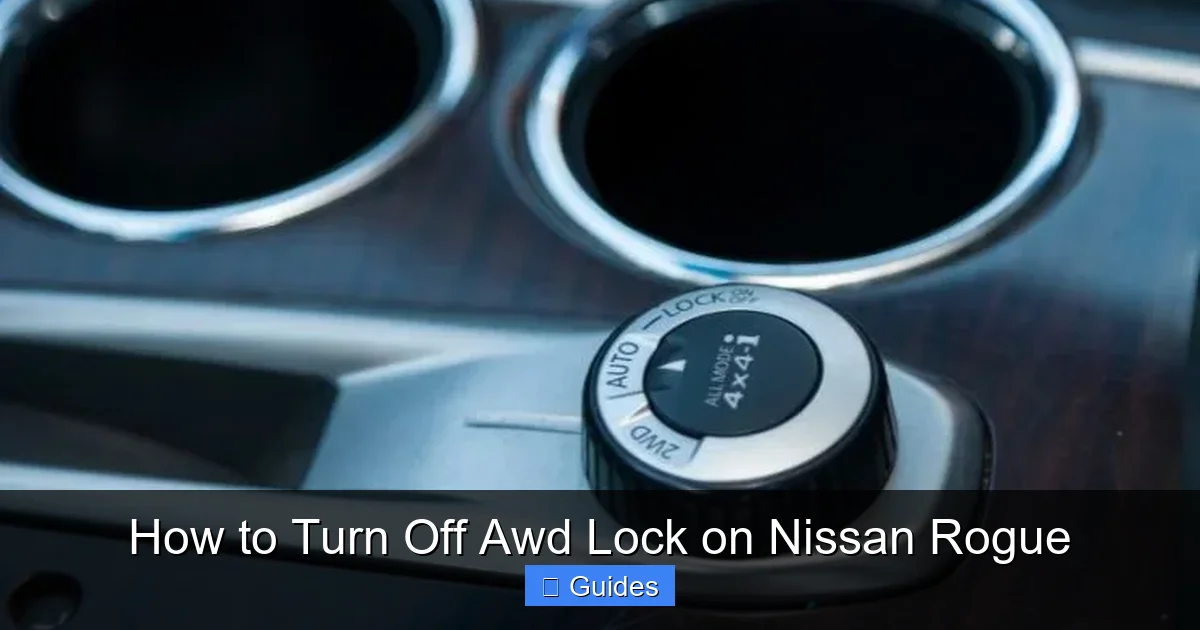
Visual guide about How to Turn Off Awd Lock on Nissan Rogue
Image source: nissannationpodcast.com
Now for the main event: turning off AWD lock. The process is straightforward and takes just a few seconds. Here’s how to do it safely and correctly.
Step 1: Locate the AWD Lock Button
The AWD lock button is typically found on the center console, near the gear shifter. It’s a small, round button with an icon that looks like a car with arrows pointing to all four wheels. On most Nissan Rogue models from 2014 onward, it’s positioned to the left or right of the shifter, depending on the trim level.
If you can’t find it, don’t worry—some higher trims may have it integrated into the touchscreen or climate control area. But in the vast majority of Rogues, it’s a physical button within easy reach of the driver.
Step 2: Check Your Speed
Before turning off AWD lock, make sure your vehicle is moving at a safe speed. Nissan recommends disabling AWD lock once you exceed 35 mph. If you’re already driving faster than that, you can turn it off immediately—no need to slow down.
However, if you’re still in a low-traction area (like a snowy road), wait until you’ve reached a safer, paved section before making the switch.
Step 3: Press the AWD Lock Button
With your foot off the accelerator (or lightly on it), press the AWD lock button once. You’ll hear a soft click, and the AWD lock indicator light on your dashboard should turn off.
That’s it! The system has now reverted to its normal AWD mode, where power is primarily sent to the front wheels unless slip is detected.
Step 4: Confirm the Indicator Light Is Off
Always double-check your instrument panel. The AWD lock light looks like a car with “AWD” and a lock symbol. When the mode is active, the light is illuminated. When it’s off, the light should be dark.
If the light remains on after pressing the button, try pressing it again. In rare cases, the button may need a firmer press or the system may take a moment to respond.
Step 5: Drive Normally
Once AWD lock is off, your Rogue will operate in its standard AWD mode. This means better fuel economy, smoother handling, and reduced strain on the drivetrain. You’re now ready for highway driving, city streets, or any normal road condition.
Understanding the Dashboard Indicators
Visual guide about How to Turn Off Awd Lock on Nissan Rogue
Image source: nissannationpodcast.com
Your Nissan Rogue’s dashboard is your best friend when it comes to monitoring AWD lock status. Here’s what to look for:
AWD Lock Indicator Light
This light is usually located in the instrument cluster, near the speedometer or tachometer. When AWD lock is active, the light glows steadily. When it’s off, the light is dark.
If the light flashes or stays on when it shouldn’t, it could indicate a system issue. In that case, have your vehicle inspected by a Nissan technician.
AWD Warning Light
Separate from the lock indicator, the AWD warning light (often labeled “AWD” or “4WD”) alerts you to a problem with the all-wheel-drive system. If this light comes on, it means there’s a malfunction—don’t ignore it.
Common causes include low fluid levels, sensor issues, or mechanical wear. If you see this light, avoid using AWD lock and schedule a service appointment.
Automatic Reversion in Newer Models
Some newer Nissan Rogue models (especially 2021 and later) are equipped with an automatic AWD lock release feature. This means that once you exceed 35 mph, the system will automatically disable AWD lock—even if you don’t press the button.
While this is convenient, it’s still a good habit to manually turn it off when you no longer need it. This ensures the system resets properly and gives you full control over your vehicle’s performance.
Common Mistakes and How to Avoid Them
Visual guide about How to Turn Off Awd Lock on Nissan Rogue
Image source: thecarhow.com
Even experienced drivers can make errors when using AWD lock. Here are some common pitfalls and how to steer clear of them.
Leaving AWD Lock On During Highway Driving
This is the #1 mistake. Driving at high speeds with AWD lock engaged can cause drivetrain binding, especially during turns. The result? Whining noises, reduced fuel economy, and potential damage to the transfer case or differential.
**Fix:** Always turn off AWD lock once you’re on paved roads and driving above 35 mph.
Using AWD Lock on Dry Pavement
Dry, smooth roads don’t need locked AWD. Using it here can cause tire scrubbing and uneven wear, especially during cornering.
**Fix:** Reserve AWD lock for snow, mud, gravel, or other low-traction surfaces only.
Forgetting to Turn It Off After Off-Roading
After a fun day on a dirt trail, it’s easy to hop back on the highway and forget to disable AWD lock.
**Fix:** Make it a habit to check the dashboard indicator as soon as you return to paved roads.
Pressing the Button While Stationary
While you *can* press the AWD lock button while parked, it’s better to do it while moving slowly (under 10 mph). This allows the system to engage smoothly.
**Fix:** Activate or deactivate AWD lock while driving at low speed, not while idling.
Ignoring the Owner’s Manual
Every Nissan Rogue model year may have slight variations in AWD operation. Relying on memory or guesswork can lead to mistakes.
**Fix:** Keep your owner’s manual handy, or download the digital version from Nissan’s website.
Tips for Maintaining Your AWD System
Turning off AWD lock is just one part of keeping your Rogue in top shape. Regular maintenance ensures your all-wheel-drive system works when you need it most.
Check Tire Tread and Pressure
Uneven tire wear or mismatched tire sizes can confuse the AWD system. Always maintain consistent tread depth and proper inflation.
**Tip:** Rotate your tires every 5,000 to 7,500 miles to promote even wear.
Service the Transfer Case and Differential
These components need periodic fluid changes. Refer to your maintenance schedule—typically every 30,000 to 60,000 miles.
**Tip:** Use only Nissan-recommended fluids to avoid damage.
Inspect Driveshafts and CV Joints
Listen for clicking noises when turning—this could indicate worn CV joints. Have them inspected during routine service.
Test AWD Lock Periodically
Even if you don’t use it often, test the AWD lock function once or twice a year. This ensures the button and system are working properly.
**Tip:** Try it in a safe, empty parking lot during winter or after rain.
Use Winter Tires in Snowy Climates
AWD helps with traction, but it doesn’t improve braking. Winter tires give you better grip in cold weather, making AWD lock even more effective.
When to Seek Professional Help
Most AWD lock issues can be resolved with a simple button press. But if you notice any of the following, it’s time to visit a Nissan service center:
– AWD lock button doesn’t respond
– Indicator light stays on or flashes
– Unusual noises from under the vehicle
– Vehicle pulls to one side during turns
– Warning lights remain illuminated
These could signal a deeper mechanical or electrical problem. Don’t ignore them—early diagnosis prevents costly repairs.
Conclusion
Turning off AWD lock on your Nissan Rogue is a quick and easy process that every driver should know. Whether you’ve just driven through a snowstorm or navigated a muddy path, remembering to disable AWD lock once you’re back on normal roads is essential for your vehicle’s health and performance.
By following the simple steps—locating the button, checking your speed, pressing to deactivate, and confirming the dashboard light—you’ll keep your Rogue running smoothly and efficiently. Plus, understanding when to use AWD lock (and when not to) helps you get the most out of your all-wheel-drive system without risking damage.
Remember: AWD lock is a tool for tough conditions, not a permanent setting. Use it wisely, turn it off when you no longer need it, and your Nissan Rogue will reward you with reliable performance for years to come.
Frequently Asked Questions
How do I know if AWD lock is active?
Check the dashboard indicator light. If the AWD lock symbol is illuminated, the mode is active. The light should turn off when you press the button to deactivate it.
Can I drive with AWD lock on all the time?
No. Driving with AWD lock engaged on dry pavement or at high speeds can cause drivetrain damage. Use it only in low-traction conditions and turn it off above 35 mph.
What happens if I forget to turn off AWD lock?
You may experience reduced fuel economy, unusual noises, or handling issues. In most cases, simply pressing the button to turn it off will resolve the problem.
Does AWD lock improve fuel efficiency?
No. AWD lock increases power distribution to all wheels, which can reduce fuel efficiency. Use it only when necessary and turn it off for normal driving.
Can I turn off AWD lock while driving?
Yes. You can safely press the AWD lock button while driving, as long as you’re not in a low-traction situation. It’s recommended to do so once you exceed 35 mph.
Why won’t my AWD lock turn off?
If the button doesn’t respond or the light stays on, there may be a system malfunction. Check your owner’s manual and consider visiting a Nissan service center for diagnosis.

At CarLegit, we believe information should be clear, factual, and genuinely helpful. That’s why every guide, review, and update on our website is created with care, research, and a strong focus on user experience.