
Turning on the digital speedometer in your Infiniti QX80 is simpler than you might think. With just a few button presses on your steering wheel or instrument cluster, you can switch from the traditional analog display to a sleek digital readout. This guide walks you through every step, troubleshooting tips, and customization options to enhance your driving experience.
In This Article
- 1 Key Takeaways
- 2 📑 Table of Contents
- 3 Introduction: Why Use a Digital Speedometer in Your Infiniti QX80?
- 4 Understanding the Infiniti QX80 Instrument Cluster
- 5 Step-by-Step Guide to Activating the Digital Speedometer
- 6 Troubleshooting Common Issues
- 7 Benefits of Using the Digital Speedometer
- 8 Tips for Maintaining Your Digital Display
- 9 Conclusion: Enjoy a Smarter, Safer Drive
- 10 Frequently Asked Questions
- 10.1 Can I turn on the digital speedometer while driving?
- 10.2 Why isn’t my digital speedometer showing up after following the steps?
- 10.3 Does the digital speedometer affect fuel efficiency?
- 10.4 Can I switch back to the analog speedometer?
- 10.5 Is the digital speedometer available on all Infiniti QX80 trims?
- 10.6 Will a firmware update improve my digital speedometer?
Key Takeaways
- Access the digital speedometer via the steering wheel controls: Use the INFO or TRIP buttons to navigate the menu and select the digital speed display option.
- Ensure your vehicle is in Park or Neutral: Some display settings can only be changed when the vehicle is stationary for safety reasons.
- The digital speedometer improves visibility and accuracy: It offers a clearer, more modern view of your speed compared to the analog gauge.
- Customize display preferences in the Settings menu: Adjust brightness, units (mph or km/h), and layout to suit your preferences.
- Firmware updates may affect display functionality: Keep your Infiniti QX80’s software up to date to ensure all digital features work correctly.
- Consult your owner’s manual for model-specific instructions: Features may vary slightly between model years (2014–2024).
- If the digital display doesn’t activate, check for system glitches: A soft reset of the infotainment system or instrument cluster may resolve the issue.
📑 Table of Contents
- Introduction: Why Use a Digital Speedometer in Your Infiniti QX80?
- Understanding the Infiniti QX80 Instrument Cluster
- Step-by-Step Guide to Activating the Digital Speedometer
- Troubleshooting Common Issues
- Benefits of Using the Digital Speedometer
- Tips for Maintaining Your Digital Display
- Conclusion: Enjoy a Smarter, Safer Drive
Introduction: Why Use a Digital Speedometer in Your Infiniti QX80?
Driving a luxury SUV like the Infiniti QX80 means enjoying advanced technology, comfort, and performance. One feature that many drivers appreciate—but don’t always know how to activate—is the digital speedometer. Unlike traditional analog gauges that use a needle to show your speed, the digital speedometer displays your current speed in crisp, easy-to-read numbers on the instrument cluster or center screen. It’s not just about looking modern; it’s about clarity, precision, and personalization.
Imagine cruising down the highway, glancing at your dashboard, and instantly seeing your exact speed without having to interpret a needle position. That’s the advantage of the digital speedometer. It reduces eye strain, especially during long drives or in low-light conditions. Plus, it integrates seamlessly with other driver-assist features like cruise control and speed limit warnings. Whether you’re a tech-savvy driver or just someone who values convenience, turning on the digital speedometer in your Infiniti QX80 is a smart move.
Understanding the Infiniti QX80 Instrument Cluster
Visual guide about How to Turn on Digital Speedometer in Infiniti Qx80
Image source: canaviet.com
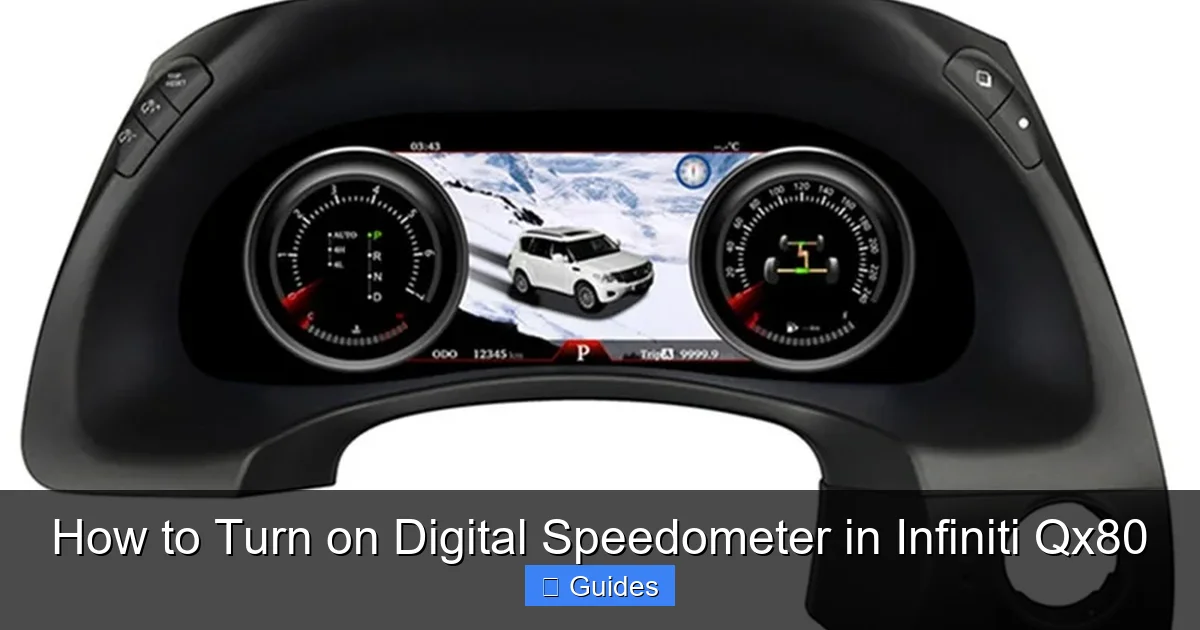
Before diving into the steps to activate the digital speedometer, it helps to understand the layout of your Infiniti QX80’s instrument cluster. Depending on your model year (ranging from 2014 to 2024), the dashboard may feature a fully digital display, a semi-digital setup, or a hybrid analog-digital cluster. Most recent models come with a 7- or 8-inch color LCD screen positioned between the traditional speedometer and tachometer gauges.
This central screen is where the digital speedometer appears. It can show not only your current speed but also navigation prompts, trip data, fuel economy, and vehicle status alerts. The beauty of this system is its flexibility—you can customize what information is displayed and how it looks. For example, you might prefer a large, bold speed readout during highway driving, or a more compact layout when navigating city streets.
The controls for accessing and adjusting these displays are typically located on the steering wheel. Look for buttons labeled “INFO,” “TRIP,” “MENU,” or arrows (▲/▼/◀/▶). These allow you to scroll through different screens and settings without taking your hands off the wheel—a key safety feature. Familiarizing yourself with these controls is the first step toward unlocking the full potential of your QX80’s digital dashboard.
Identifying Your QX80’s Display Type
Not all Infiniti QX80s are created equal when it comes to display technology. Early models (2014–2017) often featured a basic LCD screen with limited customization, while newer models (2018–2024) come equipped with high-resolution TFT displays and more intuitive interfaces. To determine your setup, start the vehicle and observe the instrument cluster. If you see a colorful, high-definition screen with multiple tabs or menus, you likely have a newer system capable of displaying a full digital speedometer.
If your screen is smaller or monochrome, you may still be able to activate a digital speed readout, but the options could be more limited. In some cases, the digital speedometer appears as an overlay on the analog gauge rather than replacing it entirely. This hybrid approach is common in mid-tier trims. Regardless of your model, the process to enable the digital display is generally similar—just accessed through slightly different menu paths.
Step-by-Step Guide to Activating the Digital Speedometer

Visual guide about How to Turn on Digital Speedometer in Infiniti Qx80
Image source: superkilometerfilter.com
Now that you understand the basics, let’s walk through the actual process of turning on the digital speedometer in your Infiniti QX80. The steps are straightforward and can be completed in under two minutes. Always ensure your vehicle is parked or in neutral with the parking brake engaged before making any changes to the display settings—this is a safety precaution built into the system.
Using the Steering Wheel Controls
The most common method involves the buttons on your steering wheel. Here’s how to do it:
1. Start your Infiniti QX80 and allow the instrument cluster to fully power up.
2. Locate the “INFO” or “TRIP” button on the left side of the steering wheel. This button cycles through different information screens.
3. Press the “INFO” button repeatedly until you see a screen that displays trip data, fuel economy, or vehicle status.
4. Once you’re on a screen with multiple options, look for a “Settings” or “Display” icon—this may appear as a gear symbol or a screen graphic.
5. Use the arrow buttons (▲/▼/◀/▶) to navigate to the “Display Settings” or “Instrument Cluster” menu.
6. Scroll down to find “Speedometer Display” or “Digital Speedometer.”
7. Select “Digital” or “On” to activate the digital readout.
8. Exit the menu by pressing the “Back” or “Home” button.
After completing these steps, your current speed should appear as large, digital numbers on the screen—usually in the center or upper portion of the cluster. If you don’t see it immediately, try driving at a low speed (under 10 mph) to trigger the display.
Alternative Method: Using the Center Touchscreen
On higher trims like the Luxe or Premium, you may also access display settings through the central infotainment touchscreen. Here’s how:
1. Tap the “Settings” icon on the home screen (usually looks like a gear).
2. Select “Vehicle” or “Driving” from the menu.
3. Choose “Instrument Cluster” or “Display Preferences.”
4. Toggle the “Digital Speedometer” option to “On.”
5. You may also adjust the size, color, or position of the speed display here.
This method offers more customization, such as choosing between mph and km/h, adjusting brightness, or selecting a night mode theme. It’s especially useful if you prefer using the larger touchscreen over the smaller steering wheel buttons.
Customizing Your Digital Speedometer Display
Once activated, you can personalize your digital speedometer to match your driving style. For instance, you might want a larger font for better visibility or a different color scheme for night driving. To do this:
– Navigate back to the “Display Settings” menu.
– Look for options like “Font Size,” “Color Theme,” or “Layout.”
– Select your preferred style. Some models even offer sport or eco-themed displays that change the appearance based on driving mode.
For example, switching to “Sport Mode” might make the speedometer turn red and increase the font size, giving you a more dynamic feel. Conversely, “Eco Mode” could use green tones and smaller text to emphasize fuel efficiency.
Troubleshooting Common Issues

Visual guide about How to Turn on Digital Speedometer in Infiniti Qx80
Image source: 5.imimg.com
Even with clear instructions, you might run into a few hiccups when trying to turn on the digital speedometer. Don’t worry—most issues are easy to fix with a little troubleshooting.
Digital Speedometer Not Appearing
If you’ve followed the steps but still don’t see the digital readout, try these fixes:
– **Check if the vehicle is in motion:** Some display settings can only be changed when the car is stationary. Shift to Park and try again.
– **Cycle the ignition:** Turn the car off, wait 30 seconds, then restart it. This can reset the instrument cluster and resolve minor software glitches.
– **Update the system software:** Infiniti periodically releases firmware updates that improve functionality. Visit your local dealership or use the Infiniti InTouch app to check for updates.
– **Reset the infotainment system:** On some models, holding the power button on the audio system for 10 seconds performs a soft reset. This can restore default settings and fix display issues.
Display Looks Blurry or Flickering
A flickering or blurry digital speedometer could indicate a hardware issue, such as a loose connection or failing LCD panel. However, it’s often caused by incorrect brightness settings. Try adjusting the dashboard brightness using the dimmer switch (usually located near the headlight controls). If the problem persists, consult your owner’s manual or contact an Infiniti service center.
Speed Reading Seems Inaccurate
While the digital speedometer is generally accurate, slight discrepancies can occur due to tire size, calibration, or GPS signal interference. If you suspect your speed reading is off, compare it with a GPS-based speed app on your phone. If there’s a consistent difference of more than 3–5 mph, consider having your vehicle inspected for wheel sensor or ABS system issues.
Benefits of Using the Digital Speedometer
Switching to a digital speedometer isn’t just about aesthetics—it offers real advantages for everyday driving.
Improved Readability and Safety
Digital numbers are easier to read at a glance, especially for drivers with vision challenges or in challenging lighting conditions. Unlike analog gauges, which require you to estimate needle position, digital displays show your exact speed instantly. This reduces cognitive load and helps you maintain better speed control, which is crucial for avoiding speeding tickets or accidents.
Integration with Driver Assistance Features
The digital speedometer works hand-in-hand with advanced safety systems like adaptive cruise control, lane departure warning, and speed limit recognition. For example, if your QX80 detects a lower speed limit ahead, it can highlight your current speed in red if you’re exceeding it. This visual alert is only possible with a digital display.
Personalization and Modern Aesthetics
Let’s face it—digital displays look sleek and futuristic. They give your dashboard a high-tech feel that matches the luxury status of the Infiniti QX80. Plus, being able to customize colors, layouts, and themes makes your driving experience more enjoyable and tailored to your preferences.
Tips for Maintaining Your Digital Display
To keep your digital speedometer functioning smoothly, follow these maintenance tips:
– **Clean the screen gently:** Use a microfiber cloth and screen-safe cleaner to remove dust and fingerprints. Avoid harsh chemicals or abrasive materials.
– **Avoid extreme temperatures:** Prolonged exposure to direct sunlight or freezing conditions can affect LCD performance. Park in shaded or covered areas when possible.
– **Update software regularly:** Check for system updates every few months to ensure compatibility and performance.
– **Don’t overload the display:** While customization is fun, too much information on the screen can be distracting. Stick to essential data like speed, fuel, and navigation.
Conclusion: Enjoy a Smarter, Safer Drive
Turning on the digital speedometer in your Infiniti QX80 is a simple yet impactful upgrade that enhances both safety and convenience. With just a few button presses, you can transform your driving experience from analog to digital, gaining clearer speed readings, better integration with safety systems, and a more personalized dashboard. Whether you’re navigating city streets or cruising on the highway, the digital speedometer helps you stay informed and in control.
Remember, the exact steps may vary slightly depending on your model year and trim level, so always refer to your owner’s manual for model-specific guidance. And if you run into any issues, don’t hesitate to visit an Infiniti service center—they can help with software updates or hardware diagnostics.
By embracing this feature, you’re not just keeping up with modern automotive technology—you’re making every drive in your QX80 more enjoyable, efficient, and safe. So go ahead, activate that digital speedometer, and enjoy the road with confidence.
Frequently Asked Questions
Can I turn on the digital speedometer while driving?
No, for safety reasons, most display settings—including the digital speedometer—can only be changed when the vehicle is in Park or Neutral. Always stop and engage the parking brake before adjusting settings.
Why isn’t my digital speedometer showing up after following the steps?
This could be due to a software glitch, incorrect menu navigation, or a model-specific limitation. Try restarting the vehicle, checking for system updates, or consulting your owner’s manual for exact instructions.
Does the digital speedometer affect fuel efficiency?
No, the digital speedometer itself doesn’t impact fuel economy. However, it can help you drive more efficiently by providing precise speed feedback, especially when used with eco-driving modes.
Can I switch back to the analog speedometer?
Yes, simply return to the “Display Settings” menu and select “Analog” or “Off” under the speedometer options. You can toggle between digital and analog anytime.
Is the digital speedometer available on all Infiniti QX80 trims?
Most trims from 2014 onward support a digital speed readout, but higher trims (like Luxe and Premium) offer more customization and a full digital cluster. Base models may have limited functionality.
Will a firmware update improve my digital speedometer?
Yes, Infiniti periodically releases updates that enhance display performance, fix bugs, and add new features. Visit your dealership or use the Infiniti InTouch app to check for available updates.

At CarLegit, we believe information should be clear, factual, and genuinely helpful. That’s why every guide, review, and update on our website is created with care, research, and a strong focus on user experience.