
Knowing where the TPMS reset button is on your Acura MDX can save time and ensure accurate tire pressure readings. This guide walks you through the exact location, step-by-step reset procedures, and common troubleshooting tips for different model years.
If you’ve ever been driving your Acura MDX and suddenly seen that little tire icon light up on your dashboard, you’re not alone. That’s your Tire Pressure Monitoring System (TPMS) letting you know something might be off with your tire pressure. It’s a helpful safety feature, but it can also be a bit confusing—especially when you’re not sure how to reset it. One of the most common questions Acura MDX owners ask is: “Where is the TPMS reset button on my Acura MDX?”
The good news is that resetting the TPMS isn’t rocket science. But the process does vary depending on your MDX’s model year. Older models (like the 2007–2013 versions) often have a physical reset button, while newer ones (2014 and later) use a digital menu system through the infotainment screen. Knowing which method applies to your vehicle is the first step to getting that warning light turned off and your tires properly monitored.
In this guide, we’ll walk you through everything you need to know—from locating the reset button (or menu option) to performing the reset correctly. We’ll also cover common mistakes, troubleshooting tips, and when it’s time to call in a professional. Whether you’re a DIY enthusiast or just want to understand your vehicle better, this article will give you the confidence to handle TPMS issues like a pro.
In This Article
- 1 Key Takeaways
- 2 📑 Table of Contents
- 3 Understanding TPMS in the Acura MDX
- 4 Locating the TPMS Reset Button on Older Acura MDX Models (2007–2013)
- 5 Resetting TPMS on Newer Acura MDX Models (2014 and Later)
- 6 Troubleshooting Common TPMS Issues
- 7 When to Visit a Professional
- 8 Maintaining Your TPMS for Long-Term Reliability
- 9 Conclusion
- 10 Frequently Asked Questions
Key Takeaways
- TPMS reset button location varies by model year: On most Acura MDX models (2007–2013), it’s near the steering column; newer models (2014+) use a menu-based reset via the infotainment system.
- Always check tire pressure before resetting: Ensure all tires are inflated to the recommended PSI listed on the driver’s door jamb sticker.
- Use the correct reset procedure: Follow the specific steps for your model year to avoid triggering warning lights or inaccurate readings.
- Battery disconnection isn’t usually needed: Most MDX models allow a soft reset without disconnecting the 12V battery.
- Persistent TPMS warnings may indicate sensor issues: If the light stays on after reset, one or more sensors might be faulty or need replacement.
- Seasonal changes affect tire pressure: Cold weather can lower PSI, so reset the system after significant temperature drops.
- Professional help is available: If DIY steps fail, visit an Acura dealer or trusted mechanic for diagnostics.
📑 Table of Contents
Understanding TPMS in the Acura MDX
Before we dive into the reset process, it’s important to understand what TPMS actually does and why it matters. The Tire Pressure Monitoring System is designed to alert you when one or more of your tires are significantly underinflated—typically 25% or more below the recommended pressure. This isn’t just about comfort; underinflated tires can reduce fuel efficiency, increase wear, and even lead to blowouts, especially at high speeds.
The Acura MDX uses a direct TPMS system, which means each wheel has a sensor inside the tire that measures actual air pressure and sends that data wirelessly to the vehicle’s computer. These sensors are usually mounted on the valve stem or inside the wheel and are powered by small batteries that last around 5–10 years. When the system detects low pressure, it triggers a warning light on your dashboard—usually a yellow icon shaped like a tire cross-section with an exclamation point.
Now, here’s the thing: the TPMS doesn’t automatically “learn” new pressure levels after you’ve inflated your tires. That’s why a reset is necessary. Think of it like recalibrating a scale—after you’ve added weight (or in this case, air), you need to tell the system what “normal” looks like again. Without a reset, the system might continue to show a warning even if your tires are properly inflated.
Why Resetting TPMS Is Important
Resetting the TPMS ensures that your vehicle’s computer recognizes the current tire pressure as the correct baseline. This is especially important after:
– Rotating your tires
– Replacing a tire or sensor
– Inflating tires after a cold night (when pressure drops)
– Installing new wheels or tires
If you skip the reset, the system may keep showing a warning light, which can be distracting and may mask real issues later. Plus, some states require a functioning TPMS for vehicle inspections, so keeping it calibrated is both a safety and legal necessity.
How TPMS Sensors Work in the MDX
Each TPMS sensor in your Acura MDX transmits a unique ID and pressure reading to the vehicle’s control module. When you reset the system, the module “learns” the new pressure values and associates them with the correct wheel position. On older models, this learning process is initiated manually via a reset button. On newer models, it’s done through the vehicle settings menu.
It’s worth noting that TPMS sensors can fail over time. If a sensor’s battery dies or it gets damaged, it may stop transmitting data. In that case, the system might show a “TPMS Fault” message or fail to reset properly. We’ll cover how to diagnose and address these issues later in the guide.
Locating the TPMS Reset Button on Older Acura MDX Models (2007–2013)
Visual guide about Where Is the Tpms Reset Button on Acura Mdx
Image source: cimg5.ibsrv.net
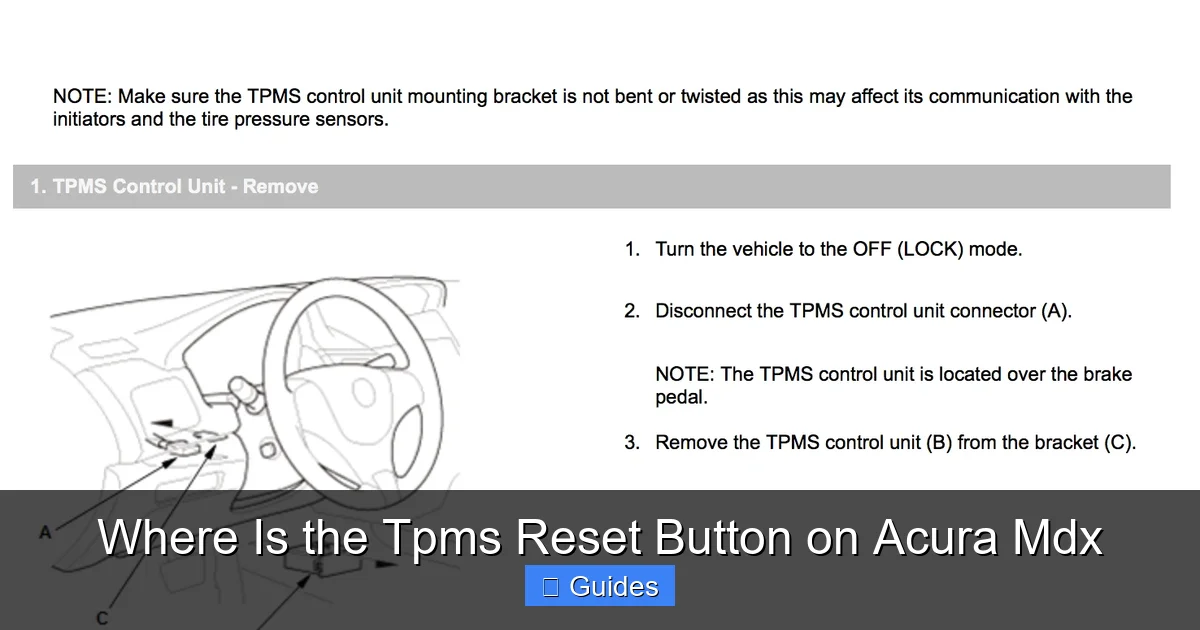
If you drive an Acura MDX from 2007 to 2013, you’re in luck—these models typically come with a physical TPMS reset button. This makes the process straightforward, though the exact location can vary slightly depending on the year and trim level.
Where to Find the Button
In most 2007–2013 Acura MDX models, the TPMS reset button is located under the dashboard, near the steering column. Specifically, look for a small, unmarked button (sometimes labeled “TPMS” or “Reset”) on the lower left side of the steering wheel, close to the fuse panel or knee bolster. It’s often tucked behind a plastic cover or panel, so you may need to crouch down and look up from beneath the dashboard.
Some owners report finding the button behind the glove compartment, but this is less common. If you don’t see it near the steering column, check the owner’s manual—it usually includes a diagram showing the exact location.
What the Button Looks Like
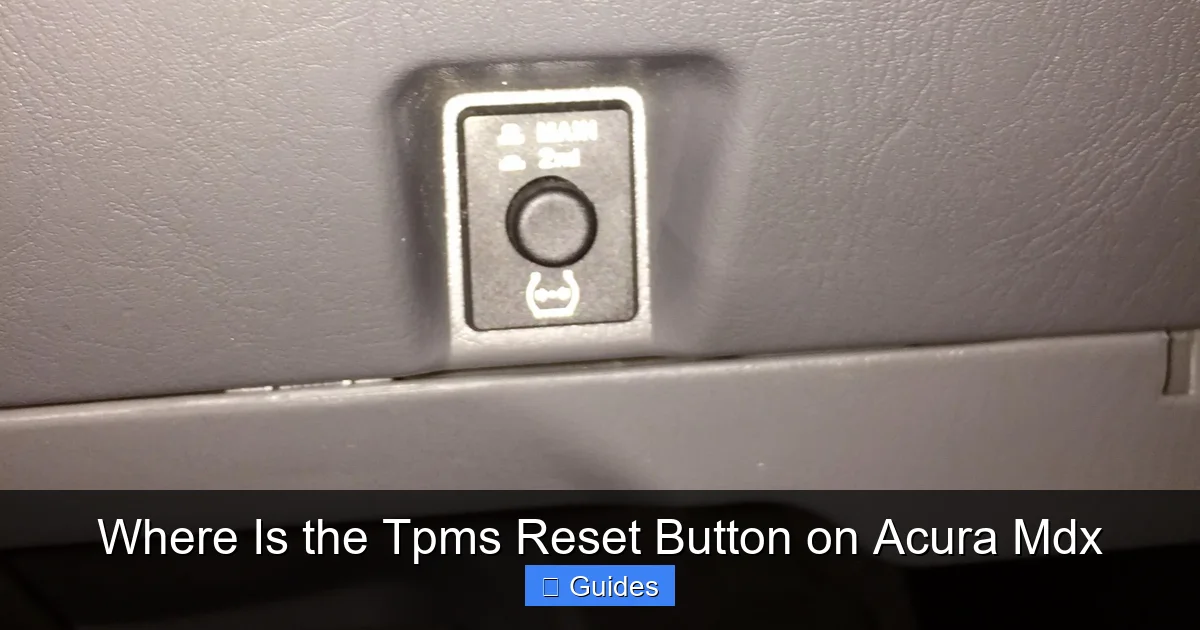
The reset button is typically a small, black or gray plastic button, about the size of a pencil eraser. It may be recessed into the dashboard trim to prevent accidental presses. In some cases, it’s connected to a wire harness and mounted on a small bracket. Don’t confuse it with other buttons like the hazard light switch or trunk release—those are usually larger and more prominently placed.
If you’re having trouble finding it, try turning on the ignition (without starting the engine) and listening for a faint click when you press suspected buttons. The TPMS reset button often makes a soft click when activated.
Step-by-Step Reset Process for 2007–2013 Models
Once you’ve located the button, follow these steps to reset the TPMS:
1. **Turn the ignition to the “ON” position** (do not start the engine).
2. **Press and hold the TPMS reset button** for about 3–5 seconds.
3. **Watch the TPMS warning light** on the dashboard. It should flash three times, then stay off.
4. **Release the button** and turn off the ignition.
5. **Start the engine** and drive the vehicle for at least 10–15 minutes at speeds above 20 mph. This allows the system to recalibrate and confirm the new pressure readings.
If the light doesn’t flash or stays on after driving, repeat the process. Sometimes it takes a couple of tries, especially if the tires were significantly underinflated before the reset.
Common Mistakes to Avoid
– **Not inflating tires first:** Always check and adjust tire pressure to the recommended PSI (found on the driver’s door jamb sticker) before resetting.
– **Pressing the button too briefly:** Hold it for at least 3 seconds to ensure the system registers the command.
– **Driving too slowly:** The system needs to detect wheel rotation at moderate speeds to complete the learning process.
Resetting TPMS on Newer Acura MDX Models (2014 and Later)
Visual guide about Where Is the Tpms Reset Button on Acura Mdx
Image source: clublexus.com
Starting with the 2014 model year, Acura phased out the physical TPMS reset button in favor of a digital menu system. This change aligns with the MDX’s upgraded infotainment and driver assistance features. While it might seem more complex at first, the menu-based reset is actually quite user-friendly once you know where to look.
Accessing the TPMS Reset Menu
To reset the TPMS on a 2014 or newer Acura MDX, you’ll use the touchscreen or control knob on the center console. Here’s how:
1. **Turn the ignition to “ON”** (or press the start button without pressing the brake).
2. **Navigate to the “Settings” menu** on the infotainment screen.
3. **Select “Vehicle”** from the settings options.
4. **Choose “TPMS” or “Tire Pressure”** (the exact wording may vary by model year).
5. **Tap “Reset” or “Initialize”** and confirm when prompted.
The system will then begin the reset process. You’ll usually see a message like “TPMS Reset in Progress” or “Please Drive to Complete Reset.”
Completing the Reset
After initiating the reset, you’ll need to drive the vehicle for about 10–15 minutes at speeds above 20 mph. This allows the sensors to transmit updated pressure data and the system to confirm that all tires are within the correct range. Once complete, the TPMS warning light should turn off.
If the light remains on, double-check your tire pressures and ensure they match the recommended PSI. Also, make sure you didn’t accidentally select “Calibrate” instead of “Reset”—some models have both options, and they serve different purposes.
Tips for a Smooth Digital Reset
– **Use the correct menu path:** If you can’t find the TPMS option, consult your owner’s manual—menu layouts can vary between model years.
– **Don’t rush the drive:** The system needs time to collect data from all four sensors. Avoid short trips or idling.
– **Check for software updates:** Occasionally, Acura releases updates that improve TPMS functionality. Visit a dealership if you’re experiencing persistent issues.
Troubleshooting Common TPMS Issues
Visual guide about Where Is the Tpms Reset Button on Acura Mdx
Image source: images.platforum.cloud
Even with the correct reset procedure, you might encounter problems. Here are some common issues and how to fix them.
TPMS Light Won’t Turn Off After Reset
If the warning light stays on after a reset, it could mean:
– One or more tires are still underinflated.
– A TPMS sensor is malfunctioning or has a dead battery.
– The system hasn’t completed the learning process.
First, recheck all tire pressures with a reliable gauge. If they’re correct, try driving longer or at higher speeds. If the light persists, use an OBD2 scanner with TPMS functionality to read sensor data. This can tell you which sensor is failing.
“TPMS Fault” or “System Error” Message
This usually indicates a communication problem between the sensors and the control module. Possible causes include:
– Damaged or corroded sensors
– Low battery in one or more sensors
– Interference from aftermarket wheels or electronics
In most cases, this requires professional diagnosis. An Acura technician can use specialized tools to test each sensor and replace faulty ones.
Intermittent or Flashing TPMS Light
A flashing TPMS light (as opposed to a steady one) often means the system has lost communication with one or more sensors. This could be due to:
– A sensor that’s been dislodged during tire service
– A weak signal caused by metal wheels or shielding
– Extreme temperatures affecting sensor performance
Try reseating the valve stems and ensuring all sensors are properly installed. If the issue continues, have the sensors inspected.
When to Visit a Professional
While most TPMS resets can be done at home, there are times when you should seek professional help:
– If the reset button is missing or inaccessible
– If the digital menu doesn’t offer a TPMS reset option
– If sensors need replacement (each can cost $50–$150)
– If you’re unsure about tire pressure specifications
Acura dealerships and certified mechanics have the tools and expertise to diagnose and fix complex TPMS issues. They can also perform a full system scan and update software if needed.
Maintaining Your TPMS for Long-Term Reliability
To keep your TPMS working smoothly:
– Check tire pressure monthly, especially before long trips
– Rotate tires every 5,000–7,500 miles to ensure even wear
– Replace TPMS sensors when replacing tires (most last 5–10 years)
– Avoid aftermarket wheels that may interfere with sensor signals
Regular maintenance not only extends the life of your sensors but also ensures your MDX remains safe and efficient on the road.
Conclusion
Knowing where the TPMS reset button is on your Acura MDX—and how to use it—is a valuable skill that enhances both safety and convenience. Whether you drive an older model with a physical button or a newer one with a digital menu, the process is straightforward once you understand the steps.
Remember to always check tire pressure before resetting, follow the correct procedure for your model year, and don’t hesitate to seek help if issues persist. With proper care, your TPMS will continue to protect you and your passengers for years to come.
Frequently Asked Questions
The TPMS reset button on a 2010 Acura MDX is typically located under the dashboard, near the steering column on the driver’s side. Look for a small, unmarked button close to the fuse panel or knee bolster.
How do I reset the TPMS on a 2016 Acura MDX?
On a 2016 Acura MDX, go to the “Settings” menu on the infotainment screen, select “Vehicle,” then “TPMS,” and choose “Reset.” Drive the vehicle for 10–15 minutes at speeds above 20 mph to complete the process.
Why won’t my TPMS light turn off after resetting?
The light may stay on if tires are still underinflated, a sensor is faulty, or the system hasn’t finished learning. Recheck pressures and drive longer. If it persists, have the sensors tested.
Yes, on newer MDX models (2014+), use the digital menu in the infotainment system. No physical button is needed.
How often should I reset my TPMS?
Reset the TPMS after tire rotations, replacements, or significant pressure changes (like seasonal temperature drops). There’s no need to reset it routinely if no changes have occurred.
Do TPMS sensors need to be replaced?
Yes, TPMS sensors have batteries that last 5–10 years. If a sensor fails or the battery dies, it must be replaced to maintain accurate monitoring.

At CarLegit, we believe information should be clear, factual, and genuinely helpful. That’s why every guide, review, and update on our website is created with care, research, and a strong focus on user experience.