
Resetting the oil change light on your Chrysler 200 is simple and takes just a few minutes—no mechanic required. This guide walks you through the exact steps for different model years, so you can clear that persistent reminder and keep your vehicle in top shape.
So, you’ve just changed the oil in your Chrysler 200—great job! But now, that little oil change light on your dashboard is still glowing like a stubborn firefly. It’s annoying, right? You know the oil’s fresh, but the car doesn’t. And until you reset that light, it’ll keep nagging you every time you start the engine.
Don’t worry—you’re not alone. Thousands of Chrysler 200 owners face this same issue after every oil change. The good news? Resetting the oil change light is easier than you think. No special tools, no trip to the dealership, and definitely no need to call a mechanic. With just a few simple steps, you can clear that reminder and get back to driving in peace.
In this guide, we’ll walk you through the exact process to reset the oil change light on your Chrysler 200—whether you drive a 2011 model or a 2017. We’ll cover the differences between model years, explain why the light comes on in the first place, and even share troubleshooting tips if the standard method doesn’t work. By the end, you’ll be a pro at handling this common dashboard annoyance.
In This Article
- 1 Key Takeaways
- 2 📑 Table of Contents
- 3 Why Does the Oil Change Light Come On?
- 4 Tools You’ll Need (Spoiler: It’s Just You and Your Car)
- 5 Step-by-Step Guide: Resetting the Oil Change Light (2011–2014 Models)
- 6 Step-by-Step Guide: Resetting the Oil Change Light (2015–2017 Models)
- 7 Troubleshooting: What If the Light Won’t Reset?
- 8 Tips to Avoid Future Issues
- 9 Why Resetting the Light Matters
- 10 Final Thoughts
- 11 Frequently Asked Questions
- 11.1 Can I reset the oil change light without starting the engine?
- 11.2 What if I have a push-button start instead of a key?
- 11.3 How often should I change the oil in my Chrysler 200?
- 11.4 Will resetting the light affect my warranty?
- 11.5 What if the light still won’t turn off after resetting?
- 11.6 Can I reset the light at a dealership or auto shop?
Key Takeaways
- Know your model year: The reset procedure varies slightly between 2011–2014 and 2015–2017 Chrysler 200 models.
- Use the ignition key, not the engine: You don’t need to start the car—just turn the key to the “ON” position.
- Press the gas pedal three times: This is the core step for most models—timing matters, so do it within five seconds.
- Watch for the light to flash or turn off: This confirms the reset was successful.
- Check your owner’s manual: Always refer to it for model-specific instructions or warnings.
- Don’t ignore regular oil changes: Resetting the light doesn’t replace actual maintenance—stick to your schedule.
- Try a battery reset if needed: If the standard method fails, disconnecting the battery for 10–15 minutes may help.
📑 Table of Contents
- Why Does the Oil Change Light Come On?
- Tools You’ll Need (Spoiler: It’s Just You and Your Car)
- Step-by-Step Guide: Resetting the Oil Change Light (2011–2014 Models)
- Step-by-Step Guide: Resetting the Oil Change Light (2015–2017 Models)
- Troubleshooting: What If the Light Won’t Reset?
- Tips to Avoid Future Issues
- Why Resetting the Light Matters
- Final Thoughts
Why Does the Oil Change Light Come On?
Before we dive into the reset steps, let’s talk about why that light appears in the first place. The oil change light on your Chrysler 200 isn’t just a random warning—it’s part of the vehicle’s onboard maintenance reminder system. This system tracks your driving habits, mileage, and engine conditions to estimate when your next oil change is due.
Most Chrysler 200 models use a time- and mileage-based algorithm. For example, the system might trigger the light after 7,500 miles or 12 months—whichever comes first. Some newer models even factor in things like short trips, extreme temperatures, and heavy loads, which can degrade oil faster.
When the light comes on, it’s the car’s way of saying, “Hey, it’s time to check your oil and possibly change it.” But here’s the thing: once you’ve actually changed the oil, the system doesn’t automatically know. That’s why you need to manually reset the light. It’s like telling your car, “I’ve done the job—you can stop reminding me now.”
Ignoring the light won’t harm your engine if the oil is truly fresh, but it can be distracting. Plus, if you ever sell the car, a lit maintenance light might make buyers think the vehicle hasn’t been well cared for. So, resetting it isn’t just about comfort—it’s about maintaining your car’s value and your peace of mind.
Tools You’ll Need (Spoiler: It’s Just You and Your Car)

Visual guide about How to Reset Oil Change Light on Chrysler 200
Image source: oilreset.com
Here’s the best part: you don’t need any special tools to reset the oil change light on your Chrysler 200. No scan tools, no diagnostic machines, not even a screwdriver. All you need is:
– Your car key
– About 2–3 minutes of free time
– A quiet moment (so you can focus on the steps)
That’s it. The entire process uses the vehicle’s built-in systems and simple pedal or button actions. It’s designed to be user-friendly, so even if you’re not a car expert, you can handle it with confidence.
One thing to note: make sure your car is parked on a level surface and the engine is off before you begin. You don’t want to accidentally shift into gear or start the engine during the reset. Safety first!
Also, if your Chrysler 200 has a push-button start instead of a traditional key, don’t worry—the process is nearly identical. We’ll cover that in the next section.
Step-by-Step Guide: Resetting the Oil Change Light (2011–2014 Models)
Visual guide about How to Reset Oil Change Light on Chrysler 200
Image source: oilreset.com
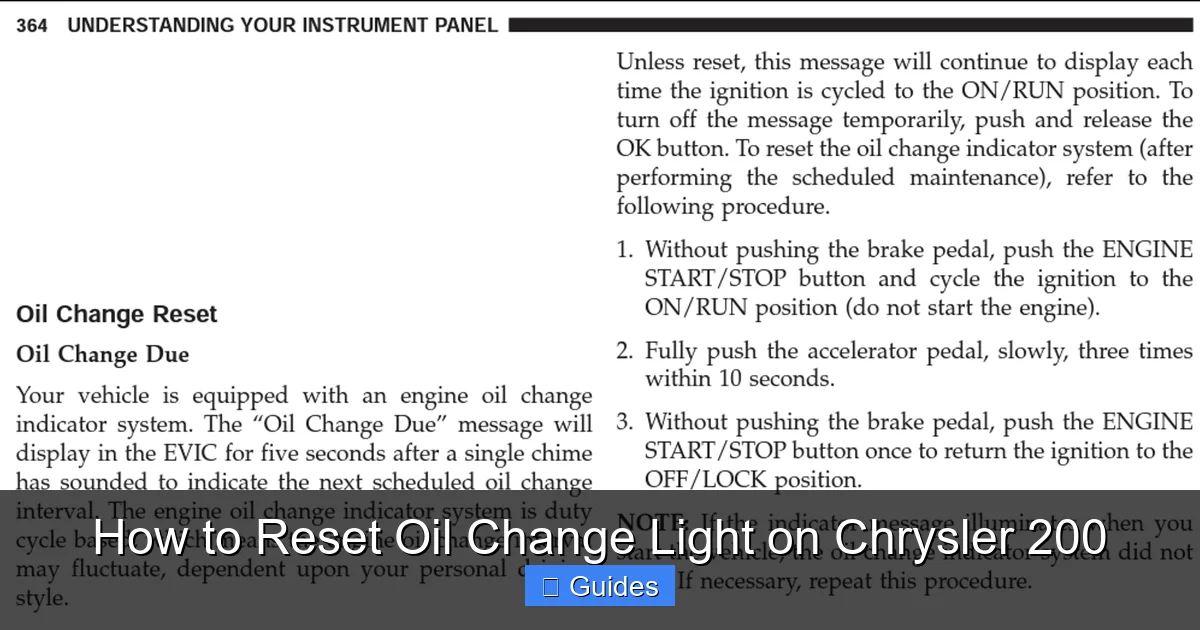
If you drive a Chrysler 200 from 2011 to 2014, here’s how to reset the oil change light. This method uses the gas pedal and ignition switch—no dashboard buttons required.
Step 1: Turn the Ignition to “ON”
Insert your key into the ignition and turn it to the “ON” position. Do not start the engine—just turn it far enough that the dashboard lights up. You should see all the warning lights briefly illuminate, including the oil change light.
If your car has a push-button start, press the “Start” button twice without pressing the brake pedal. This will power up the electronics without cranking the engine.
Step 2: Press the Gas Pedal Three Times
With the ignition on and the engine off, press the gas pedal all the way to the floor—three times—within five seconds. Make sure each press is firm and complete. You don’t need to hold it down; just tap it fully three times in quick succession.
Timing is important here. If you take too long between presses, the system won’t register the sequence. Try to do all three presses within a 3–5 second window.
Step 3: Watch for the Light to Flash
After the third press, watch the oil change light on your dashboard. It should begin to flash or blink. This is your confirmation that the reset process has started.
In some cases, the light may turn off immediately. Either way, it means the system has acknowledged the reset command.
Step 4: Turn Off the Ignition
Once the light flashes or turns off, turn the ignition back to the “OFF” position. Remove the key (or press the “Start” button once to power down).
Step 5: Test It Out
Now, start your car normally. The oil change light should be off. If it comes back on after a few seconds, don’t panic—it might just be doing a quick system check. But if it stays on, you may need to repeat the process or try an alternative method.
Step-by-Step Guide: Resetting the Oil Change Light (2015–2017 Models)
Visual guide about How to Reset Oil Change Light on Chrysler 200
Image source: oilreset.com
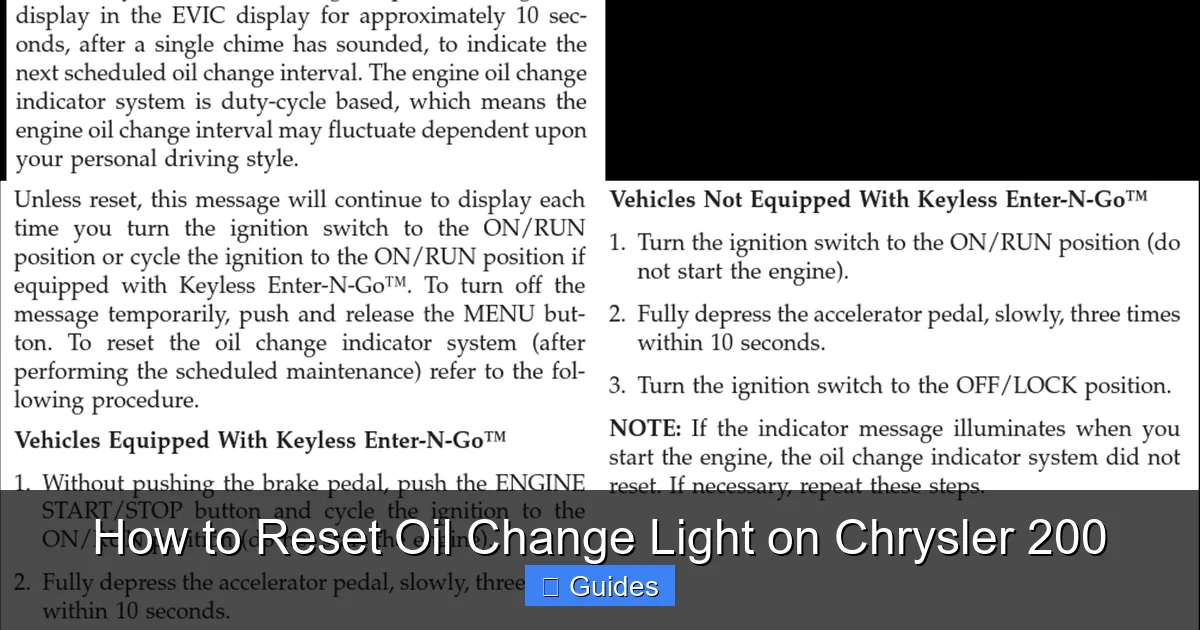
For Chrysler 200 models from 2015 to 2017, the process is slightly different. These vehicles often use a button-based system through the instrument cluster or Uconnect display. Here’s how to do it.
Step 1: Turn the Ignition to “ON”
Just like before, turn the key to the “ON” position without starting the engine. For push-button models, press the “Start” button twice (no brake pedal).
Use the steering wheel controls or the buttons on the instrument cluster to access the vehicle settings. Look for a menu labeled “Vehicle Info,” “Settings,” or “Maintenance.”
On some models, you may need to press and hold the “Trip” button on the dashboard until the menu appears.
Step 3: Find the Oil Life or Maintenance Option
Scroll through the menu until you find “Oil Life,” “Oil Change,” or “Maintenance Reset.” This option allows you to reset the oil change reminder.
Step 4: Confirm the Reset
Select the reset option and confirm when prompted. The system may ask, “Reset oil life?” or “Clear maintenance reminder?” Use the arrow buttons to select “Yes” or “Reset.”
Once confirmed, the oil change light should turn off or reset to 100% oil life.
Step 5: Turn Off the Ignition
Power down the vehicle and start it normally. The light should remain off.
Troubleshooting: What If the Light Won’t Reset?
Sometimes, the standard reset method doesn’t work. Don’t worry—it happens. Here are a few common issues and how to fix them.
The Light Comes Back On Immediately
If the oil change light resets but comes back on after starting the car, it could mean the system didn’t fully register the reset. Try repeating the process—sometimes it takes two or three attempts.
Make sure you’re following the steps exactly, especially the timing on the gas pedal presses. Rushing or pausing too long can break the sequence.
The Dashboard Menu Isn’t Responding
On 2015–2017 models, if the settings menu won’t open or the buttons feel unresponsive, try turning the ignition off and on again. Sometimes the system just needs a quick reboot.
Also, check that your battery isn’t low. A weak battery can cause electronic glitches, including unresponsive dashboards.
The Light Still Won’t Turn Off
If nothing works, try a battery reset. Turn off the car, open the hood, and disconnect the negative terminal of the battery. Wait 10–15 minutes, then reconnect it. This resets the car’s computer systems and often clears stubborn warning lights.
After reconnecting, start the car and check if the light is off. If it is, great! If not, it might be time to visit a mechanic—there could be an actual oil system issue, like low oil pressure or a faulty sensor.
Tips to Avoid Future Issues
Now that you’ve reset the light, here are a few tips to keep your Chrysler 200 running smoothly and avoid repeat problems.
Stick to a Regular Oil Change Schedule
Even though the light is off, don’t forget to change your oil on time. Most experts recommend every 5,000 to 7,500 miles, depending on driving conditions. Use high-quality oil and filters to extend engine life.
Keep a Maintenance Log
Write down when you changed the oil and reset the light. This helps you stay on track and proves to future buyers that the car was well maintained.
Check Your Owner’s Manual
Your Chrysler 200’s manual has the most accurate info for your specific model. If you’ve misplaced it, you can usually download a free PDF from the Chrysler website.
Don’t Ignore Other Warning Lights
While the oil change light is usually harmless once reset, other dashboard lights—like the check engine light—could signal serious problems. Address them promptly.
Why Resetting the Light Matters
You might be thinking, “It’s just a light—why bother?” But resetting the oil change light is about more than just aesthetics. It’s a small act of car care that pays off in big ways.
First, it keeps your dashboard clean and distraction-free. A cluttered dashboard can make driving stressful, especially on long trips. Clearing unnecessary warnings helps you focus on the road.
Second, it maintains your car’s resale value. Buyers look for well-maintained vehicles, and a lit maintenance light can raise red flags—even if the car is in great shape.
Third, it reinforces good habits. Every time you reset the light, you’re reminded that you’ve taken care of your car. That mindset leads to better overall maintenance—like checking tire pressure, topping off fluids, and scheduling regular inspections.
Finally, it saves you money. By staying on top of oil changes and resetting the reminder, you avoid costly engine repairs down the line. Clean oil reduces friction, prevents overheating, and extends engine life.
Final Thoughts
Resetting the oil change light on your Chrysler 200 is a quick, easy task that every owner should know how to do. Whether you drive a 2011 model with a gas pedal reset or a 2017 with a digital menu, the process takes just a few minutes and requires no special tools.
Remember: the light is there to help you, not hassle you. Once you’ve changed the oil, resetting it is the final step in completing your maintenance routine. It’s a small gesture that shows you care about your vehicle—and that makes all the difference.
So the next time that little light pops up, don’t groan. Smile, grab your keys, and reset it like a pro. Your car—and your peace of mind—will thank you.
Frequently Asked Questions
Can I reset the oil change light without starting the engine?
Yes, you can. In fact, you should never start the engine during the reset process. Just turn the ignition to the “ON” position—this powers the dashboard without cranking the motor.
No problem. For push-button models, press the “Start” button twice without pressing the brake pedal. This turns on the electronics without starting the engine, allowing you to reset the light.
How often should I change the oil in my Chrysler 200?
Most experts recommend every 5,000 to 7,500 miles, depending on driving conditions. Check your owner’s manual for the exact interval recommended for your model year.
Will resetting the light affect my warranty?
No, resetting the oil change light does not affect your warranty. It’s a standard maintenance procedure and is encouraged to keep your vehicle in good condition.
What if the light still won’t turn off after resetting?
Try repeating the process or perform a battery reset by disconnecting the negative terminal for 10–15 minutes. If the light persists, there may be an underlying issue—consult a mechanic.
Can I reset the light at a dealership or auto shop?
Yes, but it’s unnecessary. The process is simple and can be done at home in under five minutes. Save yourself the trip and do it yourself!

At CarLegit, we believe information should be clear, factual, and genuinely helpful. That’s why every guide, review, and update on our website is created with care, research, and a strong focus on user experience.