
Replacing the battery in your Buick Encore key fob is a quick and simple DIY task that takes less than 10 minutes. With just a few basic tools and a new CR2032 battery, you can restore full functionality to your key fob without visiting a dealership.
In This Article
- 1 Key Takeaways
- 2 📑 Table of Contents
- 3 Why Your Buick Encore Key Fob Battery Needs Replacing
- 4 What You’ll Need to Replace the Battery
- 5 Step-by-Step Guide to Replacing the Battery
- 6 Testing Your Key Fob After Battery Replacement
- 7 Common Mistakes to Avoid
- 8 When to Seek Professional Help
- 9 Tips for Extending Key Fob Battery Life
- 10 Conclusion
- 11 Frequently Asked Questions
- 11.1 What type of battery does a Buick Encore key fob use?
- 11.2 Do I need to reprogram the key fob after replacing the battery?
- 11.3 How long does a key fob battery last?
- 11.4 Can I use a different battery if I don’t have a CR2032?
- 11.5 What should I do if my key fob still doesn’t work after battery replacement?
- 11.6 Where can I recycle my old key fob battery?
Key Takeaways
- Use the correct battery type: The Buick Encore key fob requires a CR2032 3-volt lithium coin cell battery. Using the wrong type can damage the fob or cause it to malfunction.
- No special tools needed: A small flathead screwdriver or a plastic prying tool is all you need to open the fob safely without scratching or cracking the casing.
- Handle the circuit board carefully: Avoid touching the internal components with bare fingers to prevent static discharge or oil transfer that could affect performance.
- Test the fob after replacement: Always test all functions—lock, unlock, trunk release, and panic button—to ensure the new battery is working properly.
- Replace batteries proactively: If your key fob range decreases or buttons become unresponsive, it’s likely time for a battery change—don’t wait until it stops working entirely.
- Keep the old battery safe: Dispose of used batteries responsibly at a local recycling center or auto parts store to protect the environment.
- No programming required: Unlike some vehicle key fobs, the Buick Encore does not need to be reprogrammed after a battery replacement—just snap it back together and go.
📑 Table of Contents
Why Your Buick Encore Key Fob Battery Needs Replacing
Your Buick Encore key fob is one of those small but essential pieces of modern car technology that you probably don’t think about—until it stops working. Whether you’re standing in the parking lot on a cold morning or rushing to get home after a long day, a dead key fob can turn a simple task like unlocking your car into a frustrating ordeal. The good news? Replacing the battery in your Buick Encore key fob is one of the easiest and most cost-effective DIY fixes you can do at home.
Most Buick Encore key fobs use a CR2032 lithium coin cell battery, which typically lasts between 3 to 5 years depending on usage. Over time, the battery loses its charge, leading to weaker signal strength, delayed responses, or complete failure of the remote functions. You might notice that you have to stand closer to the car for the fob to work, or that pressing the buttons multiple times is necessary to get a response. These are clear signs that the battery is nearing the end of its life.
Rather than paying $50 or more at a dealership or locksmith for a simple battery swap, you can do it yourself in under 10 minutes with minimal tools. Not only does this save you money, but it also gives you the confidence to handle small maintenance tasks on your own. Plus, knowing how to replace the battery means you’re never stuck waiting for help when your fob suddenly dies at the worst possible moment.
What You’ll Need to Replace the Battery
Before you begin, it’s important to gather the right tools and materials. The process is straightforward, but having everything ready will make the job smoother and reduce the risk of damaging your key fob.
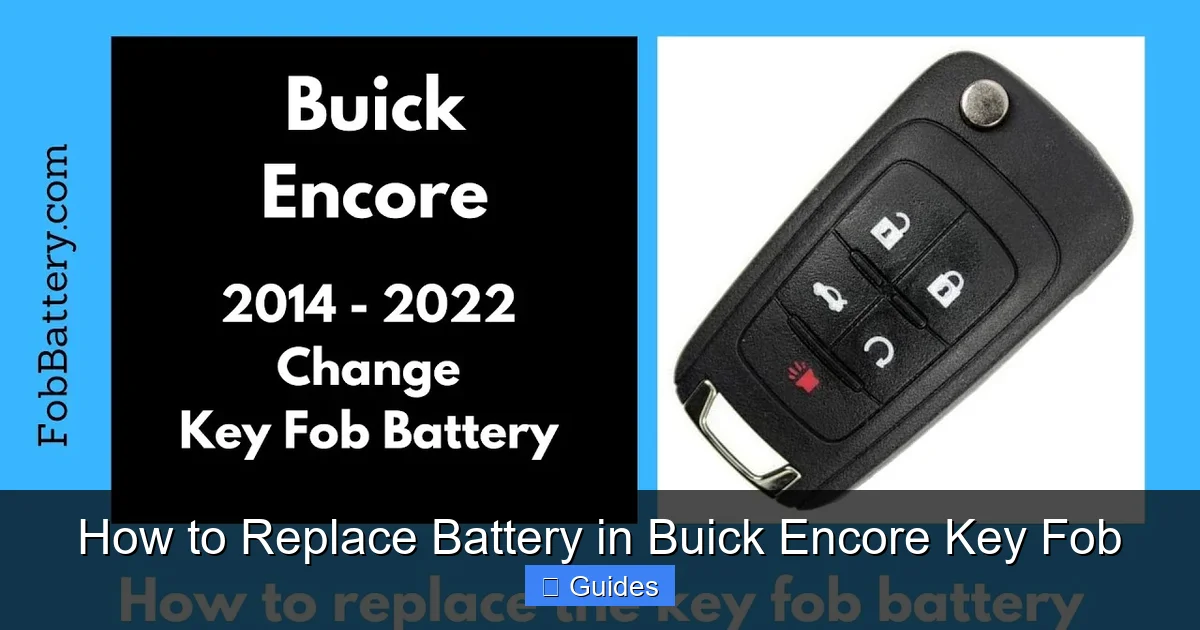
Visual guide about How to Replace Battery in Buick Encore Key Fob
Image source: fobbattery.com
The Right Battery: CR2032
The most critical component is the battery itself. The Buick Encore key fob uses a CR2032 3-volt lithium coin cell battery. This is a common battery type found in watches, calculators, and other small electronics, so it’s easy to find at most drugstores, supermarkets, or auto parts stores. Make sure to check the packaging to confirm it’s a CR2032—don’t confuse it with similar-looking batteries like the CR2025 or CR2016, which are thinner and won’t fit properly.
Tools for Opening the Fob
You don’t need a full toolbox for this job. A small flathead screwdriver (about 3mm wide) or a plastic prying tool (often included with phone repair kits) is ideal for separating the two halves of the key fob. Avoid using metal tools like knives or large screwdrivers, as they can scratch the plastic or damage the internal components. If you don’t have a prying tool, a thin plastic card (like an old gift card) can work in a pinch.
Clean Workspace and Good Lighting
Choose a clean, well-lit area to work in—preferably a table or countertop where you can lay out your tools and the fob parts. This helps prevent losing small components like the battery or screws. A soft cloth or paper towel underneath can also protect the fob from scratches and provide a non-slip surface.
Optional: Tweezers and Magnifying Glass
While not required, tweezers can be helpful for handling the small battery, especially if you have shaky hands or wear gloves. A magnifying glass or using your phone’s camera zoom can also help you see the tiny contacts and alignment points inside the fob, ensuring everything goes back together correctly.
Step-by-Step Guide to Replacing the Battery
Now that you’ve gathered your supplies, it’s time to get started. Follow these detailed steps to safely and effectively replace the battery in your Buick Encore key fob.

Visual guide about How to Replace Battery in Buick Encore Key Fob
Image source: noahthoughts.net
Step 1: Locate the Seam and Release Button
Hold your key fob with the Buick logo facing up. Look along the edges for a thin seam that runs around the perimeter of the fob. This is where the two plastic halves are joined. Near the top or side of the fob, you’ll notice a small indentation or a tiny button—this is the release mechanism. On most Buick Encore models, it’s a small rectangular button located on the side of the fob, just below the key ring loop.
Step 2: Press the Release Button and Slide the Key
Use your thumb or a fingernail to press and hold the release button. While holding it down, gently pull the physical key (the metal blade used for manual entry) out of the fob. The key should slide out smoothly. Set the key aside in a safe place—don’t lose it! This step is crucial because it gives you access to the battery compartment and prevents damage to the internal mechanism.
Step 3: Open the Fob Casing
With the key removed, you’ll now see a small gap between the two halves of the fob. Insert your flathead screwdriver or plastic prying tool into this gap near the release button. Gently twist the tool slightly to create a small opening. Once you have a gap, carefully work your way around the edge of the fob, applying light pressure to separate the two halves. Go slowly—don’t force it. The plastic clips can break if you apply too much pressure.
Step 4: Remove the Old Battery
Once the fob is open, you’ll see the circular battery seated in a small compartment. The battery is usually held in place by a metal clip or a plastic ring. Use your screwdriver or tweezers to gently lift the edge of the battery. It should pop out easily. Take note of how the battery is positioned—most CR2032 batteries have the positive (+) side facing up, but double-check the markings inside the compartment to be sure.
Step 5: Insert the New Battery
Take your new CR2032 battery and place it into the compartment with the correct orientation—positive side up unless otherwise indicated. Press it down gently until it sits securely in place. Make sure it’s flush with the surrounding plastic and doesn’t wobble. A loose battery can cause intermittent connectivity issues.
Step 6: Reassemble the Fob
Carefully align the two halves of the fob and press them together. Start at one end and work your way around, ensuring all the clips snap back into place. You should hear a series of soft clicks as the casing seals. Avoid using excessive force—if it doesn’t close easily, double-check that the battery and internal components are properly seated.
Step 7: Reinsert the Physical Key
Slide the metal key back into its slot until it clicks into place. Make sure it’s fully inserted and secure. The key should not wobble or feel loose.
Testing Your Key Fob After Battery Replacement
After reassembling your key fob, it’s essential to test all its functions to ensure everything is working correctly. This step confirms that the new battery is properly installed and that no internal damage occurred during the process.

Visual guide about How to Replace Battery in Buick Encore Key Fob
Image source: katynel.com
Test All Remote Functions
Stand within 10–15 feet of your Buick Encore and press each button on the fob:
- Lock: Press the lock button and listen for the doors to lock. The hazard lights may flash once as confirmation.
- Unlock: Press the unlock button. The doors should unlock, and the hazard lights may flash twice.
- Trunk Release: Press and hold the trunk button (usually marked with an icon of an open trunk). The trunk should pop open.
- Panic Button: Press the red panic button (often labeled with a horn icon). The horn should sound and the lights should flash.
If any function doesn’t work, double-check the battery orientation and ensure the fob is fully closed. Sometimes, a loose connection or misaligned clip can prevent proper operation.
Check Keyless Entry Range
Walk around your vehicle and test the keyless entry feature. The fob should work from at least 20–30 feet away under normal conditions. If the range is significantly reduced, the battery may be defective or the fob may have an internal issue. Try replacing the battery again with a fresh one from a different pack.
Use the Physical Key as a Backup
In rare cases, the fob may not work even with a new battery. Always keep the physical key accessible. You can use it to manually unlock the driver’s door and start the car using the ignition button (if your Encore has push-to-start). Once inside, the car should recognize the key fob and allow normal operation.
Common Mistakes to Avoid
Even though replacing a key fob battery is simple, a few common mistakes can lead to frustration or damage. Being aware of these pitfalls can save you time and prevent costly repairs.
Using the Wrong Battery
One of the most frequent errors is using a battery that looks similar but isn’t the correct type. For example, a CR2025 is thinner than a CR2032 and may not make proper contact, leading to intermittent function. Always verify the battery model number before purchasing and installing.
Forcing the Fob Open
Applying too much pressure when prying open the fob can crack the plastic or break the internal clips. If the fob doesn’t open easily, double-check that you’ve removed the physical key and are prying at the correct seam. Patience is key—gentle, consistent pressure works better than force.
Touching the Circuit Board
The internal circuit board is sensitive to static electricity and oils from your skin. Avoid touching it with bare fingers. If you must handle it, use tweezers or wear anti-static gloves. Even a small amount of oil can interfere with electrical connections over time.
Reassembling Incorrectly
Make sure all components are aligned before snapping the fob back together. Misaligned parts can prevent the fob from closing properly or damage the battery contacts. If the fob feels loose or doesn’t click shut, disassemble it and try again.
Ignoring the Physical Key
Some people forget to reinsert the physical key after replacing the battery. This can be a problem if the fob fails again in the future. Always keep the key in the fob and test it to ensure it slides in and out smoothly.
When to Seek Professional Help
While most Buick Encore owners can replace the key fob battery themselves, there are situations where professional assistance may be necessary.
Damaged or Cracked Fob
If your key fob is cracked, water-damaged, or shows signs of wear, replacing the battery may not solve the problem. Internal corrosion or broken circuits could require a full fob replacement. In such cases, visit a Buick dealership or certified locksmith.
Fob Still Doesn’t Work After Battery Replacement
If you’ve followed all steps correctly and the fob still doesn’t function, the issue may be more complex. It could be a faulty antenna, damaged circuit board, or a problem with the car’s receiver. A professional diagnostic tool may be needed to pinpoint the issue.
Lost or Broken Physical Key
If you’ve lost the physical key or it’s broken inside the fob, you’ll need a replacement key cut and programmed. This typically requires visiting a dealership or automotive locksmith with your vehicle’s VIN and proof of ownership.
Tips for Extending Key Fob Battery Life
Once you’ve replaced the battery, there are several ways to maximize its lifespan and keep your key fob working reliably for years.
Avoid Extreme Temperatures
Leaving your key fob in a hot car or exposing it to freezing temperatures can degrade the battery faster. Store it in a cool, dry place when not in use, especially during summer or winter months.
Minimize Unnecessary Use
Pressing the buttons repeatedly when not needed (like testing the panic button) drains the battery. Use the fob only when necessary, and avoid holding buttons down longer than required.
Keep It Clean
Dirt, dust, and moisture can accumulate in the fob and affect performance. Wipe the exterior with a dry cloth regularly, and avoid exposing it to water or chemicals.
Use a Key Fob Cover
A silicone or rubber key fob cover can protect against drops, scratches, and moisture. It also reduces the chance of accidentally pressing buttons in your pocket or purse.
Replace Batteries Proactively
Instead of waiting for the fob to die completely, consider replacing the battery every 3–4 years as part of regular maintenance. This prevents unexpected failures and ensures consistent performance.
Conclusion
Replacing the battery in your Buick Encore key fob is a simple, rewarding DIY task that saves time, money, and frustration. With just a CR2032 battery and a small tool, you can restore full functionality to your fob in minutes. By following the step-by-step guide, avoiding common mistakes, and testing the fob afterward, you’ll ensure a smooth and successful replacement.
Remember, your key fob is more than just a remote—it’s your gateway to convenience and security. Taking a few minutes to maintain it properly can prevent future headaches and keep your Buick Encore experience seamless. So the next time your fob starts acting up, don’t panic. Grab a new battery, follow these instructions, and get back on the road with confidence.
Frequently Asked Questions
What type of battery does a Buick Encore key fob use?
The Buick Encore key fob uses a CR2032 3-volt lithium coin cell battery. This is a standard battery type available at most stores. Always confirm the model number before purchasing.
Do I need to reprogram the key fob after replacing the battery?
No, the Buick Encore key fob does not require reprogramming after a battery replacement. Simply replace the battery, reassemble the fob, and it should work normally.
How long does a key fob battery last?
A typical CR2032 battery in a Buick Encore key fob lasts between 3 to 5 years, depending on usage frequency and environmental conditions.
Can I use a different battery if I don’t have a CR2032?
No, using a different battery type (like CR2025 or DL2032) may not fit properly or provide the correct voltage, which can damage the fob or cause it to malfunction.
What should I do if my key fob still doesn’t work after battery replacement?
First, double-check the battery orientation and ensure the fob is fully closed. If it still doesn’t work, the fob may be damaged internally, and you should consult a Buick dealer or locksmith.
Where can I recycle my old key fob battery?
Most auto parts stores, hardware stores, and recycling centers accept used lithium batteries for safe disposal. Never throw them in the regular trash.

At CarLegit, we believe information should be clear, factual, and genuinely helpful. That’s why every guide, review, and update on our website is created with care, research, and a strong focus on user experience.