
Adjusting the side mirrors in your Tesla Model 3 is simple but essential for safe driving. This guide walks you through manual and automatic mirror adjustments, memory settings, and best practices to eliminate blind spots and enhance visibility.
In This Article
- 1 Key Takeaways
- 2 📑 Table of Contents
- 3 Why Proper Side Mirror Adjustment Matters in the Tesla Model 3
- 4 Understanding the Tesla Model 3 Side Mirror Controls
- 5 Step-by-Step Guide to Adjusting Your Tesla Model 3 Side Mirrors
- 6 Using Driver Profiles to Save Mirror Positions
- 7 Advanced Mirror Features: Auto-Folding and More
- 8 Best Practices for Safe Mirror Use
- 9 Troubleshooting Common Mirror Issues
- 10 Conclusion: Master Your Tesla Model 3 Mirrors for Safer Driving
- 11 Frequently Asked Questions
- 11.1 Can I adjust the side mirrors while driving?
- 11.2 Why won’t my Tesla Model 3 mirrors fold automatically?
- 11.3 Do the side mirrors heat up in cold weather?
- 11.4 How do I reset my mirror positions after a software update?
- 11.5 Can I adjust the mirrors without the touchscreen?
- 11.6 What’s the best way to eliminate blind spots?
Key Takeaways
- Understanding How To Adjust Side Mirrors In Tesla Model 3: Provides essential knowledge
📑 Table of Contents
- Why Proper Side Mirror Adjustment Matters in the Tesla Model 3
- Understanding the Tesla Model 3 Side Mirror Controls
- Step-by-Step Guide to Adjusting Your Tesla Model 3 Side Mirrors
- Using Driver Profiles to Save Mirror Positions
- Advanced Mirror Features: Auto-Folding and More
- Best Practices for Safe Mirror Use
- Troubleshooting Common Mirror Issues
- Conclusion: Master Your Tesla Model 3 Mirrors for Safer Driving
Why Proper Side Mirror Adjustment Matters in the Tesla Model 3
Driving a Tesla Model 3 is a smooth, high-tech experience—quiet, responsive, and packed with intelligent features. But even with all the advanced driver assistance systems, one of the most fundamental aspects of safe driving remains the same: proper visibility. And that starts with correctly adjusted side mirrors.
You might think adjusting side mirrors is a no-brainer. After all, every car has them, and most drivers do it instinctively. But the Tesla Model 3, with its minimalist interior and reliance on digital controls, approaches mirror adjustment a bit differently than traditional vehicles. Whether you’re a new Tesla owner or upgrading from an older Model 3, understanding how to fine-tune your side mirrors can dramatically improve your driving safety and comfort.
The side mirrors on the Tesla Model 3 are electronically controlled, sleek, and integrated into the car’s overall design. They’re not just for checking what’s behind you—they’re part of a broader safety ecosystem that includes blind spot monitoring, rear cross-traffic alerts, and the rearview camera. But none of those features work as effectively if your mirrors aren’t positioned correctly. A poorly adjusted mirror can create dangerous blind spots, reduce your awareness of nearby vehicles, and even contribute to accidents during lane changes or merging.
In this guide, we’ll walk you through everything you need to know about adjusting the side mirrors in your Tesla Model 3—from basic manual adjustments to advanced settings like memory profiles and auto-folding. We’ll also share expert tips on positioning for optimal visibility and how to integrate mirror use with Tesla’s suite of safety technologies. By the end, you’ll have the confidence to set up your mirrors perfectly every time you get behind the wheel.
Understanding the Tesla Model 3 Side Mirror Controls
Visual guide about How to Adjust Side Mirrors in Tesla Model 3
Image source: i.ytimg.com
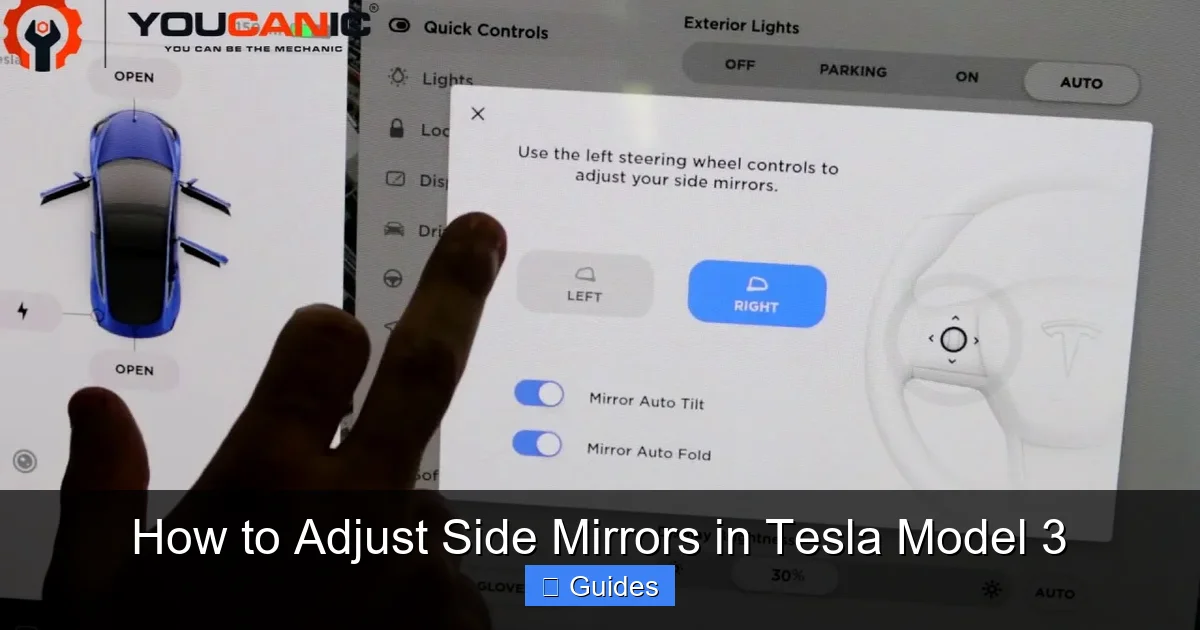
Before you start adjusting your mirrors, it’s important to understand how the Tesla Model 3 controls them. Unlike older cars with manual levers or knobs, the Model 3 uses electronic controls accessed either through the turn signal stalk or the central touchscreen. This digital approach offers precision and convenience, but it can be confusing at first if you’re used to traditional systems.
Adjusting Mirrors Using the Turn Signal Stalk
The most common way to adjust your side mirrors is by using the turn signal stalk located on the left side of the steering column. Here’s how it works:
1. **Select the mirror you want to adjust:** Push the stalk forward or pull it back to choose the left or right mirror. A small icon will appear on the touchscreen indicating which mirror is selected.
2. **Use the stalk to move the mirror:** Once selected, move the stalk up, down, left, or right to adjust the mirror’s angle. The mirror will move in real time as you manipulate the stalk.
3. **Deselect when done:** Once you’re satisfied with the position, simply stop moving the stalk. The mirror will remain in place.
This method is quick and intuitive, especially when you’re parked and want to make fine adjustments. It’s also useful when you’re driving slowly and need to tweak your mirrors on the go—though we always recommend making major adjustments when the car is stationary for safety.
Adjusting Mirrors via the Touchscreen
If you prefer using the central display, Tesla also allows mirror adjustments through the touchscreen interface. This method is particularly helpful if you’re setting up your mirrors for the first time or fine-tuning them after a software update.
To adjust mirrors using the touchscreen:
1. Tap the **Controls** icon (looks like a car) in the bottom-left corner of the screen.
2. Select **Mirrors** from the menu.
3. Choose either **Left Mirror** or **Right Mirror**.
4. Use the on-screen arrows to adjust the mirror angle.
5. Tap **Done** when finished.
The touchscreen method gives you a visual confirmation of which mirror is being adjusted and allows for very precise movements. It’s also the only way to access advanced mirror settings like auto-folding and memory profiles, which we’ll cover in detail later.
Mirror Adjustment Indicators
Whenever you adjust a mirror—whether using the stalk or touchscreen—a small icon appears on the touchscreen showing which mirror is active. This visual cue helps prevent confusion, especially if you’re adjusting both mirrors in quick succession. The icon disappears once you stop making adjustments, confirming that the mirror is locked in place.
It’s worth noting that the Tesla Model 3 does not have physical buttons or switches for mirror adjustment on the door panels, unlike many other vehicles. Everything is handled electronically, which keeps the interior clean and minimalist but requires a bit of familiarization for new users.
Step-by-Step Guide to Adjusting Your Tesla Model 3 Side Mirrors
Visual guide about How to Adjust Side Mirrors in Tesla Model 3
Image source: koala.sh
Now that you understand the controls, let’s walk through the actual process of adjusting your side mirrors for optimal visibility and safety. Whether you’re setting them up for the first time or recalibrating after a service visit, these steps will ensure your mirrors are positioned correctly.
Step 1: Park in a Safe, Level Location
Always adjust your mirrors when the car is parked and on a level surface. This ensures accuracy and prevents accidental movement while driving. Turn on the car (or put it in accessory mode) so the electronics are active, but keep the vehicle in Park.
Step 2: Sit in Your Normal Driving Position
Adjust your seat, steering wheel, and headrest to your preferred driving position before touching the mirrors. Your mirror alignment should match your posture—if you slouch or sit too far forward, your mirrors won’t provide the correct field of view.
Step 3: Adjust the Driver’s Side Mirror
Start with the left (driver’s side) mirror. Use the turn signal stalk or touchscreen to select the left mirror. Then:
– Tilt the mirror so you can just barely see the edge of your own car in the mirror.
– The goal is to see the lane next to you and any vehicles approaching from behind.
– Avoid positioning the mirror so that your own car takes up too much of the view—this creates a blind spot.
A good rule of thumb: when a car passes you and disappears from your side mirror, it should immediately appear in your peripheral vision or rearview mirror. This overlap minimizes blind spots.
Step 4: Adjust the Passenger Side Mirror
Repeat the process for the right (passenger side) mirror. Select it using the stalk or touchscreen, then adjust the angle so:
– You can see the adjacent lane clearly.
– Your own car is only faintly visible in the corner of the mirror.
– The horizon is centered, giving you a balanced view of the road behind.
Some drivers prefer a slightly more outward angle on the passenger side to compensate for the longer distance from the driver’s seat. Experiment to find what feels most natural.
Step 5: Fine-Tune for Blind Spot Coverage
Once both mirrors are roughly positioned, test them by driving on a quiet road. Change lanes slowly and observe how vehicles move from your side mirrors into your peripheral vision. If you notice a gap—where a car disappears from the mirror but doesn’t immediately appear in your side view—adjust the mirror outward slightly.
Remember: the goal isn’t to eliminate your car from the mirror entirely (some visibility is helpful), but to maximize coverage of the adjacent lanes.
Step 6: Save Your Settings (Optional)
If you’ve set up driver profiles (more on that below), your mirror positions can be saved and recalled automatically. This is especially useful if multiple people drive the same Tesla.
Using Driver Profiles to Save Mirror Positions
Visual guide about How to Adjust Side Mirrors in Tesla Model 3
Image source: tesloid.com
One of the most convenient features of the Tesla Model 3 is the ability to save personalized settings—including mirror positions—through driver profiles. This means you can have your mirrors, seat, steering wheel, climate, and even favorite radio stations automatically adjust when you unlock the car.
How to Create a Driver Profile
1. Tap the **Controls** icon on the touchscreen.
2. Select **Locks** > **Driver Profiles**.
3. Tap **Add Profile** and enter your name.
4. Adjust your seat, mirrors, and other settings to your preference.
5. The system will automatically save these settings to your profile.
Once created, your profile is linked to your key fob, phone key, or Tesla app. When you approach the car with your key or phone, the vehicle recognizes you and adjusts everything to your saved preferences—including the side mirrors.
Editing or Updating a Profile
If you make changes to your mirror position after creating a profile, the system will prompt you to save the update. You can also manually edit your profile at any time:
1. Go to **Controls** > **Locks** > **Driver Profiles**.
2. Select your profile.
3. Tap **Edit** and adjust settings as needed.
4. Confirm to save.
This feature is a game-changer for households with multiple drivers. No more fumbling with adjustments every time you switch drivers—your Tesla remembers exactly how you like it.
Switching Between Profiles
If someone else is driving, they can easily switch to their profile from the same menu. The mirrors (and other settings) will adjust automatically within seconds. This seamless transition enhances comfort and safety for all users.
Advanced Mirror Features: Auto-Folding and More
Beyond basic adjustment, the Tesla Model 3 offers several advanced mirror features that enhance convenience and protection. Let’s explore the most useful ones.
Auto-Folding Mirrors
One of the most popular features is auto-folding mirrors. When enabled, your side mirrors will automatically fold in when you lock the car and unfold when you unlock it. This is especially helpful in tight parking spaces, narrow garages, or areas with heavy pedestrian traffic.
To enable auto-folding:
1. Go to **Controls** > **Mirrors**.
2. Toggle on **Auto-Fold**.
3. Choose whether you want mirrors to fold when locking, parking, or both.
You can also manually fold the mirrors by pressing the small button on the mirror housing (located near the base of the mirror). This is useful if you want to fold them temporarily without changing settings.
Mirror Tilt on Reverse
Another smart feature is mirror tilt when reversing. When you shift into Reverse, the passenger-side mirror can automatically tilt downward to give you a better view of the curb, driveway, or parking lines. This helps prevent scrapes and makes parallel parking easier.
To enable this:
1. Go to **Controls** > **Mirrors**.
2. Toggle on **Tilt Passenger Mirror on Reverse**.
You can adjust how far the mirror tilts by making small changes while in Reverse—the system will remember your preference.
Heated Mirrors
The Tesla Model 3 comes with heated side mirrors to prevent fogging and ice buildup in cold weather. They activate automatically when the rear defroster is turned on, or you can enable them manually through the climate controls.
Heated mirrors improve visibility in winter conditions and are especially useful in snowy or rainy climates. No more scraping ice off your mirrors—just turn on the defroster and let the car do the work.
Best Practices for Safe Mirror Use
Even with perfect mirror alignment, safe driving requires active use of your mirrors. Here are some best practices to keep in mind:
Check Mirrors Frequently
Make it a habit to glance at your side mirrors every 5–10 seconds, especially in traffic. This helps you stay aware of vehicles approaching from behind and prepares you for lane changes.
Use the “Mirror–Signal–Mirror” Technique
Before changing lanes, follow this sequence:
1. Check your side mirror.
2. Signal your intention.
3. Check the mirror again (and your blind spot).
4. Change lanes smoothly.
This routine reduces the risk of collisions and keeps other drivers informed of your actions.
Combine Mirrors with Tesla’s Safety Features
The Tesla Model 3 includes blind spot monitoring, which alerts you with a visual icon on the mirror if a vehicle is in your blind spot. However, this system is not a replacement for mirror checks—use it as a supplement, not a substitute.
Similarly, the rearview camera provides a wide-angle view when reversing, but it doesn’t cover the sides. Always check your side mirrors when backing out of parking spots or driveways.
Adjust for Different Driving Conditions
Your ideal mirror position may vary slightly depending on the situation:
– **Highway driving:** Slightly more outward angle to monitor fast-moving traffic.
– **City driving:** Slightly more inward to watch for pedestrians and cyclists.
– **Night driving:** Avoid overly bright reflections by tilting mirrors slightly downward (if needed).
Keep Mirrors Clean
Dirt, rain, snow, and ice can obstruct your view. Regularly clean your mirrors with a microfiber cloth and glass cleaner. In winter, use the heated mirrors and windshield wipers to maintain clarity.
Troubleshooting Common Mirror Issues
Even with advanced technology, you might encounter occasional issues with your Tesla Model 3 side mirrors. Here’s how to handle the most common problems.
Mirrors Won’t Adjust
If your mirrors aren’t responding to the stalk or touchscreen:
– Check that the car is powered on (not in sleep mode).
– Ensure the correct mirror is selected.
– Try restarting the car by holding both scroll wheels on the steering wheel for 10 seconds.
– If the issue persists, schedule a service appointment—there may be a software or hardware fault.
Mirrors Reset After Update
After a software update, your mirror positions might reset to default. This is normal. Simply readjust them and save to your driver profile to prevent future resets.
Auto-Folding Not Working
If your mirrors aren’t folding automatically:
– Verify that **Auto-Fold** is enabled in the settings.
– Check that your key fob or phone key is within range.
– Ensure the mirrors aren’t manually locked in the unfolded position.
Mirror Vibration at High Speeds
Some drivers report slight vibration in the mirrors at highway speeds. This is usually due to loose mounting or wind turbulence. If the vibration is severe, have the mirror assembly inspected by Tesla service.
Conclusion: Master Your Tesla Model 3 Mirrors for Safer Driving
Adjusting the side mirrors in your Tesla Model 3 might seem like a small task, but it has a big impact on your safety and driving experience. With electronic controls, driver profiles, and smart features like auto-folding and mirror tilt, the Model 3 offers a level of customization and convenience that traditional cars can’t match.
By following the steps in this guide—properly aligning your mirrors, saving your settings, and using advanced features—you’ll eliminate blind spots, improve visibility, and drive with greater confidence. Remember, even the most advanced driver assistance systems work best when paired with good old-fashioned mirror checks.
Take a few minutes today to adjust your mirrors, save your profile, and test them on the road. Your future self—and everyone else on the road—will thank you.
Frequently Asked Questions
Can I adjust the side mirrors while driving?
Yes, you can adjust the mirrors while driving using the turn signal stalk, but it’s safer to make major adjustments when parked. Minor tweaks are possible at low speeds, but always prioritize focus on the road.
Why won’t my Tesla Model 3 mirrors fold automatically?
Check that Auto-Fold is enabled in the Controls > Mirrors menu. Also ensure your key or phone is nearby, as the feature only works when the car detects a recognized driver.
Do the side mirrors heat up in cold weather?
Yes, the Tesla Model 3 side mirrors are heated and activate automatically with the rear defroster. This helps prevent ice and fog buildup in winter conditions.
How do I reset my mirror positions after a software update?
After an update, simply readjust your mirrors using the stalk or touchscreen, then save the new positions to your driver profile to prevent future resets.
Can I adjust the mirrors without the touchscreen?
Yes, you can use the turn signal stalk to adjust mirrors without touching the screen. The stalk method is quick and works even if the touchscreen is off or unresponsive.
What’s the best way to eliminate blind spots?
Position your mirrors so your own car is barely visible in the corner, and adjust them outward enough that vehicles passing you transition smoothly from the side mirror to your peripheral vision.

At CarLegit, we believe information should be clear, factual, and genuinely helpful. That’s why every guide, review, and update on our website is created with care, research, and a strong focus on user experience.