
Changing the clock on your Lexus RX 350 is simple and can be done in minutes using the infotainment system or steering wheel controls. Whether you’ve just switched time zones or adjusted for daylight saving, this guide walks you through every step clearly and confidently.
If you own a Lexus RX 350—one of the most popular luxury SUVs on the road—you already know it blends comfort, reliability, and advanced technology seamlessly. But even in a vehicle packed with smart features, sometimes the simplest tasks can feel confusing. One such task? Changing the clock. Whether you’ve just returned from a cross-country trip, switched time zones, or simply noticed your dashboard clock is running a few minutes slow, knowing how to adjust the time accurately ensures your daily drives stay punctual and stress-free.
The good news is that Lexus designed the RX 350 with user convenience in mind. Unlike older cars where you might fiddle with tiny buttons under the radio, modern Lexus models use intuitive touchscreen interfaces or steering wheel controls to manage settings—including the clock. However, the exact steps depend on your vehicle’s model year and infotainment system version. From the classic Display Audio system found in pre-2016 models to the sleeker Lexus Enform interface in newer editions, the process remains straightforward once you know where to look.
In this comprehensive guide, we’ll walk you through every method to change the clock on your Lexus RX 350—whether you drive a 2010 model or a 2023 refresh. We’ll cover manual adjustments, automatic GPS synchronization, troubleshooting tips, and even what to do if your clock resets after a battery change. No technical jargon, no guesswork—just clear, friendly instructions so you can get back to enjoying your ride with perfect timekeeping.
In This Article
- 1 Key Takeaways
- 2 📑 Table of Contents
- 3 Why Accurate Time Matters in Your Lexus RX 350
- 4 Understanding Your Lexus RX 350’s Infotainment System
- 5 Method 1: Changing the Clock via Touchscreen (Manual Adjustment)
- 6 Method 2: Using Steering Wheel Controls (For Select Models)
- 7 Method 3: Enabling Automatic GPS Time Sync
- 8 Troubleshooting Common Clock Issues
- 9 Best Practices for Maintaining Accurate Time
- 10 Final Thoughts
- 11 Frequently Asked Questions
- 11.1 Can I change the clock while driving?
- 11.2 Why does my Lexus RX 350 clock keep losing time?
- 11.3 Does the RX 350 automatically adjust for daylight saving time?
- 11.4 What if my touchscreen is unresponsive when trying to change the clock?
- 11.5 Can I set the clock using my smartphone?
- 11.6 Is there a physical clock adjustment button on older RX 350 models?
Key Takeaways
- Multiple methods available: You can adjust the clock using the touchscreen, steering wheel buttons, or voice commands depending on your model year.
- Automatic time sync option: Many newer RX 350 models support GPS-based automatic time updates—ideal for frequent travelers.
- Manual adjustment steps vary by year: Pre-2016 models use a different menu layout than post-2016 versions with the updated Enform system.
- Battery disconnect resets clock: If your vehicle loses power, you’ll need to reset the time manually—no dealership visit required.
- Daylight saving made easy: The system doesn’t auto-adjust for DST, so remember to update it twice a year unless using GPS sync.
- User-friendly interface: Even if you’re not tech-savvy, the intuitive menus make clock changes straightforward and stress-free.
- Keep your manual handy: Your owner’s manual includes model-specific screenshots and troubleshooting tips for rare issues.
📑 Table of Contents
- Why Accurate Time Matters in Your Lexus RX 350
- Understanding Your Lexus RX 350’s Infotainment System
- Method 1: Changing the Clock via Touchscreen (Manual Adjustment)
- Method 2: Using Steering Wheel Controls (For Select Models)
- Method 3: Enabling Automatic GPS Time Sync
- Troubleshooting Common Clock Issues
- Best Practices for Maintaining Accurate Time
- Final Thoughts
Why Accurate Time Matters in Your Lexus RX 350
You might wonder: “It’s just a clock—why does it matter?” But in today’s connected world, accurate time isn’t just about knowing when to leave for work. Your Lexus RX 350 uses system time for far more than displaying the hour on the dashboard. It syncs with navigation routes, logs maintenance reminders, timestamps voice memos, and even coordinates with smartphone apps like Lexus Enform Remote. If your clock is off by even 15 minutes, you could miss a scheduled service alert or confuse your calendar sync.
Moreover, many drivers rely on the built-in clock as their primary time reference—especially when driving long distances without checking their phone. A drifting clock can throw off your sense of timing, leading to rushed decisions or missed appointments. And let’s be honest: in a premium vehicle like the RX 350, consistency and precision are part of the experience. Keeping your clock accurate reflects the same attention to detail Lexus engineers put into every component.
Another often-overlooked benefit? Resale value. Buyers inspecting a used RX 350 will notice small inconsistencies—like a mismatched clock—and may assume other systems aren’t well maintained. Taking two minutes to ensure your time display is correct shows pride of ownership and helps preserve your vehicle’s perceived value.
Understanding Your Lexus RX 350’s Infotainment System

Visual guide about How to Change Clock on Lexus Rx 350
Image source: i2.wp.com
Before diving into the steps, it helps to understand which system your RX 350 uses. Lexus has updated its infotainment platform several times over the past decade, and the clock-setting process varies slightly between them.
Pre-2016 Models: Display Audio System
If your RX 350 was manufactured before 2016, it likely features the older Display Audio system. This setup uses a central touchscreen (usually 7 or 8 inches) with physical buttons around the edges. The menu structure is simpler but still effective. Clock adjustments are found under “Settings” > “Clock” or directly via a dedicated “Clock” button on some dashboards.
2016–2022 Models: Lexus Enform with Touchscreen
Starting in 2016, Lexus introduced the Enform system with a more modern interface. These models typically have an 8- or 12.3-inch touchscreen and rely heavily on on-screen menus. The clock setting is buried within the “Setup” or “Vehicle Settings” menu, but it’s still easy to navigate once you know the path.
2023 and Newer: Updated Enform with Voice Integration
The latest RX 350 models (2023+) come with an even more refined Enform system that supports voice commands via “Hey Lexus.” You can now say, “Set the clock to 3:45 PM,” and the system will comply—provided voice recognition is enabled. This hands-free option is perfect for drivers who want to adjust time without taking their eyes off the road.
Regardless of your model year, all systems allow both manual input and automatic GPS synchronization. The latter pulls time data from satellite signals, ensuring your clock stays accurate even during daylight saving transitions—though you may still need to enable this feature manually.
Method 1: Changing the Clock via Touchscreen (Manual Adjustment)
Visual guide about How to Change Clock on Lexus Rx 350
Image source: i.ytimg.com
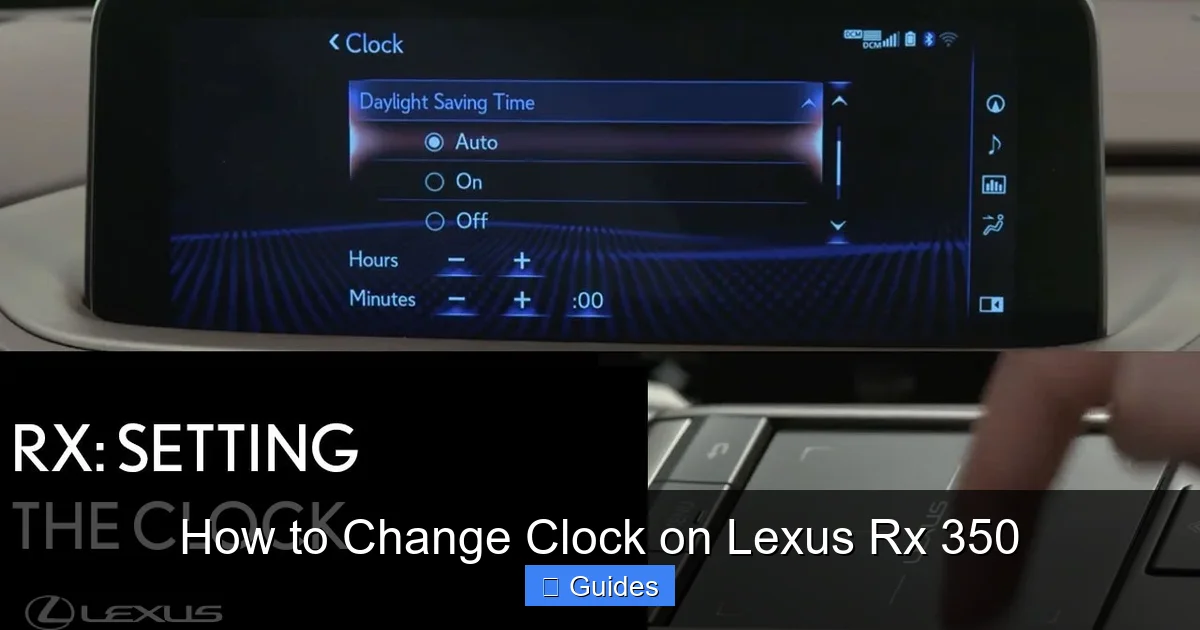
This is the most common method and works for nearly all RX 350 models from 2010 onward. Follow these steps carefully:
Step-by-Step Instructions
- Turn on the ignition. You don’t need to start the engine—just press the “Start” button once (or turn the key to “ON”) so the infotainment screen powers up.
- Tap the “Menu” or “Setup” icon. On older models, look for a gear-shaped “Settings” button. On newer Enform systems, tap the three-line “hamburger” menu in the top-left corner.
- Navigate to “Clock” or “Time Settings.” In pre-2016 models, this may appear as a standalone option. In newer versions, go to “Vehicle Settings” > “Clock.”
- Select “Manual” mode. If your system offers “Auto” (GPS sync), toggle it off to enable manual editing.
- Adjust the hour and minute. Use the on-screen +/- buttons or drag the digital hands (on some models). Confirm each change by tapping “Set” or “OK.”
- Exit the menu. The new time will save automatically. Double-check the dashboard display to confirm accuracy.
Pro Tips for Success
- If the “Clock” option is grayed out, ensure your vehicle isn’t in “Valet Mode” or that the system hasn’t locked due to a recent software update.
- Some older RX 350s require you to hold the “DISP” button on the steering wheel for 3 seconds to access clock settings—check your owner’s manual if the touchscreen method fails.
- Always verify AM/PM! It’s easy to overlook, especially when adjusting near noon or midnight.
Method 2: Using Steering Wheel Controls (For Select Models)

Visual guide about How to Change Clock on Lexus Rx 350
Image source: i2.wp.com
If you prefer not to touch the screen while driving—or if your RX 350 has a smaller display—you can often adjust the clock using buttons on the steering wheel. This method is particularly useful for 2013–2018 models with multifunction displays.
How It Works
- Press the “DISP” (Display) button on your steering wheel repeatedly until the clock appears in the instrument cluster.
- Hold the “DISP” button for 3–5 seconds. The hour digits should begin blinking.
- Use the “+” and “–” buttons (usually near the DISP button) to adjust the hour.
- Press “DISP” again to move to minutes, then use “+”/“–” to set the correct minute value.
- Press “DISP” one final time to confirm and exit.
Note: Not all RX 350 trims include this functionality. If holding “DISP” doesn’t trigger editing mode, your model likely requires the touchscreen method.
When to Use This Method
This approach shines during quick adjustments—like right after daylight saving time ends. You can fix the clock without stopping or fumbling with the center console. Just remember: the instrument cluster only shows basic time info, so you won’t see seconds or timezone details here.
Method 3: Enabling Automatic GPS Time Sync
For the ultimate “set it and forget it” experience, enable automatic time synchronization. This feature uses your vehicle’s built-in GPS to pull the exact current time from satellites—no manual input needed.
Why Choose Auto-Sync?
- Perfect accuracy: GPS time is synced to atomic clocks, so it’s always precise.
- Daylight saving handled automatically: Once enabled, your RX 350 will adjust forward or back without prompting.
- Ideal for travelers: Drive across time zones? Your clock updates instantly upon entering a new region.
How to Enable GPS Time Sync
- Go to “Setup” or “Settings” on your touchscreen.
- Select “Clock” or “Time Settings.”
- Toggle “Automatic Time Adjustment” or “GPS Sync” to ON.
- Ensure your vehicle has a clear view of the sky (drive outdoors if parked in a garage).
- Wait 1–2 minutes for the system to acquire satellite signals.
Once active, you’ll see a small GPS icon next to the clock display. If the icon disappears or the time seems stuck, try driving to an open area or restarting the infotainment system (hold the power button for 10 seconds).
Limitations to Know
GPS sync requires an active navigation system and clear satellite reception. In dense urban canyons or underground parking, the signal may drop temporarily. Also, some older RX 350s (pre-2014) don’t support this feature—manual adjustment remains your only option.
Troubleshooting Common Clock Issues
Even with clear instructions, things don’t always go smoothly. Here’s how to solve the most frequent clock problems in the RX 350.
Clock Resets After Battery Disconnect
If you’ve recently replaced your battery or had a jump start, your clock likely reverted to 12:00. This is normal—the infotainment system loses power and defaults to factory settings. Simply follow the manual adjustment steps above to reset it. No dealership visit or diagnostic tool is needed.
Time Drifts Gradually Over Days
A slowly drifting clock usually indicates a weak internal backup battery in the infotainment module. While rare, this issue affects some 2010–2015 models. Lexus dealerships can replace the module’s capacitor for under $100. Alternatively, enabling GPS sync (if available) masks the problem by constantly correcting the time.
“Clock” Menu Missing or Grayed Out
This often happens if the vehicle is in Valet Mode or if a recent software update changed menu layouts. Try restarting the system: turn off the car, wait 30 seconds, then restart. If the issue persists, consult your owner’s manual or visit a Lexus service center—some firmware updates require a technician to re-enable certain settings.
Voice Command Fails to Set Time
On 2023+ models, say “Hey Lexus, set the clock to [time]” clearly and slowly. Ensure microphone permissions are enabled in Settings > Voice Recognition. Background noise or accent variations can interfere—try again in a quiet cabin.
Best Practices for Maintaining Accurate Time
Keeping your RX 350’s clock reliable doesn’t end with a one-time adjustment. Adopt these habits for long-term accuracy:
- Enable GPS sync if available. It’s the easiest way to stay current without thinking about it.
- Check the clock monthly. A quick glance during fuel stops helps catch drift early.
- Update your infotainment software. Lexus releases periodic updates that improve system stability—including clock functions.
- Keep your owner’s manual accessible. It contains model-specific diagrams and troubleshooting codes.
- Avoid third-party chargers. Cheap USB adapters can cause electrical noise that interferes with sensitive electronics.
Remember: your Lexus RX 350 is engineered for precision. Treating the clock with the same care you give your tires or oil changes ensures every system works in harmony.
Final Thoughts
Changing the clock on your Lexus RX 350 might seem like a minor task, but it reflects the thoughtful design and user-centric philosophy that defines the Lexus brand. Whether you’re using the touchscreen, steering wheel, or voice commands, the process is intentionally simple—so you spend less time adjusting settings and more time enjoying the drive.
With the methods outlined here, you’re equipped to handle any time-related scenario: from post-trip resets to daylight saving transitions. And if you ever hit a snag, remember that solutions are usually just a menu tap away. Your RX 350 isn’t just a vehicle—it’s a trusted companion. Keeping its clock accurate is one small way to honor that relationship.
So next time you notice the time is off, don’t stress. Grab your keys, follow these steps, and within minutes, you’ll be back on schedule—with the quiet confidence that comes from driving a well-maintained luxury SUV.
Frequently Asked Questions
Can I change the clock while driving?
Yes, but for safety, it’s best to pull over or use voice commands (on 2023+ models). Manual touchscreen adjustments require your attention and should only be done when the vehicle is stationary.
Why does my Lexus RX 350 clock keep losing time?
This is often due to a failing internal backup battery in the infotainment system or lack of GPS sync. Enable automatic time adjustment if your model supports it, or have a technician inspect the module.
Does the RX 350 automatically adjust for daylight saving time?
Only if GPS time sync is enabled. Otherwise, you must manually adjust the clock forward in spring and back in fall.
What if my touchscreen is unresponsive when trying to change the clock?
Try restarting the infotainment system by holding the power/volume button for 10 seconds. If it remains frozen, check for software updates or visit a Lexus dealer.
Can I set the clock using my smartphone?
Not directly. However, if your RX 350 supports Apple CarPlay or Android Auto, your phone’s time may influence some apps—but the vehicle’s master clock must still be set manually or via GPS.
Some 2010–2013 models have a small “CLOCK” button near the audio system. Press and hold it to enter edit mode, then use surrounding buttons to adjust time.

At CarLegit, we believe information should be clear, factual, and genuinely helpful. That’s why every guide, review, and update on our website is created with care, research, and a strong focus on user experience.