
Disabling the door ajar warning on your Ford F150 can stop constant chimes and dashboard alerts when a door isn’t fully latched. This guide walks you through safe, step-by-step methods—from basic manual fixes to using the onboard menu or a diagnostic tool—so you can drive in peace without compromising safety.
If you’ve ever been driving your Ford F150 and suddenly heard that incessant *ding-ding-ding* chime because the truck thinks a door is open—even though everything looks shut—you know how frustrating the “door ajar” warning can be. It’s not just annoying; it can drain your battery, confuse new drivers, or even prevent you from starting the engine in some cases. Whether you’re hauling gear, parked on a slight incline, or just dealing with aging door hardware, false door ajar alerts are more common than you’d think.
The good news? You don’t have to live with it. Disabling or resetting the door ajar function on your Ford F150 is possible—and often simpler than you might expect. But before you start flipping switches or buying expensive tools, it’s important to understand what’s actually causing the problem. Is it a mechanical issue? A dirty sensor? Or just a glitch in the truck’s computer system? This guide will walk you through every step, from basic troubleshooting to advanced software solutions, so you can silence that pesky chime safely and effectively.
We’ll cover everything from quick DIY fixes you can do in your driveway to using specialized diagnostic tools like Forscan. Whether you drive a 2005 F150 or a brand-new 2024 model, we’ve got you covered. And don’t worry—we’ll always emphasize safety. While disabling the door ajar warning might seem like a harmless tweak, it’s crucial to know when and why you’re doing it, and how to restore normal function when needed.
In This Article
- 1 Key Takeaways
- 2 📑 Table of Contents
- 3 Understanding the Door Ajar System in Your Ford F150
- 4 Basic Troubleshooting: Fix the Problem, Not Just the Symptom
- 5 Temporarily Disable Door Ajar Chime Using the Dashboard Menu
- 6 Permanently Disable Door Ajar with an OBD2 Scanner (Forscan)
- 7 Safety Considerations and Best Practices
- 8 Model-Specific Notes for Ford F150 (2004–2024)
- 9 Conclusion
- 10 Frequently Asked Questions
- 10.1 Can I permanently disable the door ajar warning on my Ford F150?
- 10.2 Why does my F150 say “door ajar” when all doors are closed?
- 10.3 Will disabling the door ajar chime drain my battery?
- 10.4 Does the door ajar system affect remote start?
- 10.5 Can I disable the door ajar warning without a computer?
- 10.6 Is it illegal to disable the door ajar warning?
Key Takeaways
- Understand the door ajar system: The Ford F150 uses sensors in each door to detect if it’s open, triggering chimes and dashboard warnings.
- Common causes of false alerts: Dirt, worn latches, misaligned doors, or faulty switches can cause the system to think a door is ajar even when closed.
- Manual fixes first: Clean door latches, check alignment, and ensure all doors close firmly before attempting electronic solutions.
- Use the instrument cluster menu: Many F150 models allow you to temporarily disable the door ajar chime through the dashboard settings.
- Professional tools for full control: An OBD2 scanner with Ford-specific software (like Forscan) can permanently disable or reset the door ajar function.
- Safety matters: Never fully disable safety systems long-term; only use temporary fixes when necessary and re-enable alerts afterward.
- Know your model year: Procedures vary slightly between 2004–2024 F150s—always check your owner’s manual or consult a mechanic if unsure.
📑 Table of Contents
- Understanding the Door Ajar System in Your Ford F150
- Basic Troubleshooting: Fix the Problem, Not Just the Symptom
- Temporarily Disable Door Ajar Chime Using the Dashboard Menu
- Permanently Disable Door Ajar with an OBD2 Scanner (Forscan)
- Safety Considerations and Best Practices
- Model-Specific Notes for Ford F150 (2004–2024)
- Conclusion
Understanding the Door Ajar System in Your Ford F150
The door ajar system in your Ford F150 is part of the vehicle’s body control module (BCM) network. Each door—front, rear, and tailgate—has a small switch or sensor located near the latch mechanism. When a door is opened, this switch sends a signal to the BCM, which then triggers dashboard warnings, interior lights, and that unmistakable chime. The system is designed for safety: it reminds you to close doors before driving and helps prevent accidents or theft.
But here’s the catch: these sensors are sensitive. Over time, dirt, moisture, or wear can cause them to malfunction. For example, if the switch gets gummed up with grime or the latch becomes misaligned, the sensor may continue to read “open” even after you’ve slammed the door shut. This leads to false positives—the most common reason people want to disable the door ajar feature.
It’s also worth noting that the system interacts with other features. On newer F150s (2015 and later), the door ajar status affects things like automatic headlight activation, keyless entry, and even remote start functionality. So while disabling the chime might seem like a small change, it can have ripple effects. That’s why it’s essential to diagnose the root cause first. Is the door actually not closing properly? Or is the sensor lying to your truck’s computer?
How the Door Ajar Sensor Works
Each door latch contains a microswitch—a tiny electrical component that opens or closes a circuit based on whether the door is latched. When the door is shut and locked into place, the switch is depressed, completing the circuit and telling the BCM, “All clear.” If the door isn’t fully closed, the switch remains open, and the BCM interprets this as a door being ajar.
On some older F150 models (pre-2011), these are simple mechanical switches. On newer trucks, especially those with power locks and keyless entry, the system may use Hall-effect sensors or integrated latch assemblies that communicate digitally with the BCM. This makes them more accurate but also more complex to troubleshoot.
One common misconception is that the door ajar warning only appears when driving. In reality, it can activate anytime the ignition is on—even when parked. That’s why you might hear the chime while sitting in your driveway or at a red light. The system is always monitoring door status as long as the key is in the “on” or “run” position.
Why False Door Ajar Alerts Happen
False alerts are frustrating, but they’re rarely a sign of a major electrical failure. More often, they stem from everyday wear and environmental factors. Here are the most common culprits:
– **Dirt and debris in the latch:** Dust, mud, or ice can build up inside the door latch, preventing the switch from fully engaging.
– **Worn or loose latches:** Over years of use, the metal components in the latch can wear down, causing the door to not seat properly even when it looks closed.
– **Door misalignment:** If your truck has been in an accident or the hinges have shifted slightly, the door may not close flush with the frame, leaving the sensor partially activated.
– **Faulty switch:** Like any mechanical part, the door ajar switch can fail over time. It might get stuck in the “open” position due to internal corrosion or physical damage.
– **Moisture intrusion:** Water leaking into the door panel (often from a broken window seal or clogged drain) can short-circuit the switch or corrode its contacts.
Before jumping to disable the entire system, it’s smart to inspect each door individually. Try closing them one at a time while watching the dashboard. Does the light stay on for a specific door? That’s your clue. You can also listen for the latch “click”—if it sounds weak or inconsistent, the hardware may need attention.
Basic Troubleshooting: Fix the Problem, Not Just the Symptom
Visual guide about How to Disable Door Ajar on Ford F150
Image source: f150forum.com
The best way to handle a persistent door ajar warning is to fix the underlying issue—not just silence the alarm. Not only is this safer, but it also prevents future headaches like dead batteries (from interior lights staying on) or difficulty starting the truck.
Start with the simplest solutions first. Often, a little cleaning and adjustment are all it takes to restore normal function.
Step 1: Inspect and Clean the Door Latches
Grab a flashlight and examine each door latch—especially the driver’s side, which gets the most use. Look for visible dirt, rust, or debris packed into the mechanism. Use a can of electrical contact cleaner (not WD-40, which can attract more grime) and a small brush (like an old toothbrush) to gently clean the area. Spray the cleaner into the latch and work the door open and closed a few times to help dislodge stubborn gunk.
After cleaning, dry the area thoroughly with compressed air or a clean cloth. Then test the door by closing it firmly several times. Listen for a solid “thunk” and check if the interior light turns off immediately.
Step 2: Check Door Alignment and Hinges
If cleaning doesn’t help, the door itself might be misaligned. Stand back and look at how the door sits in the frame. Is there a gap at the top or bottom? Does it sit flush when closed? On older F150s, hinge pins can wear out, causing the door to sag slightly. This subtle shift is enough to keep the latch from fully engaging.
You can test this by having someone sit inside the truck while you close the door from the outside. If the interior light stays on, ask them to gently push up or down on the door while you listen for the latch to click into place. If it does, hinge adjustment may be needed.
For minor sagging, you can often fix it by loosening the hinge bolts, repositioning the door, and tightening them back up. For severe wear, replacement hinge kits are available online for under $50.
Step 3: Test the Door Ajar Switch
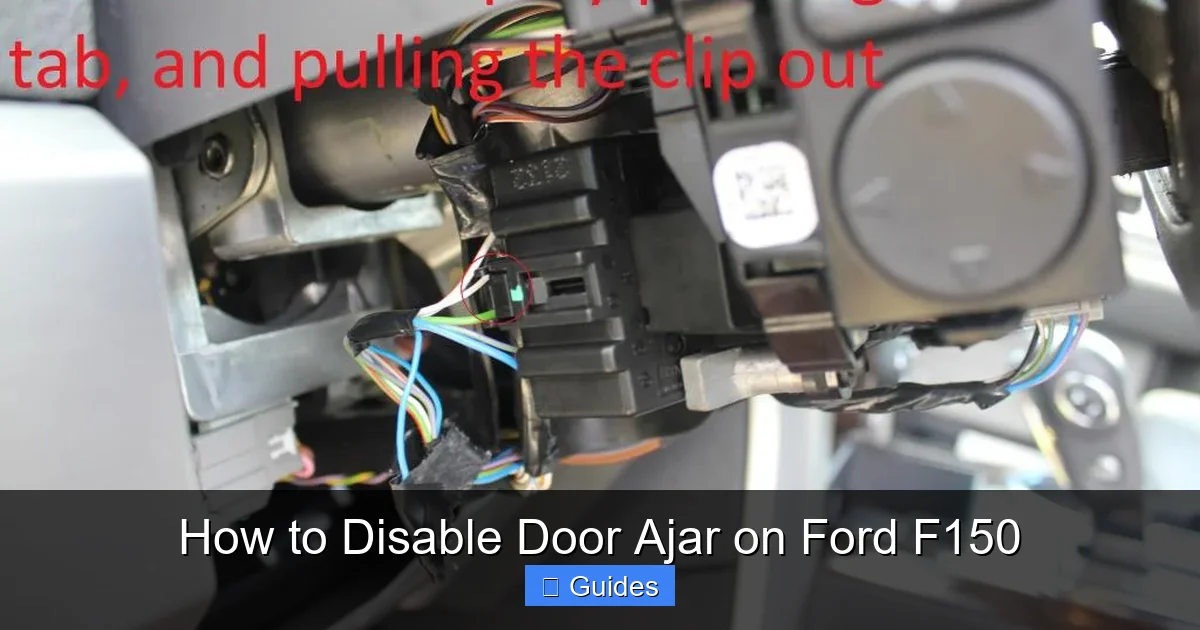
If the latch and alignment seem fine, the switch itself might be faulty. On most F150s, you can access the switch by removing the door panel. Be careful—modern trucks have wiring harnesses, airbag sensors, and speaker connections that must be disconnected properly.
Once the panel is off, locate the latch assembly. The door ajar switch is usually a small plastic piece with two wires connected to it. You can test it with a multimeter set to continuity mode. With the door open, the switch should show continuity (beep). When the door is closed and latched, it should break continuity (no beep). If it doesn’t change states, the switch is likely bad and needs replacement.
Replacement switches cost around $10–$20 and are easy to install. Just unplug the old one, snap in the new, and reassemble the door.
Temporarily Disable Door Ajar Chime Using the Dashboard Menu
Visual guide about How to Disable Door Ajar on Ford F150
Image source: garagesee.com
If you’ve ruled out mechanical issues but still want to silence the chime—perhaps you’re loading heavy items and need the door partially open—you can temporarily disable the door ajar warning using your F150’s instrument cluster menu. This method works on most models from 2009 onward, especially those with the 4-inch or 8-inch display.
Note: This doesn’t disable the entire system—just the audible chime. The dashboard light may still illuminate, and safety functions remain active.
How to Access the Settings Menu
1. Turn the ignition to the “on” position (but don’t start the engine).
2. Press the “Setup” or “Menu” button on your steering wheel or dashboard. On newer models, this is usually a physical button near the instrument cluster.
3. Navigate to “Vehicle Settings” or “Driver Assist.”
4. Look for an option labeled “Door Chime,” “Door Ajar Warning,” or “Interior Chime.”
5. Toggle it off.
The exact wording varies by model year. On a 2021 F150, for example, it’s under *Settings > Vehicle > Door Chime*. On a 2013 model, you might find it under *Message Center > Settings > Chimes*.
Once disabled, the chime won’t sound when a door is open—but remember to turn it back on later! Leaving it off permanently defeats the purpose of the safety system.
Limitations of the Dashboard Method
This method is great for temporary use, but it has limits. First, it only works when the ignition is on—so if your battery dies and you restart the truck, the setting may reset. Second, it doesn’t fix the root cause. If a door truly isn’t closing, you’re just ignoring the warning, which could lead to water damage, theft, or a dead battery.
Also, some older F150s (pre-2009) don’t have this menu option. In those cases, you’ll need to try a different approach.
Permanently Disable Door Ajar with an OBD2 Scanner (Forscan)
Visual guide about How to Disable Door Ajar on Ford F150
Image source: garagesee.com
For full control over the door ajar system—including permanent disabling or customizing alerts—you’ll need a diagnostic tool that can communicate with your F150’s computer. The best option for Ford owners is **Forscan**, a free (or low-cost) software program that works with compatible OBD2 adapters.
Forscan gives you access to advanced settings not available in the factory menu, including the ability to disable specific chimes, reset modules, or even reprogram door sensors.
What You’ll Need
– A Windows laptop or tablet
– A compatible OBD2 adapter (ELM327-based, preferably with MS-CAN support—look for “Forscan-compatible” models)
– Forscan software (download from forscan.org)
– Your vehicle’s VIN and basic info
Step-by-Step Guide to Disable Door Ajar in Forscan
1. **Install Forscan** on your computer and launch the program.
2. **Connect the OBD2 adapter** to your truck’s port (under the dashboard, near the steering column) and plug it into your laptop via USB or Bluetooth.
3. Turn the ignition to “on” (engine off).
4. In Forscan, click “Connect” and wait for it to detect your vehicle.
5. Once connected, go to the **Body Control Module (BCM)** section.
6. Look for a menu called “As-Built Data” or “Configuration.”
7. Find the line related to door chimes—often labeled something like “720-01-01” or “Door Ajar Chime Enable.”
8. Change the value from “Enabled” to “Disabled.”
9. Click “Write” to save the change.
10. Disconnect and restart the truck to test.
⚠️ **Warning:** Modifying As-Built data can affect other systems. Always back up your original settings before making changes. If you’re unsure, consult the Forscan forum or a professional.
Alternative: Use a Professional Mechanic
If Forscan sounds too technical, many Ford dealerships and independent shops can disable the door ajar chime using their factory tools. It usually takes 10–15 minutes and costs $50–$100. While not free, it’s a safe option if you’re not comfortable with DIY electronics.
Safety Considerations and Best Practices
Disabling the door ajar warning might seem harmless, but it’s important to remember: this system exists for a reason. Open doors while driving can cause accidents, distract the driver, or allow passengers (especially children) to fall out.
Here are some best practices to keep in mind:
– **Only disable temporarily:** Use the dashboard menu or Forscan for short-term needs—like loading cargo—and re-enable it afterward.
– **Never disable all doors at once:** If you must disable the system, consider doing it one door at a time so you still get warnings for others.
– **Check doors manually:** Make it a habit to visually confirm all doors are closed before driving, especially if the chime is off.
– **Monitor battery health:** A stuck door ajar signal can keep interior lights on, draining your battery overnight. If you disable the chime, be extra vigilant about turning off lights.
– **Re-enable after repairs:** Once you fix a faulty latch or switch, restore the original settings so the system works as intended.
Remember: convenience shouldn’t come at the cost of safety. The goal isn’t to eliminate all warnings—it’s to eliminate *false* warnings while keeping real ones intact.
Model-Specific Notes for Ford F150 (2004–2024)
Not all F150s are created equal when it comes to the door ajar system. Here’s a quick breakdown by generation:
– **2004–2008 (11th Gen):** Basic mechanical switches. Dashboard menu not available. Forscan or manual switch replacement required.
– **2009–2014 (12th Gen):** Introduced digital displays. Some models allow chime disable via menu. Forscan highly recommended.
– **2015–2020 (13th Gen):** Advanced BCM with integrated sensors. Forscan essential for customization. Tailgate sensor added.
– **2021–2024 (14th Gen):** Full digital cockpit. Menu-based disable available on most trims. Forscan still offers deeper control.
Always check your owner’s manual or search for your specific model year + “door ajar disable” for the most accurate instructions.
Conclusion
Dealing with a constant door ajar warning on your Ford F150 doesn’t have to be a daily annoyance. Whether it’s a simple latch cleaning, a quick menu toggle, or a deeper dive with Forscan, you have multiple options to regain peace and quiet—without sacrificing safety.
Start with the basics: inspect, clean, and test. If the problem persists, use the tools at your disposal to temporarily or permanently adjust the system. And always remember: the goal is to fix the issue, not just hide it.
With the right approach, you can enjoy your F150 the way it was meant to be—smooth, quiet, and reliable.
Frequently Asked Questions
Can I permanently disable the door ajar warning on my Ford F150?
Yes, but it requires an OBD2 scanner and software like Forscan to modify the Body Control Module settings. However, it’s not recommended for long-term use due to safety risks.
Why does my F150 say “door ajar” when all doors are closed?
This is usually caused by a dirty latch, misaligned door, or faulty door switch. Clean the latches first and check for proper door alignment before assuming an electrical issue.
Will disabling the door ajar chime drain my battery?
Not directly, but if a door truly isn’t closing and the interior lights stay on, yes—it can drain the battery. Always ensure doors are fully closed, even with the chime off.
Does the door ajar system affect remote start?
Yes, on newer F150s (2015+), the truck won’t allow remote start if it detects a door ajar. Fixing or disabling the warning may be necessary for remote start to work.
Can I disable the door ajar warning without a computer?
On models with a digital display (2009+), yes—use the instrument cluster menu. Older trucks require Forscan or a visit to a mechanic.
Is it illegal to disable the door ajar warning?
It’s not illegal, but it may violate safety guidelines. Always prioritize safe driving practices and re-enable warnings when possible.

At CarLegit, we believe information should be clear, factual, and genuinely helpful. That’s why every guide, review, and update on our website is created with care, research, and a strong focus on user experience.