
Turning on the heat in your Nissan Altima is simple once you understand the climate control system. This guide walks you through every step, from basic operation to troubleshooting common issues, ensuring you stay cozy no matter how cold it gets outside.
In This Article
- 1 Key Takeaways
- 2 📑 Table of Contents
- 3 Introduction: Staying Warm in Your Nissan Altima
- 4 Understanding Your Nissan Altima’s Climate Control System
- 5 Step-by-Step Guide: How to Turn On Heat in Nissan Altima
- 6 Troubleshooting Common Heating Issues
- 7 Tips for Efficient Heating and Comfort
- 8 Conclusion: Stay Warm and Safe All Winter
- 9 Frequently Asked Questions
- 9.1 Why isn’t my Nissan Altima heater working?
- 9.2 Can I use the A/C while heating my Altima?
- 9.3 How long does it take for the heat to work in a cold car?
- 9.4 What should I do if my heater blows cold air after driving?
- 9.5 How often should I replace the cabin air filter?
- 9.6 Can I drive with a broken heater core?
Key Takeaways
- Use the climate control panel: Locate the temperature dial or touchscreen controls to adjust heat settings.
- Wait for the engine to warm up: The heater only works effectively once the engine reaches operating temperature.
- Set the temperature to high: Turn the temperature dial to the red zone or select a high setting on digital models.
- Choose the right airflow mode: Direct warm air to your feet and windshield for maximum comfort and defrosting.
- Check the coolant level: Low coolant can prevent the heater from producing warm air.
- Ensure the A/C compressor is off: The A/C should be off when heating to avoid cooling the air unnecessarily.
- Maintain your HVAC system: Regular maintenance prevents issues and ensures efficient heating performance.
📑 Table of Contents
Introduction: Staying Warm in Your Nissan Altima
There’s nothing worse than hopping into your car on a freezing winter morning, only to realize the heat isn’t working. If you drive a Nissan Altima, you’re in luck—this reliable sedan comes equipped with a well-designed climate control system that can keep you warm and comfortable, even in the coldest conditions. But like any vehicle feature, it only works if you know how to use it properly.
Whether you’re new to the Nissan Altima or just need a refresher, understanding how to turn on the heat is essential for your comfort and safety. The process is straightforward, but it involves more than just flipping a switch. From waiting for the engine to warm up to selecting the right airflow settings, there are a few key steps to follow. This guide will walk you through everything you need to know, including tips for troubleshooting common problems and maintaining your heating system for long-term performance.
Understanding Your Nissan Altima’s Climate Control System
Before diving into the steps for turning on the heat, it’s helpful to understand how the climate control system in your Nissan Altima works. The Altima uses a heater core—a small radiator-like component located inside the dashboard—to warm the air that flows into the cabin. This heater core is connected to the engine’s cooling system and uses hot coolant to generate warmth.
Visual guide about How to Turn on Heat in Nissan Altima
Image source: i.ebayimg.com
The climate control panel, typically located in the center console, allows you to adjust temperature, fan speed, and airflow direction. Depending on your model year and trim level, you may have a manual dial system or a digital touchscreen interface. Both systems function similarly, but the digital versions often offer more precise control and additional features like dual-zone climate control.
Manual vs. Digital Climate Controls
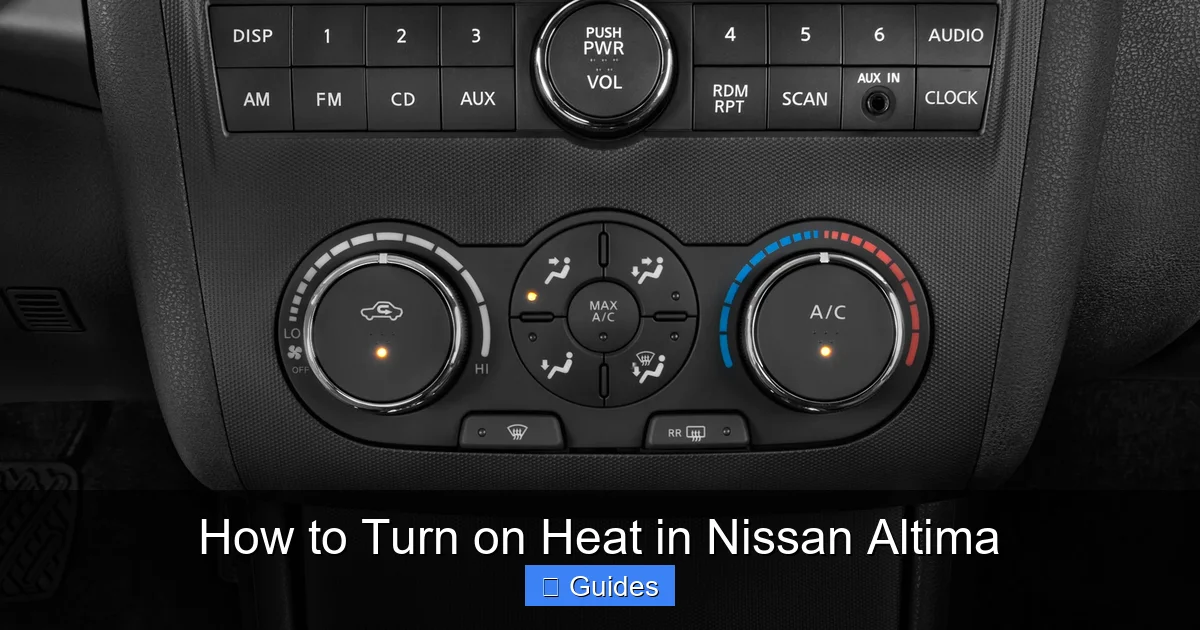
Older Nissan Altima models (typically 2018 and earlier) often feature manual climate controls with physical dials and buttons. These include a temperature dial (usually marked with blue for cold and red for hot), a fan speed knob, and buttons for airflow direction (defrost, floor, face, etc.). To turn on the heat, you simply turn the temperature dial toward the red zone and adjust the fan speed as needed.
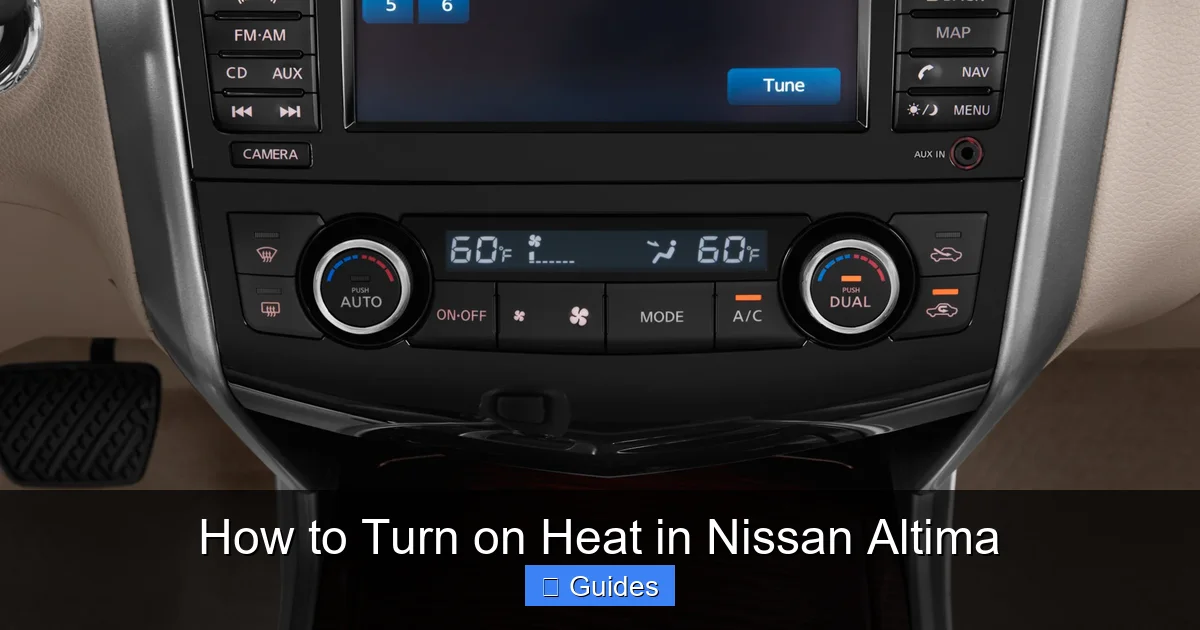
Newer models (2019 and later) often come with a digital touchscreen climate control system. These systems allow you to set exact temperatures (e.g., 72°F), control fan speed with a slider, and choose airflow modes with a tap. Some even offer automatic climate control, which adjusts settings based on your preferences and outside conditions. Despite the differences in interface, the underlying heating mechanism remains the same.
How the Heater Core Works
The heater core is a critical component of your Altima’s heating system. It’s essentially a small radiator filled with hot coolant from the engine. As air from the blower motor passes over the heater core, it absorbs heat and is then directed into the cabin through the vents. This process only works once the engine has warmed up and the coolant has reached a sufficient temperature—typically after a few minutes of driving.
If your heater isn’t producing warm air, the issue could be related to the heater core, coolant level, or a malfunctioning thermostat. We’ll cover troubleshooting tips later in this guide, but for now, it’s important to know that the heater relies on the engine’s heat to function.
Step-by-Step Guide: How to Turn On Heat in Nissan Altima
Now that you understand the basics, let’s walk through the step-by-step process of turning on the heat in your Nissan Altima. Whether you have a manual or digital system, these instructions will help you get warm quickly and efficiently.
Visual guide about How to Turn on Heat in Nissan Altima
Image source: motortrend.com
Step 1: Start the Engine and Let It Warm Up
The first and most important step is to start your engine and allow it to warm up. Unlike air conditioning, which can work immediately, the heater depends on the engine’s coolant temperature. When you first start your car, the coolant is cold, so the heater core won’t produce warm air right away.
Give your engine 3 to 5 minutes to reach normal operating temperature. You’ll know it’s ready when the temperature gauge on your dashboard moves into the middle range. During this time, you can still turn on the fan to circulate air, but don’t expect it to be warm yet.
Step 2: Turn the Temperature Dial to the Hot Setting
Once the engine is warm, locate the temperature control on your climate panel. On manual systems, this is a dial marked with blue (cold) on one end and red (hot) on the other. Turn the dial all the way to the red zone or the highest temperature setting.
On digital systems, use the touchscreen or temperature buttons to increase the temperature. You can usually set it to a specific number (e.g., 75°F or 80°F). The higher the setting, the warmer the air will be.
Step 3: Adjust the Fan Speed
Next, set the fan speed to your desired level. On manual systems, use the fan speed knob to increase airflow. On digital systems, use the fan speed slider or buttons. Start with a medium setting and adjust as needed. Higher fan speeds will push more warm air into the cabin, but they may also be noisier.
Keep in mind that the fan speed doesn’t affect the temperature of the air—only how quickly it’s delivered. The actual warmth comes from the heater core and the engine’s coolant.
Step 4: Select the Airflow Direction
Choose where you want the warm air to go. Most Nissan Altima models offer several airflow modes:
- Face: Directs air to the upper vents for head and chest warmth.
- Feet: Sends air to the floor vents, ideal for warming your legs and feet.
- Defrost: Blows air onto the windshield to clear fog or ice.
- Bi-Level: Combines face and feet for balanced comfort.
For maximum warmth, especially on cold mornings, start with the “feet” setting. This helps warm your lower body first and prevents cold feet. You can switch to “face” or “bi-level” once you’re comfortable.
Step 5: Turn Off the A/C (If Enabled)
Many drivers don’t realize that the air conditioning (A/C) can interfere with heating. When the A/C is on, it dehumidifies the air, which can make it feel cooler—even if the heater is working. To get the warmest air possible, make sure the A/C is turned off.
On manual systems, look for an A/C button and press it to turn it off (the light should go out). On digital systems, check the climate menu and disable A/C if it’s active. Some models have an “AUTO” mode that automatically manages A/C, but you can usually override it.
Step 6: Use the Recirculation Mode (Optional)
Recirculation mode prevents outside air from entering the cabin and instead recycles the air inside. This can help warm up the car faster, especially in cold weather, because it doesn’t have to heat fresh, cold air from outside.
To activate recirculation, press the recirculation button (usually marked with a car icon and curved arrow). Use this mode sparingly, though—prolonged use can reduce air quality and cause fogging on the windows.
Troubleshooting Common Heating Issues
Even with proper operation, you might encounter issues with your Nissan Altima’s heating system. Here are some common problems and how to fix them.
Visual guide about How to Turn on Heat in Nissan Altima
Image source: motortrend.com
No Heat Coming From the Vents
If you’ve followed all the steps and still aren’t getting warm air, the problem could be related to the engine or cooling system. Check the following:
- Coolant level: Open the hood and inspect the coolant reservoir. If it’s low, top it off with the correct type of coolant (usually a 50/50 mix of antifreeze and water). Low coolant can prevent the heater core from receiving hot fluid.
- Thermostat: A stuck thermostat can prevent the engine from reaching proper temperature. If your engine is running cooler than normal, the thermostat may need replacement.
- Heater core blockage: Over time, the heater core can become clogged with debris or sediment. This restricts coolant flow and reduces heating performance. Flushing the heater core or replacing it may be necessary.
Blowing Cold Air After Driving
If your heater works initially but starts blowing cold air after a few minutes, it could be a sign of a failing water pump or a coolant leak. The water pump circulates coolant through the engine and heater core. If it’s not working properly, the heater core won’t stay warm.
Check for coolant leaks under the car or around the engine. If you notice a sweet smell or green/orange fluid, have your vehicle inspected by a mechanic immediately.
Weak Airflow
If the air is warm but the airflow is weak, the issue might be with the blower motor or cabin air filter. A clogged air filter restricts airflow, reducing heating efficiency. Replace the cabin air filter every 12,000 to 15,000 miles or as recommended in your owner’s manual.
If the filter is clean but airflow is still weak, the blower motor or resistor may be failing. This is a more complex repair and may require professional assistance.
Strange Smells When Heating
If you notice a musty or burning smell when you turn on the heat, it could indicate mold or debris in the HVAC system. This is common in humid climates or if the A/C has been used frequently. Running the heater on high for a few minutes can help dry out the system.
For persistent odors, consider having the HVAC system cleaned or replacing the cabin air filter. In severe cases, professional cleaning may be needed.
Tips for Efficient Heating and Comfort
Getting the most out of your Nissan Altima’s heating system isn’t just about turning it on—it’s about using it efficiently. Here are some tips to stay warm while saving fuel and reducing wear on your vehicle.
Pre-Warm Your Car (If Possible)
If you have access to a garage or a remote starter, pre-warming your car can make a big difference. A remote starter allows you to start the engine from inside your home, giving the engine time to warm up before you get in. This not only improves comfort but also helps reduce engine wear in cold weather.
Even without a remote starter, starting your car a few minutes early can help the heater begin producing warm air by the time you’re ready to drive.
Use Seat Warmers (If Equipped)
Many Nissan Altima trims come with heated seats, which can provide instant warmth without relying solely on the HVAC system. Using seat warmers can reduce the load on the heater and help you feel comfortable faster.
Heated seats are especially useful on extremely cold days when the cabin takes longer to warm up. Just be mindful of battery usage—don’t leave them on unnecessarily.
Keep Windows Clear
Foggy or icy windows can make driving uncomfortable and unsafe. Use the defrost setting to clear the windshield and side windows. For best results, set the temperature to high, fan speed to medium or high, and airflow to defrost. Turning off recirculation helps bring in dry outside air, which speeds up defogging.
Once the windows are clear, switch back to a comfort setting like “feet” or “bi-level” to maintain warmth.
Regular Maintenance Matters
To keep your heating system working properly, follow your owner’s maintenance schedule. This includes checking coolant levels, replacing the cabin air filter, and inspecting the HVAC system during routine service.
Neglecting maintenance can lead to reduced heating performance, strange noises, or even system failure. A little prevention goes a long way in ensuring your Altima stays warm all winter.
Conclusion: Stay Warm and Safe All Winter
Knowing how to turn on the heat in your Nissan Altima is more than just a convenience—it’s a key part of staying safe and comfortable during cold weather. By following the steps in this guide, you can ensure your heater works efficiently and reliably, no matter how low the temperature drops.
Remember to let your engine warm up, adjust the temperature and fan settings, choose the right airflow mode, and keep your HVAC system well-maintained. If you encounter any issues, don’t hesitate to check the coolant level or consult a professional. With a little care and attention, your Nissan Altima will keep you cozy from the first frost to the last snowflake of the season.
Frequently Asked Questions
Why isn’t my Nissan Altima heater working?
The most common reason is that the engine hasn’t warmed up yet. The heater relies on hot coolant, so give it 3–5 minutes after starting. If it still doesn’t work, check the coolant level or thermostat.
Can I use the A/C while heating my Altima?
It’s best to turn off the A/C when heating. The A/C dehumidifies the air, which can make it feel cooler. Only use A/C if you need to defog windows quickly.
How long does it take for the heat to work in a cold car?
It typically takes 3 to 5 minutes for the engine to warm up enough for the heater to produce warm air. In very cold weather, it may take slightly longer.
What should I do if my heater blows cold air after driving?
This could indicate a coolant leak, failing water pump, or thermostat issue. Check for leaks and have your vehicle inspected by a mechanic.
How often should I replace the cabin air filter?
Replace the cabin air filter every 12,000 to 15,000 miles or once a year. A dirty filter can reduce airflow and heating efficiency.
Can I drive with a broken heater core?
While you can drive without heat, a leaking heater core can cause coolant loss, foggy windows, and unpleasant odors. It’s best to have it repaired promptly.

At CarLegit, we believe information should be clear, factual, and genuinely helpful. That’s why every guide, review, and update on our website is created with care, research, and a strong focus on user experience.