
Wondering how to turn off rear occupant alert Hyundai? This feature alerts you if rear doors were opened before your trip—great for safety, but sometimes annoying. We’ll show you exactly how to disable it temporarily or permanently across popular Hyundai models.
If you’ve ever hopped into your Hyundai, started driving, and then been startled by a chime followed by a message on the dashboard saying “Check Rear Seats,” you’re not alone. That’s the Rear Occupant Alert system doing its job—and while it’s designed with good intentions, it can feel more like an annoyance than a helpful reminder, especially if you’re just running a quick errand or know your back seat is empty.
The Rear Occupant Alert (ROA) is one of Hyundai’s newer safety technologies, introduced in recent model years across popular vehicles like the Elantra, Tucson, Santa Fe, and Palisade. Its purpose is simple but vital: prevent children or pets from being accidentally left behind in hot or cold cars. The system detects if a rear door was opened before the engine started, and if so, it triggers an alert when you shift into Park—complete with a dashboard warning, audible chime, and sometimes even a notification sent to your smartphone via the Hyundai Blue Link app.
But here’s the thing: once you understand how it works, you might find yourself wishing you could just… turn it off. Maybe you’re tired of the constant reminder, or perhaps you frequently transport items in the back seat that trigger false alarms. Whatever your reason, this guide will walk you through exactly how to turn off rear occupant alert Hyundai—safely, legally, and without voiding your warranty.
In this comprehensive article, we’ll cover everything from what the feature does and why Hyundai added it, to step-by-step instructions for disabling it on different models. We’ll also discuss the pros and cons of turning it off, share tips to avoid accidental triggers, and answer common questions drivers have about this increasingly common safety system. Whether you drive a compact Elantra or a full-size Palisade, by the end of this guide, you’ll know exactly what to do.
In This Article
- 1 Key Takeaways
- 2 📑 Table of Contents
- 3 What Is the Rear Occupant Alert System?
- 4 Why Would You Want to Turn Off Rear Occupant Alert?
- 5 How to Turn Off Rear Occupant Alert on Hyundai Models
- 6 Tips to Avoid Triggering the Alert Unnecessarily
- 7 Safety Considerations: Should You Really Turn It Off?
- 8 Conclusion
- 9 Frequently Asked Questions
- 9.1 Can I permanently disable the Rear Occupant Alert on my Hyundai?
- 9.2 Why does the Rear Occupant Alert keep going off even when no one is in the back seat?
- 9.3 Does turning off the alert affect other safety features?
- 9.4 Will disabling the alert prevent Blue Link notifications?
- 9.5 Is it illegal to disable the Rear Occupant Alert?
- 9.6 My Hyundai doesn’t have a Rear Occupant Alert option in the menu. Why?
Key Takeaways
- Rear Occupant Alert is a safety feature: It reminds drivers to check the back seat before exiting, especially useful for parents with young children or pet owners.
- You can’t permanently disable it on all models: Most Hyundai vehicles only allow temporary deactivation per drive cycle—turning the car off resets the setting.
- Use the infotainment menu for quick access: Navigate through Settings > Vehicle > Driver Assistance to find the toggle for Rear Occupant Alert.
- Physical button method works on some trims: Certain Hyundai models like the Santa Fe offer a physical button near the climate controls to turn off the alert.
- Check your owner’s manual for model-specific steps: Procedures vary slightly between Elantra, Tucson, Palisade, and other Hyundai vehicles.
- Consider why you’re turning it off: While convenient, disabling this feature reduces safety—only do so when absolutely necessary.
- Software updates may change functionality: Hyundai occasionally updates vehicle software, which could affect how or where you find the setting.
📑 Table of Contents
What Is the Rear Occupant Alert System?
Before we dive into how to turn it off, let’s take a moment to understand what the Rear Occupant Alert system actually is—and why Hyundai included it in the first place.
Introduced around 2019–2020 across many Hyundai models, the ROA system uses sensors in the rear doors and sometimes interior motion detection (depending on the trim level) to monitor activity in the back seat. Here’s how it typically works:
– When you start your car, the system checks whether any rear doors were opened since the last time the engine was turned off.
– If a rear door was opened (even briefly), the system “remembers” this and activates the alert protocol.
– Once you come to a stop and shift into Park, the system triggers a multi-layered warning: a message appears on the instrument cluster (“Check Rear Seats”), an audible chime sounds, and in some vehicles equipped with Hyundai Blue Link, a push notification may be sent to your phone.
This technology was developed in response to tragic incidents where young children were accidentally left in vehicles, often with fatal consequences. According to national safety organizations, dozens of children die each year from heatstroke after being forgotten in cars—even on mild days. Hyundai, like many automakers, responded by integrating passive safety reminders into their vehicles.
It’s important to note that the ROA system is not a replacement for parental vigilance or responsible pet ownership. It’s a backup—a nudge to double-check before walking away from your vehicle. And while it’s undeniably helpful in high-risk situations, it can become repetitive or inconvenient for everyday drivers who don’t regularly transport passengers in the back.
For example, imagine you’re loading groceries into your trunk and briefly open the rear passenger door to reach something. Even if no one gets in, the system logs that door as “opened,” and you’ll get the alert when you park. Or maybe you’re using your Hyundai as a mobile office and keep a laptop bag in the back seat—every time you open that door, the system thinks there might be a person inside.
That’s why so many Hyundai owners search for ways to disable or reduce the frequency of these alerts. Fortunately, Hyundai does provide options—though they’re not always obvious or permanent.
Why Would You Want to Turn Off Rear Occupant Alert?
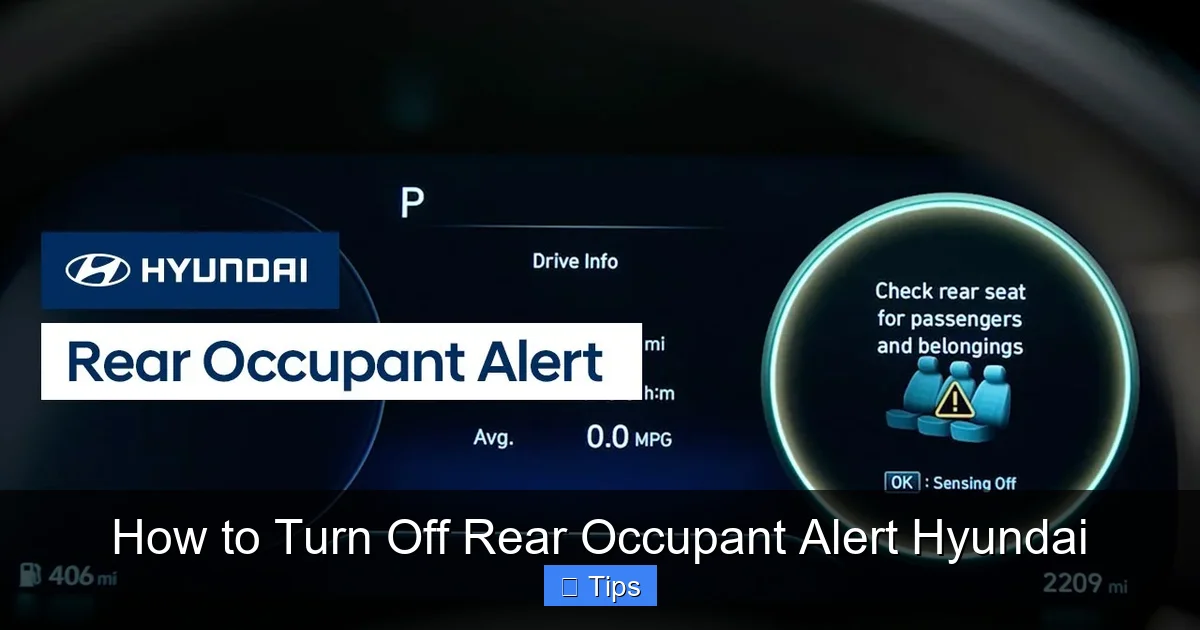
Visual guide about How to Turn Off Rear Occupant Alert Hyundai
Image source: hyundaihowtos.com
At first glance, turning off a safety feature might seem counterintuitive—even reckless. After all, if it’s meant to protect children and pets, why would anyone want to disable it?
The truth is, most people who look for ways to turn off rear occupant alert Hyundai aren’t trying to compromise safety. Instead, they’re dealing with real-world scenarios where the system becomes more of a nuisance than a help. Let’s explore some common reasons drivers choose to disable or minimize the ROA alerts.
Frequent False Alarms
One of the biggest complaints about the ROA system is its sensitivity. Because it only checks whether a rear door was opened—not whether someone actually got in—it can trigger alerts even when the back seat is completely empty.
For instance, if you open the rear door to load luggage, adjust a seatbelt, or retrieve an item from the floor, the system logs that action and assumes there might be a passenger. Even a quick 2-second opening can set off the alert later. This becomes especially frustrating on long trips or during daily commutes where you’re constantly accessing the back seat for bags, tools, or supplies.
Pet owners also report issues. If you have a dog that rides in the back, you might open the rear door to let them in or out—but if you forget to close it fully or reopen it briefly, the system activates. And if your dog is small or sleeps quietly, the motion sensors (if equipped) might not detect movement, leading to repeated alerts even when your pet is safely secured.
Noise and Distraction While Parking
Another common frustration is the auditory component of the alert. The chime can be loud and startling, especially in quiet neighborhoods or parking garages. For drivers who park frequently—like delivery workers, rideshare drivers, or parents doing school drop-offs—the constant beeping becomes disruptive and annoying.
Some users also report that the alert interrupts other vehicle functions. For example, if you’re trying to use the infotainment system to navigate or adjust climate settings while parked, the ROA message can cover important information on the screen or delay access to menus.
Privacy Concerns with Blue Link Notifications
On Hyundai models equipped with Blue Link connected services, the ROA system can send push notifications to your smartphone when the alert is triggered. While this adds an extra layer of safety, it also raises privacy concerns for some users.
Imagine getting a notification at 7 a.m. that says, “Check your rear seats”—even though you’re already at work and your car is parked in the garage. Or worse, receiving repeated alerts throughout the day because you opened a rear door to grab something from the back seat. These notifications can feel invasive, especially if you share your phone with family members or use it for work.
Driving Habits and Vehicle Use
Not everyone uses their Hyundai the same way. Some drivers primarily use their vehicle for solo commuting, running errands, or transporting cargo—not passengers. For these individuals, the ROA system offers little practical benefit but creates ongoing irritation.
For example, a freelance photographer might use their Tucson to carry equipment in the back seat. Every time they load or unload gear, they risk triggering the alert. Similarly, a small business owner using their Elantra for deliveries may open rear doors dozens of times a day—each one potentially activating the system.
In these cases, the safety value of the ROA is minimal, but the inconvenience is high. That’s why so many drivers seek ways to disable it—at least temporarily.
Temporary vs. Permanent Needs
It’s also worth noting that most people don’t want to permanently disable the ROA system. Instead, they’re looking for a way to turn it off for a single trip or driving session—especially when they know the back seat will remain empty.
Unfortunately, Hyundai’s design currently limits this flexibility. On most models, you can only disable the alert for the current drive cycle. Once you turn the car off and restart it, the system reactivates automatically. This means you have to manually turn it off every time you drive—which defeats the purpose for many users.
Still, knowing how to quickly disable it when needed can make a big difference in your daily driving experience. And in the next section, we’ll show you exactly how to do that.
How to Turn Off Rear Occupant Alert on Hyundai Models
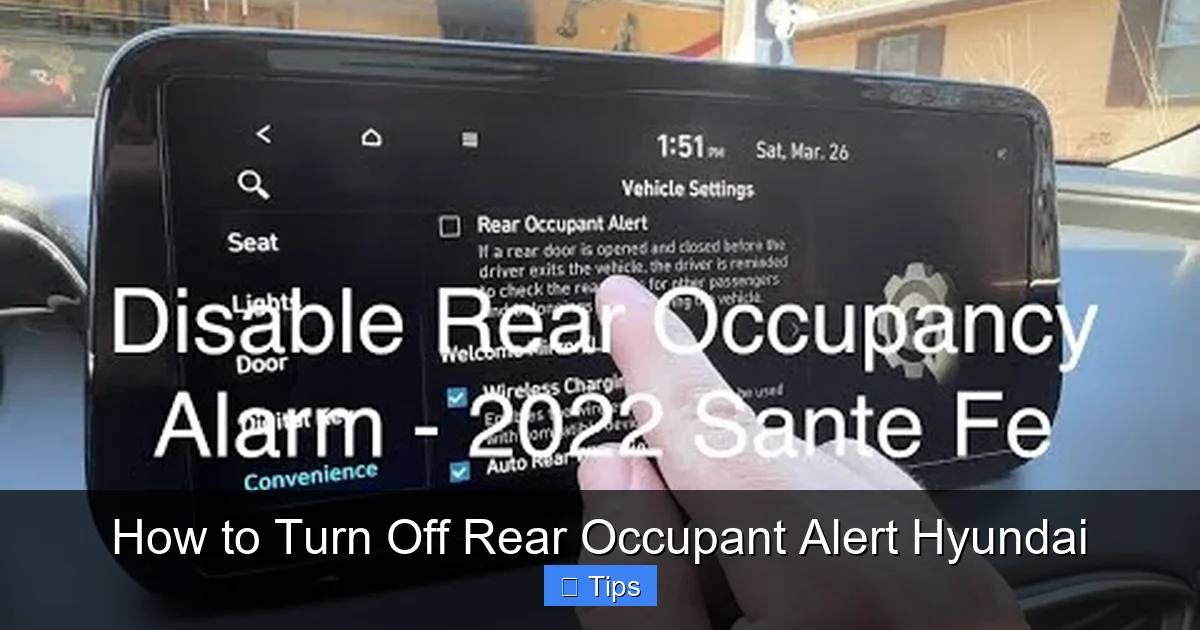
Visual guide about How to Turn Off Rear Occupant Alert Hyundai
Image source: carnewsbox.com
Now for the main event: how to turn off rear occupant alert Hyundai. The good news is that Hyundai does allow drivers to disable the system—though the method varies slightly depending on your vehicle model, trim level, and infotainment system.
Below, we’ll walk you through the most common ways to turn off the ROA, including menu-based settings, physical buttons, and model-specific instructions. We’ll also highlight which methods offer temporary vs. permanent deactivation.
Method 1: Using the Infotainment System Menu (Most Common)
The most widely used method to disable Rear Occupant Alert is through the vehicle’s touchscreen infotainment system. This approach works on most Hyundai models from 2020 onward, including the Elantra, Sonata, Tucson, Santa Fe, and Palisade.
Here’s how to do it:
1. Start your vehicle and ensure the infotainment screen is active.
2. Tap the “Settings” icon (usually looks like a gear or wrench) on the home screen.
3. Scroll down and select “Vehicle” or “Vehicle Settings.”
4. Look for “Driver Assistance” or “Safety” settings.
5. Find “Rear Occupant Alert” or “ROA” in the list.
6. Toggle the switch to “Off.”
Once disabled, the system will not trigger alerts for the remainder of that driving session. However, as mentioned earlier, the setting resets when you turn off the engine. So if you want to keep it off, you’ll need to repeat these steps each time you start the car.
💡 **Pro Tip:** On some models, you may need to press and hold the “Menu” button on the steering wheel to access quick settings. This can save time if you’re in a hurry.
Method 2: Physical Button (Santa Fe and Some Trims)
Certain Hyundai models—particularly the Santa Fe and higher trims of the Palisade—come equipped with a physical button to control the Rear Occupant Alert system. This is one of the fastest ways to turn it off without navigating menus.
Look for a button near the climate controls or center console with an icon that looks like a car with a person in the back seat. It may be labeled “ROA” or “Rear Occupant Alert.”
To use it:
– Press the button once to turn off the alert.
– The button may light up or display a message on the dashboard confirming it’s disabled.
– Like the menu method, this only lasts until you turn off the vehicle.
This method is ideal for drivers who frequently need to disable the alert and prefer a one-touch solution.
Model-Specific Instructions
Because Hyundai uses slightly different interfaces across its lineup, here’s a quick breakdown by popular model:
**Hyundai Elantra (2021–2024):**
– Go to Settings > Vehicle > Driver Assistance > Rear Occupant Alert > Off.
– No physical button available.
**Hyundai Tucson (2022–2024):**
– Use the touchscreen: Settings > Vehicle > Safety > Rear Occupant Alert > Toggle Off.
– Higher trims may include a physical button near the gear shifter.
**Hyundai Santa Fe (2021–2024):**
– Physical button located below the climate controls (look for the ROA icon).
– Alternatively, use Settings > Vehicle > Driver Assistance > Rear Occupant Alert.
**Hyundai Palisade (2020–2024):**
– Settings > Vehicle > Safety > Rear Occupant Alert > Off.
– Some trims include a dedicated button on the center console.
**Hyundai Sonata (2020–2024):**
– Settings > Vehicle > Driver Assistance > Rear Occupant Alert > Off.
Always refer to your owner’s manual for the most accurate instructions, as features can vary by region and model year.
Can You Permanently Disable It?
As of now, Hyundai does not offer a built-in option to permanently disable the Rear Occupant Alert system. The setting resets to “On” every time the vehicle is restarted.
Some third-party tools or dealerships claim they can disable it via diagnostic software, but this is not recommended. Tampering with safety systems can void your warranty, affect insurance coverage, and potentially disable other important features.
Additionally, in some states, permanently disabling federally recommended safety systems may violate regulations—especially if the vehicle is used for commercial purposes or ridesharing.
Our advice? Use the temporary disable method when needed, but keep the system active whenever possible—especially if you have children or pets.
Tips to Avoid Triggering the Alert Unnecessarily
Visual guide about How to Turn Off Rear Occupant Alert Hyundai
Image source: images.cars.com
If you don’t want to constantly turn off the ROA system but still find it overly sensitive, there are smart habits you can adopt to reduce false alerts.
Close Rear Doors Fully After Use
The ROA system triggers based on door openings, not occupancy. So even a partially opened door can activate it. Make it a habit to fully close all rear doors after loading or unloading items.
If you’re using the back seat for storage, consider keeping items in the trunk or cargo area instead. This minimizes the need to open rear doors during trips.
Use the Trunk Instead of Rear Doors
Whenever possible, load and unload through the trunk or liftgate rather than the rear passenger doors. This keeps the ROA system from detecting any door activity.
For example, if you’re picking up dry cleaning or groceries, place them in the trunk instead of the back seat. Not only does this reduce ROA triggers, but it also keeps your belongings more secure.
Disable Before Long Trips
If you’re embarking on a road trip and know you’ll be stopping frequently, consider turning off the ROA at the start of your journey. This prevents repeated alerts every time you park at rest stops, gas stations, or restaurants.
Just remember to re-enable it when you return home—especially if you have kids or pets.
Educate Passengers
If other family members or coworkers drive your Hyundai, make sure they understand how the ROA works. A simple reminder like, “Please close the rear doors completely” can prevent unnecessary alerts.
You might even add a sticky note on the rear door handle as a visual cue.
Update Your Vehicle Software
Hyundai occasionally releases software updates that improve system behavior. Check for updates through the Blue Link app or visit your local dealership. Newer firmware may reduce false positives or offer more customization options.
Safety Considerations: Should You Really Turn It Off?
We get it—the constant beeping and dashboard messages can be frustrating. But before you disable the Rear Occupant Alert, it’s worth considering the safety implications.
The ROA system was designed to address a very real and preventable problem: children and pets being left in vehicles. According to KidsAndCars.org, an average of 38 children die each year in the U.S. from vehicular heatstroke—and most of these tragedies occur when a caregiver forgets a child in the back seat.
While these incidents are rare, they’re almost always preventable. The ROA system serves as a critical backup, especially during busy mornings, schedule changes, or distractions.
That said, no system is perfect. False alerts are inconvenient, and over time, they can lead to “alert fatigue”—where drivers start ignoring warnings altogether, even legitimate ones.
The key is balance. Use the disable feature wisely: turn it off when you’re certain the back seat is empty and you won’t be transporting passengers. But keep it active during times when children or pets are present.
If you’re a parent, consider pairing the ROA with other safety habits, like placing your phone or purse in the back seat as a physical reminder to check before exiting.
Ultimately, the goal isn’t to eliminate the alert entirely—it’s to use it as a helpful tool, not a daily annoyance.
Conclusion
The Rear Occupant Alert system in Hyundai vehicles is a well-intentioned safety feature that can save lives. But for many drivers, it also brings unwanted noise, distraction, and frustration—especially when triggered by everyday activities like loading groceries or adjusting seats.
Fortunately, Hyundai provides straightforward ways to turn off rear occupant alert Hyundai, whether through the infotainment menu, a physical button, or model-specific settings. While the disable function is typically temporary (resetting after each engine cycle), knowing how to access it quickly can make your driving experience much smoother.
Remember: safety should always come first. Only disable the ROA when you’re confident the back seat is empty and won’t be used during your trip. And if you frequently transport children or pets, consider keeping the system active as an extra layer of protection.
By understanding how the system works—and how to control it—you can enjoy the benefits of modern vehicle safety without the daily hassle. Whether you drive an Elantra, Tucson, or Palisade, you now have the knowledge to manage your Rear Occupant Alert like a pro.
Drive safe, stay aware, and never underestimate the power of a simple reminder.
Frequently Asked Questions
Can I permanently disable the Rear Occupant Alert on my Hyundai?
No, Hyundai does not allow permanent disabling of the Rear Occupant Alert through standard settings. The system resets to “On” every time you restart the vehicle. Third-party modifications are not recommended and may void your warranty.
Why does the Rear Occupant Alert keep going off even when no one is in the back seat?
The system triggers based on whether a rear door was opened before starting the engine—not whether someone actually got in. Even briefly opening a door to load items can activate the alert.
Does turning off the alert affect other safety features?
No, disabling the Rear Occupant Alert only turns off that specific warning. Other safety systems like blind-spot monitoring, forward collision warning, and lane-keeping assist remain fully functional.
Will disabling the alert prevent Blue Link notifications?
Yes, if you turn off the ROA system, it will also stop push notifications from being sent to your phone via the Hyundai Blue Link app—provided your vehicle is equipped with that feature.
Is it illegal to disable the Rear Occupant Alert?
Currently, there are no federal laws prohibiting drivers from temporarily disabling the ROA. However, permanently altering safety systems may violate state regulations or affect insurance claims in rare cases.
Not all Hyundai models or trim levels include this feature. It’s typically found on vehicles from 2020 onward and may require specific safety packages. Check your owner’s manual or contact your dealer to confirm availability.

At CarLegit, we believe information should be clear, factual, and genuinely helpful. That’s why every guide, review, and update on our website is created with care, research, and a strong focus on user experience.