
Mastering cruise control on your Hyundai Tucson can make long drives more comfortable and fuel-efficient. This guide walks you through setup, operation, safety tips, and troubleshooting—so you can drive smarter, not harder.
If you’ve ever driven on a long highway stretch and felt your right foot getting tired from holding the accelerator, you’re not alone. That’s where cruise control comes in—a smart feature that maintains your vehicle’s speed without constant pedal pressure. On the Hyundai Tucson, cruise control is intuitive, reliable, and designed to enhance both comfort and fuel efficiency during steady-speed driving.
But here’s the thing: while cruise control sounds simple, using it correctly—and safely—requires a bit of know-how. Many drivers either underuse it or misuse it, especially when they’re new to the system. Some don’t realize it only works above a certain speed. Others forget how to cancel or resume properly. And a few even try using it in conditions where it’s not safe, like heavy rain or stop-and-go traffic.
That’s why this guide exists. We’ll walk you through everything you need to know about using cruise control on your Hyundai Tucson—from finding the buttons to mastering advanced features like adaptive cruise control (if equipped). Whether you’re driving a 2020 model or the latest 2024 Tucson, the basics remain consistent. By the end of this article, you’ll feel confident engaging, adjusting, and disengaging cruise control like a pro—while keeping safety front and center.
In This Article
- 1 Key Takeaways
- 2 📑 Table of Contents
- 3 Understanding Cruise Control on the Hyundai Tucson
- 4 Step-by-Step Guide: How to Use Cruise Control on Hyundai Tucson
- 5 Advanced Features: Adaptive Cruise Control (If Equipped)
- 6 Safety Tips and Best Practices
- 7 Troubleshooting Common Cruise Control Issues
- 8 Conclusion
- 9 Frequently Asked Questions
- 9.1 Can I use cruise control in the rain on my Hyundai Tucson?
- 9.2 Why won’t my cruise control turn on in my Tucson?
- 9.3 How do I resume cruise control after braking?
- 9.4 Does cruise control save fuel on the Hyundai Tucson?
- 9.5 Can I use cruise control in stop-and-go traffic?
- 9.6 What’s the difference between cruise control and adaptive cruise control?
Key Takeaways
- Locate the cruise control buttons: They’re typically on the right side of the steering wheel, including ON/OFF, SET, RES+, and COAST−.
- Activate only above 25 mph: Cruise control on the Hyundai Tucson works best at speeds over 25 mph for safety and system reliability.
- Use RES+ and COAST− to adjust speed: Tap RES+ to increase speed in 1 mph increments or hold to accelerate; COAST− slows down similarly.
- Cancel or resume with one touch: Press the brake pedal to cancel, or tap RES+ to resume your last set speed.
- Turn off completely when not in use: Use the main ON/OFF switch to deactivate the system and avoid accidental engagement.
- Practice in safe conditions first: Try cruise control on empty highways before using it in heavy traffic or bad weather.
- Know when not to use it: Avoid cruise control in rain, snow, traffic, or winding roads for better vehicle control.
📑 Table of Contents
Understanding Cruise Control on the Hyundai Tucson
Before you press any buttons, it helps to understand what cruise control actually does—and how Hyundai has designed it for the Tucson. At its core, cruise control is an electronic system that maintains a constant vehicle speed set by the driver. It does this by automatically adjusting the throttle (gas pedal) based on road conditions and resistance.
The Hyundai Tucson comes equipped with standard cruise control on most trims, and higher-end models may include Smart Cruise Control (SCC), which is Hyundai’s version of adaptive cruise control. Standard cruise control maintains a fixed speed, while adaptive cruise control can automatically slow down or speed up to maintain a safe following distance from the vehicle ahead—using radar and camera sensors.
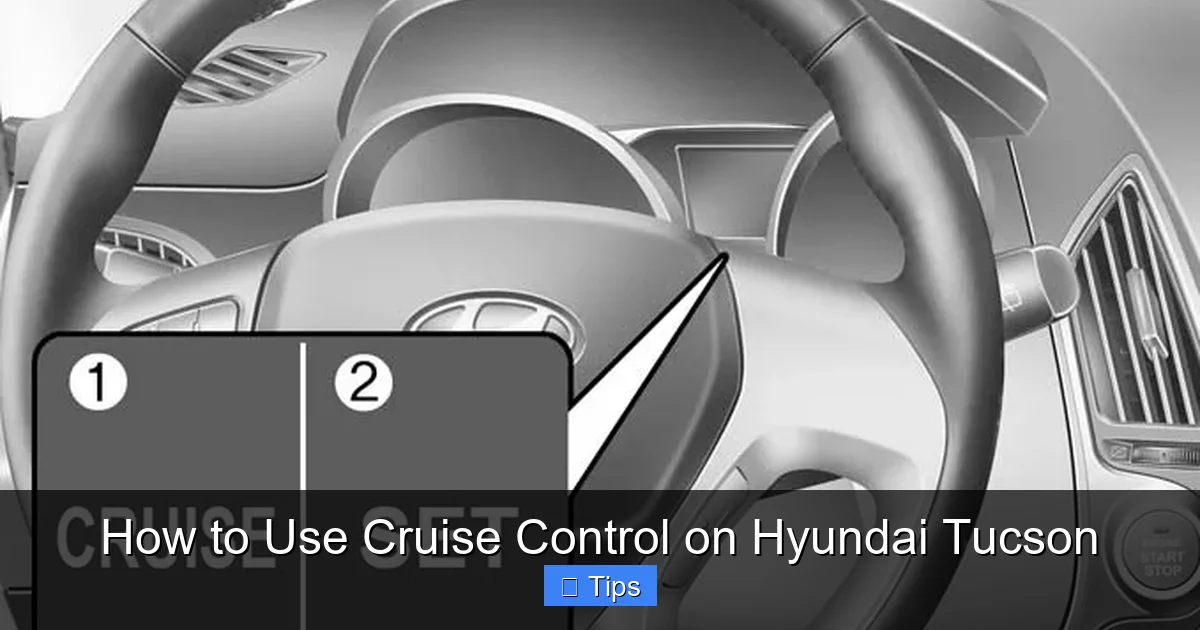
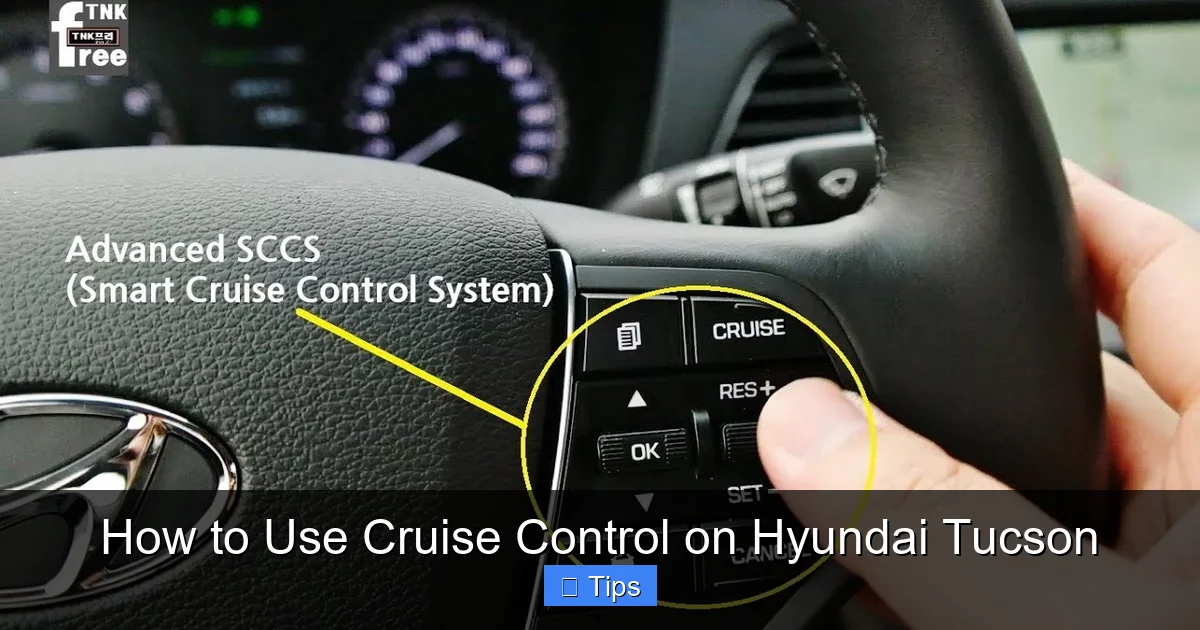
For this guide, we’ll focus on the standard system first, then touch on adaptive features later. The standard cruise control on the Tucson is activated via buttons on the right side of the steering wheel. These include:
– **CRUISE**: Turns the system on or off
– **SET–**: Sets the current speed or decreases speed
– **RES+**: Resumes previous speed or increases speed
– **CANCEL**: Cancels cruise control without turning it off
It’s important to note that cruise control is not an autonomous driving feature. It does not steer, brake for obstacles, or detect lane markings. You remain fully in control of steering, braking, and situational awareness at all times. Think of it as a helpful assistant for your right foot—not a replacement for your attention.
Where Are the Cruise Control Buttons Located?
On the Hyundai Tucson, the cruise control buttons are conveniently placed on the right side of the steering wheel for easy access without taking your hands off the wheel. Here’s a quick breakdown:
– The **CRUISE** button is usually the main toggle—press it once to turn the system on (you’ll see a light on the dashboard).
– The **SET–** button is used to set your current speed or reduce it incrementally.
– The **RES+** button resumes a previously set speed or increases speed.
– The **CANCEL** button (sometimes labeled “CNCL”) stops cruise control without turning off the system.
Some models may combine functions—for example, pressing and holding RES+ increases speed continuously, while tapping it raises speed by 1 mph. Similarly, holding SET– decreases speed smoothly.
Always refer to your owner’s manual for your specific model year, as button layouts can vary slightly. But in general, the right-side steering wheel cluster is your go-to spot.
How Cruise Control Works in the Tucson
Once activated, the cruise control system uses input from the vehicle’s speed sensors and throttle position to maintain your selected speed. If you start going uphill, the system opens the throttle more to compensate. Going downhill, it may reduce throttle or even apply light braking (on models with brake-based cruise control) to prevent speeding.
The system is designed to work best on flat, open roads like highways or interstates. It’s not intended for city driving, winding mountain roads, or areas with frequent stops. Using it in inappropriate conditions can reduce safety and increase wear on components.
Also, keep in mind that cruise control does not improve fuel economy in all situations. On flat highways, it can help by maintaining a steady speed and avoiding unnecessary acceleration. But on hilly terrain, it may use more fuel than a skilled driver who anticipates elevation changes.
Step-by-Step Guide: How to Use Cruise Control on Hyundai Tucson
Visual guide about How to Use Cruise Control on Hyundai Tucson
Image source: hyundaitucsonmanual.com
Now that you know the basics, let’s walk through how to actually use cruise control on your Hyundai Tucson. Follow these steps in order for safe and effective operation.
Step 1: Ensure You’re Driving at a Safe Speed
Cruise control on the Hyundai Tucson only works when the vehicle is traveling at or above approximately 25 mph (40 km/h). This is a safety feature—activating it at lower speeds could lead to unintended acceleration or poor control.
So, before you even think about turning it on, make sure you’re on a highway or open road and have reached at least 25 mph. Avoid using it in residential areas, school zones, or heavy traffic.
Step 2: Turn On the Cruise Control System
With your foot on the accelerator and speed above 25 mph, press the **CRUISE** button on the right side of the steering wheel. You’ll see a cruise control indicator light appear on your instrument cluster—usually a green or white icon that looks like a speedometer or car with arrows.
This light means the system is ready, but it’s not active yet. Think of it like turning on a TV—it’s powered up, but not playing anything.
Step 3: Set Your Desired Speed
Once the system is on, drive at the speed you want to maintain—say, 65 mph on the highway. When you reach that speed, press the **SET–** button. The vehicle will now hold that speed automatically, and your foot can come off the accelerator.
You’ll notice the speedometer may show a small marker or highlighted number indicating the set speed. This is your cruising speed, and the Tucson will do its best to maintain it.
Step 4: Adjust Speed as Needed
If you want to go faster, press and hold the **RES+** button. The vehicle will accelerate smoothly until you release it. Alternatively, tap RES+ repeatedly to increase speed in 1 mph increments—great for fine-tuning your pace.
To slow down, press and hold the **SET–** button. The Tucson will decelerate gradually. Tapping SET– reduces speed by 1 mph per tap.
These adjustments are perfect for adapting to speed limit changes or traffic flow without canceling cruise control entirely.
Step 5: Cancel or Resume Cruise Control
There are two ways to stop cruise control:
1. **Press the brake pedal**: This is the most common method. As soon as you tap the brakes, cruise control disengages immediately. The system remembers your last set speed, so you can resume it later.
2. **Press the CANCEL button**: This also stops cruise control without turning off the system. Useful if you need to slow down briefly without braking (e.g., avoiding a pothole).
To resume your previous speed, simply press the **RES+** button. The Tucson will accelerate back to the last set speed and maintain it.
Step 6: Turn Off Cruise Control Completely
When you’re done using cruise control—say, you’re exiting the highway or entering city traffic—press the **CRUISE** button again to turn the system off. This clears the memory and ensures it won’t accidentally re-engage.
It’s a good habit to turn it off when not in use, especially if you’re parking or driving in unpredictable conditions.
Advanced Features: Adaptive Cruise Control (If Equipped)
Visual guide about How to Use Cruise Control on Hyundai Tucson
Image source: hyundaipartsdeal.com
If your Hyundai Tucson has the Smart Cruise Control (SCC) feature—available on SEL, Limited, and hybrid/trims—you have access to adaptive cruise control. This advanced system does more than just maintain speed; it also monitors traffic ahead and adjusts your speed to keep a safe distance.
How Adaptive Cruise Control Works
Using a front-facing radar sensor (usually behind the grille) and a camera near the rearview mirror, the system detects vehicles in your lane. You can set a following distance (short, medium, or long) and a target speed. If the car ahead slows down, your Tucson will automatically brake to maintain the gap. When traffic clears, it accelerates back to your set speed.
This feature is incredibly helpful in stop-and-go traffic or long commutes. It reduces driver fatigue and can help prevent rear-end collisions.
Activating Adaptive Cruise Control
The process is similar to standard cruise control, but with extra steps:
1. Turn on the system using the **CRUISE** button.
2. Set your speed with **SET–**.
3. Press the **Distance** button (usually on the same stalk or steering wheel) to choose your following gap.
4. The system will now maintain both speed and distance.
If the vehicle ahead stops completely, some models can bring you to a full stop and resume when traffic moves again (within a few seconds). For longer stops, you may need to tap the accelerator or press RES+ to re-engage.
Limitations of Adaptive Cruise Control
While powerful, adaptive cruise control isn’t perfect. It may struggle in heavy rain, snow, or fog. It can be confused by sudden lane changes or vehicles cutting in front of you. And it won’t detect pedestrians, cyclists, or stopped vehicles in certain scenarios.
Always stay alert and ready to take control. The system is a driver aid—not a substitute for attention.
Safety Tips and Best Practices
Visual guide about How to Use Cruise Control on Hyundai Tucson
Image source: i.ytimg.com
Using cruise control safely means knowing when to use it—and when to avoid it altogether. Here are some essential tips to keep you and your passengers safe.
Use Cruise Control Only in Appropriate Conditions
Cruise control is ideal for dry, clear weather on straight, flat highways. Avoid using it in:
– Rain or wet roads (increased risk of hydroplaning)
– Snow or ice (reduced traction)
– Heavy traffic (frequent speed changes)
– Winding or hilly roads (system may overcorrect)
– Construction zones or areas with debris
In these conditions, manual control gives you better responsiveness and safety.
Always Keep Your Hands on the Wheel
Even with cruise control engaged, your hands should stay on the steering wheel. You’re responsible for steering, lane changes, and reacting to hazards. Never use cruise control as an excuse to relax too much.
Be Ready to Brake at Any Time
If a car suddenly cuts in front of you or an obstacle appears, you must brake immediately. Cruise control won’t react to emergencies. Practice braking while cruise control is on so you’re comfortable with the response.
Don’t Rely on Cruise Control in Traffic
In stop-and-go traffic, cruise control can be more annoying than helpful. The constant accelerating and braking may frustrate other drivers and increase fuel consumption. Use it only when traffic is flowing steadily.
Turn It Off When Parking or Idling
Always deactivate cruise control when you’re not driving. Leaving it on while parked or idling could lead to accidental engagement—especially if a child or pet touches the buttons.
Troubleshooting Common Cruise Control Issues
Sometimes, cruise control may not work as expected. Here’s how to troubleshoot common problems.
Cruise Control Won’t Turn On
If pressing the CRUISE button does nothing, check:
– Is the vehicle speed above 25 mph?
– Is the brake pedal fully released? (Some systems disable cruise if the brake is slightly depressed)
– Is there a warning light on the dashboard? (Check for ABS, brake, or engine issues)
– Is the fuse blown? (Refer to your owner’s manual for fuse locations)
Cruise Control Won’t Set or Holds Incorrect Speed
This could be due to:
– A faulty throttle position sensor
– Low brake fluid or brake switch issues
– Software glitches (try turning the car off and on)
– Sensor blockage (dirt or snow on radar/camera)
If problems persist, visit a Hyundai service center.
Cruise Control Disengages Unexpectedly
Common causes include:
– Hitting a bump that triggers the brake sensor
– Pressing the clutch (on manual models—though most Tucsons are automatic)
– System detecting a fault and shutting down as a safety measure
Always check your dashboard for warning messages.
Conclusion
Using cruise control on your Hyundai Tucson is a simple yet powerful way to make long drives more comfortable and efficient. By following the steps in this guide—activating at the right speed, adjusting smoothly, and knowing when to disengage—you can enjoy the benefits without compromising safety.
Remember, cruise control is a tool, not a toy. It’s designed to assist you, not replace your judgment. Use it wisely on open highways, avoid it in bad weather or traffic, and always stay alert.
Whether you’re commuting across state lines or taking a weekend road trip, mastering cruise control will help you arrive relaxed and ready. And if your Tucson has adaptive cruise control, you’ve got an even smarter co-pilot to keep you safe and steady.
So next time you hit the highway, give it a try. Set your speed, relax your foot, and let your Hyundai Tucson do the work—while you enjoy the ride.
Frequently Asked Questions
Can I use cruise control in the rain on my Hyundai Tucson?
It’s not recommended. Wet roads increase the risk of hydroplaning, and cruise control may not respond quickly to changing traction. For safety, avoid using it in rain, snow, or icy conditions.
Why won’t my cruise control turn on in my Tucson?
Check if your speed is above 25 mph, the brake pedal is fully released, and there are no warning lights. Also, ensure the system isn’t disabled due to a fault or blown fuse.
How do I resume cruise control after braking?
Simply press the RES+ button on the steering wheel. Your Tucson will accelerate back to the last set speed and maintain it automatically.
Does cruise control save fuel on the Hyundai Tucson?
It can on flat highways by maintaining steady speed and reducing unnecessary acceleration. However, on hilly roads, it may use more fuel than a skilled driver who anticipates elevation changes.
Can I use cruise control in stop-and-go traffic?
Standard cruise control isn’t ideal for frequent stops. If your Tucson has adaptive cruise control, it can help in slow traffic—but stay alert and ready to take over.
What’s the difference between cruise control and adaptive cruise control?
Standard cruise control maintains a set speed. Adaptive cruise control (Smart Cruise Control) also adjusts speed to maintain a safe distance from the vehicle ahead, using radar and camera sensors.

At CarLegit, we believe information should be clear, factual, and genuinely helpful. That’s why every guide, review, and update on our website is created with care, research, and a strong focus on user experience.