
Auto Hold on a Hyundai is a convenient safety feature that automatically keeps your vehicle stationary after you come to a complete stop—no need to keep your foot on the brake. It’s especially helpful in traffic, on hills, or at long red lights, giving you a more relaxed and confident driving experience.
Have you ever been stuck in bumper-to-bumper traffic, constantly pressing the brake pedal, only to feel your leg start to cramp after just a few minutes? Or maybe you’ve hesitated at a steep hill stop, worried your car might roll backward when you switch from brake to gas? If you drive a Hyundai—especially a newer model—you might have noticed a button labeled “Auto Hold” and wondered, “What does Auto Hold mean on a Hyundai?” You’re not alone. This feature is one of Hyundai’s smartest innovations, designed to make driving easier, safer, and more comfortable. And once you understand how it works, you’ll wonder how you ever drove without it.
Auto Hold is more than just a convenience—it’s a thoughtful integration of safety and technology that reflects Hyundai’s commitment to driver comfort and vehicle intelligence. Whether you’re navigating city streets, cruising on the highway, or parking on an incline, Auto Hold steps in at the right moment to take the strain off your foot and give you peace of mind. It’s not magic, but it sure feels like it. In this guide, we’ll break down exactly what Auto Hold does, how it works, when to use it, and why it’s becoming a must-have feature for modern drivers. We’ll also cover which Hyundai models offer it, how to activate and deactivate it, and tips to get the most out of it. So buckle up—let’s dive in and uncover the full story behind Auto Hold on a Hyundai.
In This Article
- 1 Key Takeaways
- 2 📑 Table of Contents
- 3 What Is Auto Hold and How Does It Work?
- 4 When and Where Should You Use Auto Hold?
- 5 Which Hyundai Models Come with Auto Hold?
- 6 How to Activate and Use Auto Hold on Your Hyundai
- 7 Benefits of Using Auto Hold
- 8 Common Myths and Misconceptions About Auto Hold
- 9 Maintenance and Troubleshooting Tips
- 10 Conclusion
- 11 Frequently Asked Questions
Key Takeaways
- Auto Hold keeps your Hyundai stationary without pressing the brake pedal after coming to a full stop, improving comfort and reducing fatigue.
- It works with the electronic parking brake (EPB) system and activates automatically when certain conditions are met, such as the driver’s door being closed and the seatbelt fastened.
- Useful in heavy traffic, hills, and long stops, Auto Hold prevents rollback and reduces the chance of accidental acceleration.
- To disengage, simply press the accelerator—the system releases the brakes smoothly when you’re ready to move.
- Available on many Hyundai models including the Tucson, Santa Fe, Elantra, and Palisade, typically in higher trims or as part of safety packages.
- It enhances safety and convenience but should not replace attentive driving—always stay alert and in control.
- Regular maintenance ensures optimal performance—keep sensors and brake systems clean and functional.
📑 Table of Contents
What Is Auto Hold and How Does It Work?
At its core, Auto Hold is an advanced driver-assist feature that automatically applies the brakes after your Hyundai comes to a complete stop—keeping the vehicle stationary without requiring you to keep your foot on the brake pedal. Think of it as a temporary parking brake that kicks in only when needed and releases the moment you’re ready to go. It’s especially useful in situations where you’re stopped for more than a few seconds, like at a long traffic light, in heavy congestion, or when waiting at a railroad crossing.
So how does it actually work? Auto Hold is part of Hyundai’s electronic parking brake (EPB) system, which replaces the traditional handbrake lever with a button or switch. When you press the Auto Hold button (usually located near the gear shifter or center console), the system becomes active. Once you bring your car to a full stop—say, at a red light—the system detects that the vehicle is stationary and automatically engages the brakes. You can then lift your foot off the brake pedal, and the car will remain still. When you’re ready to move, simply press the accelerator, and Auto Hold releases the brakes smoothly, allowing you to drive off without any rollback or hesitation.
The system relies on a combination of sensors and electronic controls. It monitors wheel speed, brake pressure, and vehicle angle to determine when to engage and disengage. For example, if you’re stopped on a hill, Auto Hold will hold the car firmly in place, preventing any backward movement. It also communicates with the engine control unit to ensure a seamless transition when you accelerate. Importantly, Auto Hold only works when certain conditions are met: the driver’s door must be closed, the seatbelt should be fastened, and the engine must be running. This ensures the feature is used safely and responsibly.
One of the best things about Auto Hold is that it reduces driver fatigue. Imagine sitting in traffic for 20 minutes—constantly pressing the brake pedal can be tiring, especially on long commutes. With Auto Hold, you can rest your foot, stretch your leg, or even check your phone (safely, of course) without worrying about the car creeping forward. It’s a small change that makes a big difference in daily driving comfort.
When and Where Should You Use Auto Hold?
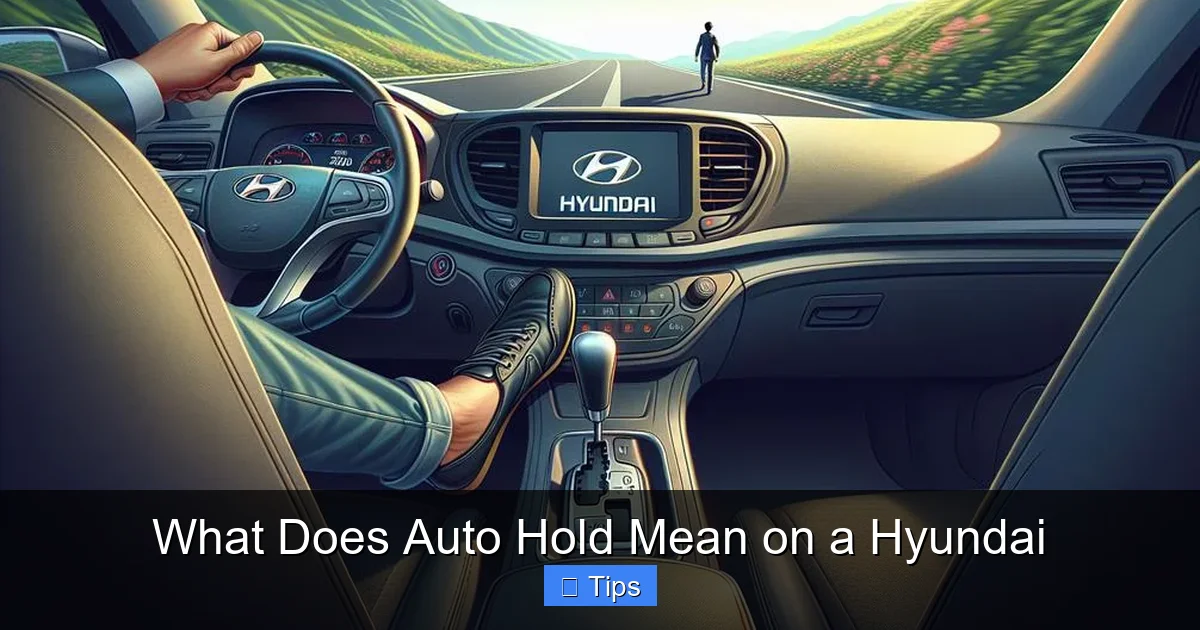
Visual guide about What Does Auto Hold Mean on a Hyundai
Image source: hyundaimaintenance.com
Now that you know what Auto Hold does, let’s talk about when it’s most useful. This feature shines in a variety of everyday driving scenarios, particularly those involving frequent stops or challenging terrain. Here are some of the most common situations where Auto Hold can make your drive smoother and safer.
Heavy Traffic and Stop-and-Go Driving
If you live in a city or commute during rush hour, you’re no stranger to stop-and-go traffic. One moment you’re moving, the next you’re crawling, then stopping completely. In these conditions, constantly pressing the brake pedal can be exhausting. Auto Hold eliminates that strain by automatically holding the car still whenever you come to a full stop. You can take your foot off the brake, relax, and wait for the light to change or traffic to move—without worrying about rolling forward when you release the pedal.
For example, imagine you’re stuck in a traffic jam on the highway. Cars are moving in fits and starts, and you’re constantly braking and accelerating. With Auto Hold, every time you stop completely, the system takes over. You don’t have to keep your foot pressed down, which reduces leg fatigue and makes the drive more comfortable. It’s especially helpful during long commutes or road trips through busy urban areas.
Driving on Hills and Inclines
Hill starts can be nerve-wracking, especially for new drivers or in manual transmission vehicles. There’s always the fear of rolling backward when you switch from the brake to the accelerator. But even in automatic Hyundais, the transition can feel jerky or uncertain. Auto Hold solves this problem by holding the car firmly in place on an incline.
Let’s say you’re stopped at a steep intersection or pulling into a parking spot on a hill. With Auto Hold active, the moment you come to a stop, the brakes engage automatically. You can lift your foot off the brake, and the car won’t move—even if the hill is steep. When you’re ready to go, just press the accelerator, and the system releases the brakes smoothly, allowing you to drive forward without any rollback. This not only prevents accidents but also builds confidence, especially in tricky driving conditions.
Long Traffic Lights and Railroad Crossings
We’ve all been there: stopped at a red light that seems to last forever, or waiting at a railroad crossing with the gates down. In these situations, it’s tempting to shift into park or engage the parking brake manually—but that’s not always practical, especially if the light changes quickly. Auto Hold offers the perfect middle ground.
When you stop at a long red light, Auto Hold keeps the car still without you having to keep your foot on the brake. You can relax, check your mirrors, or even adjust the radio. When the light turns green, simply press the accelerator, and you’re on your way. The same applies at railroad crossings or toll booths—no need to fumble with the parking brake or worry about rolling forward.
Parking in Tight Spaces
While Auto Hold isn’t a parking aid per se, it can be helpful when maneuvering in tight spaces. For instance, if you’re parallel parking on a slight incline, Auto Hold can keep the car from rolling while you adjust your position. It gives you a moment to think and act without the pressure of constant braking.
When Not to Use Auto Hold
While Auto Hold is incredibly useful, it’s not meant for every situation. Avoid using it when driving off-road, on loose gravel, or in deep snow, as the automatic braking could interfere with traction control or cause the wheels to lock. Also, if you’re towing a trailer, check your owner’s manual—some Hyundai models disable Auto Hold when a trailer is detected to prevent unintended braking.
In short, Auto Hold is best used in normal driving conditions where you expect frequent stops. It’s not a replacement for the parking brake when the car is parked for extended periods, but rather a tool to make driving more comfortable and safe during short stops.
Which Hyundai Models Come with Auto Hold?
Visual guide about What Does Auto Hold Mean on a Hyundai
Image source: theautoinsiderblog.com
Auto Hold is available on a wide range of Hyundai vehicles, particularly in higher trims and newer model years. While it’s not standard on every Hyundai, it’s becoming increasingly common as part of Hyundai’s SmartSense safety suite or premium convenience packages. Here’s a breakdown of some popular Hyundai models that typically include Auto Hold.
Hyundai Tucson
The Hyundai Tucson, one of the brand’s best-selling SUVs, offers Auto Hold on most trims starting from the SEL and up. It’s often included in the Convenience Package or as part of the Limited trim’s standard features. Whether you’re driving the gas-powered Tucson or the hybrid version, Auto Hold adds a layer of comfort and safety, especially for city drivers.
Hyundai Santa Fe
The Santa Fe, Hyundai’s midsize SUV, also comes equipped with Auto Hold on higher trims like the SEL Premium, Limited, and Calligraphy. It’s a great feature for families who frequently drive in traffic or on hilly terrain. The Santa Fe’s spacious interior and advanced tech make Auto Hold a natural fit for long trips and daily commutes alike.
Hyundai Elantra
Even in the compact sedan segment, Hyundai doesn’t skimp on innovation. The Elantra offers Auto Hold on trims such as the SEL, N Line, and Limited. It’s a standout feature in its class, giving the Elantra an edge over competitors that don’t offer similar technology. Whether you’re navigating downtown streets or cruising on the highway, Auto Hold makes the Elantra a pleasure to drive.
Hyundai Palisade
As Hyundai’s flagship three-row SUV, the Palisade includes Auto Hold as a standard feature on most trims, including the SEL, Limited, and Calligraphy. With its luxurious interior and advanced safety systems, the Palisade is designed for comfort and confidence—and Auto Hold plays a key role in that experience.
Hyundai Sonata
The Sonata, Hyundai’s midsize sedan, also offers Auto Hold on higher trims like the SEL Plus and Limited. It’s particularly useful for commuters who spend a lot of time in traffic. The Sonata’s smooth ride and responsive handling are enhanced by Auto Hold, making it a top choice for drivers who value both performance and convenience.
Hyundai Kona and Ioniq 5
Even Hyundai’s smaller and electric vehicles aren’t left out. The Kona SUV and the futuristic Ioniq 5 electric crossover both offer Auto Hold on select trims. In the Ioniq 5, the feature integrates seamlessly with the vehicle’s regenerative braking system, providing a smooth and efficient driving experience.
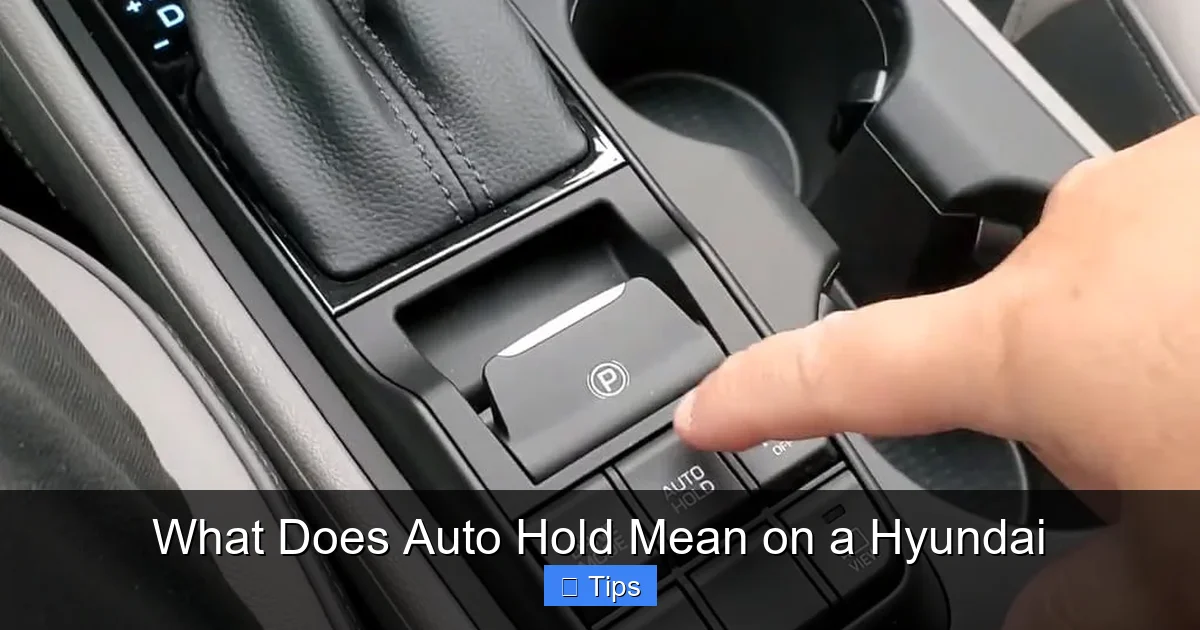
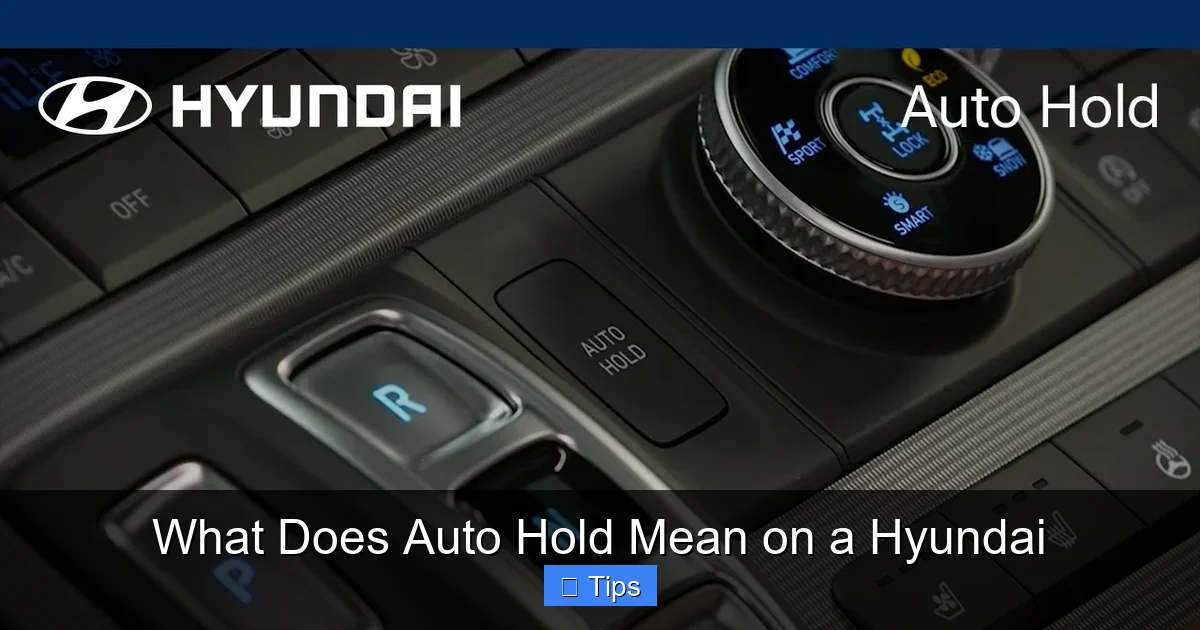
To confirm whether your specific Hyundai model and trim include Auto Hold, check your owner’s manual or look for the Auto Hold button—usually labeled with a car icon and the words “AUTO HOLD” or “HOLD.” It’s typically located near the gear shifter, center console, or electronic parking brake switch.
How to Activate and Use Auto Hold on Your Hyundai
Visual guide about What Does Auto Hold Mean on a Hyundai
Image source: i.ytimg.com
Using Auto Hold is simple, but it’s important to understand the steps to ensure it works properly and safely. Here’s a step-by-step guide to activating and using Auto Hold on your Hyundai.
Step 1: Locate the Auto Hold Button
First, find the Auto Hold button in your vehicle. It’s usually located near the gear shifter, center console, or next to the electronic parking brake (EPB) switch. The button typically has an icon of a car with the word “HOLD” or “AUTO HOLD” beneath it. On some models, it may be integrated into the EPB button.
Step 2: Turn On Auto Hold
With the engine running, press the Auto Hold button once. You’ll usually see a green indicator light on the dashboard that says “AUTO HOLD” or shows the same icon. This means the system is active and ready to engage.
Step 3: Drive Normally
Once Auto Hold is on, drive as you normally would. The system doesn’t interfere with regular braking—it only activates after you come to a complete stop.
Step 4: Come to a Full Stop
When you brake to a complete stop—say, at a traffic light or in traffic—the system will automatically engage the brakes. You’ll feel the car hold steady, and you can lift your foot off the brake pedal. The car will remain stationary, even on a hill.
Step 5: Release by Accelerating
When you’re ready to move, simply press the accelerator. Auto Hold will release the brakes smoothly, and the car will begin to move forward. There’s no need to press any buttons or shift gears—the transition is seamless.
Step 6: Turn Off Auto Hold (Optional)
If you prefer not to use Auto Hold, press the button again to turn it off. The indicator light will go out, and the system will no longer engage automatically. You can turn it back on at any time.
Important Tips for Using Auto Hold
– Always ensure the driver’s door is closed and the seatbelt is fastened—Auto Hold won’t activate otherwise.
– The system only works when the engine is running and the vehicle is in drive (D) or reverse (R).
– If the battery is low or the system detects a fault, Auto Hold may not function. Check your dashboard for warning lights.
– Don’t rely on Auto Hold as a parking brake for long-term stops—use the electronic parking brake instead.
With a little practice, using Auto Hold becomes second nature. It’s one of those features that you’ll wonder how you ever lived without.
Benefits of Using Auto Hold
Auto Hold isn’t just a fancy button—it offers real, tangible benefits that improve your driving experience. Let’s explore the key advantages of using this feature regularly.
Reduced Driver Fatigue
One of the biggest benefits of Auto Hold is that it reduces physical strain on the driver. Constantly pressing the brake pedal, especially in traffic, can lead to leg fatigue and discomfort. Auto Hold eliminates this by taking over the braking function during stops. This is especially helpful on long commutes or road trips, where every bit of comfort counts.
Improved Safety on Hills
Hill starts can be tricky, even for experienced drivers. Auto Hold prevents rollback by holding the car firmly in place until you’re ready to accelerate. This reduces the risk of collisions with vehicles behind you and gives you confidence when driving on inclines.
Smoother Driving Experience
Auto Hold ensures a smooth transition from stop to go. There’s no jerking or hesitation when you press the accelerator—the system releases the brakes gradually, matching the engine’s power output. This makes your drive feel more refined and controlled.
Convenience in Traffic
In heavy traffic, Auto Hold lets you relax during stops. You can take your foot off the brake, stretch, or even check your phone (safely and legally). It turns stressful driving situations into more manageable ones.
Enhanced Confidence for New Drivers
For drivers who are still gaining confidence—especially on hills or in busy areas—Auto Hold provides an extra layer of security. It reduces the fear of rolling backward or stalling, making the learning process less intimidating.
Better Fuel Efficiency (Indirectly)
While Auto Hold doesn’t directly improve fuel economy, it can help by reducing unnecessary braking and acceleration. By holding the car still without engine braking, it allows for smoother driving patterns, which can contribute to better overall efficiency.
Common Myths and Misconceptions About Auto Hold
Despite its benefits, Auto Hold is sometimes misunderstood. Let’s clear up a few common myths so you can use the feature with confidence.
Myth 1: Auto Hold Is the Same as Cruise Control
No, Auto Hold is not cruise control. Cruise control maintains a set speed on the highway, while Auto Hold only activates when the car is stopped. They serve completely different purposes.
Myth 2: Auto Hold Works When the Car Is Off
Auto Hold only works when the engine is running. Once you turn off the car, you must use the electronic parking brake to keep it stationary.
Myth 3: Auto Hold Can Be Used as a Parking Brake
Auto Hold is designed for short stops, not long-term parking. For extended stops, always engage the electronic parking brake.
Myth 4: Auto Hold Slows Down the Car
Auto Hold does not slow the car down—it only holds it after you’ve already stopped. You still use the brake pedal to slow and stop the vehicle.
Myth 5: Auto Hold Works in All Weather Conditions
While Auto Hold is reliable in most conditions, extreme weather like heavy snow or ice can affect sensor performance. Always drive cautiously and be prepared to use the brake pedal if needed.
Maintenance and Troubleshooting Tips
To keep Auto Hold working properly, follow these maintenance and troubleshooting tips.
Keep Sensors Clean
Dirt, snow, or ice on wheel speed sensors can interfere with Auto Hold. Regularly clean your wheels and sensors, especially in winter.
Check the Battery
A weak battery can affect electronic systems. If Auto Hold isn’t working, have your battery tested.
Watch for Warning Lights
If the Auto Hold indicator flashes or stays on, there may be a system fault. Consult your owner’s manual or visit a Hyundai service center.
Update Software
Hyundai occasionally releases software updates that improve system performance. Ask your dealer about available updates during routine service.
Don’t Override the System
Avoid pressing the brake pedal forcefully while Auto Hold is active—it can confuse the system. Let it do its job.
Conclusion
So, what does Auto Hold mean on a Hyundai? It means smarter, safer, and more comfortable driving. This innovative feature takes the stress out of stopping by automatically holding your car still when you come to a complete stop—no foot on the brake required. Whether you’re stuck in traffic, navigating a hill, or waiting at a long red light, Auto Hold gives you peace of mind and reduces fatigue.
From the Tucson to the Palisade, many Hyundai models now include this feature, making it accessible to a wide range of drivers. It’s easy to use, integrates seamlessly with other safety systems, and enhances the overall driving experience. While it’s not a replacement for attentive driving or the parking brake, it’s a valuable tool that makes everyday driving more enjoyable.
If you drive a Hyundai with Auto Hold, take the time to learn how it works and use it regularly. You’ll quickly appreciate the convenience and confidence it brings. And if you’re considering a Hyundai, look for models with Auto Hold—it’s a feature that truly makes a difference.
So the next time you see that “AUTO HOLD” button, don’t ignore it. Press it, try it, and experience the difference for yourself. Your feet—and your peace of mind—will thank you.
Frequently Asked Questions
What does Auto Hold do on a Hyundai?
Auto Hold automatically keeps your Hyundai stationary after you come to a complete stop, allowing you to lift your foot off the brake pedal. It’s especially useful in traffic, on hills, or at long stops.
Is Auto Hold the same as the parking brake?
No, Auto Hold is not the same as the parking brake. Auto Hold is for short stops and releases when you press the accelerator, while the parking brake is for long-term parking and must be manually engaged and disengaged.
Can I use Auto Hold on a hill?
Yes, Auto Hold works on hills and prevents rollback by holding the car firmly in place until you’re ready to accelerate.
Does Auto Hold work in all Hyundai models?
Auto Hold is available on many Hyundai models, including the Tucson, Santa Fe, Elantra, and Palisade, typically in higher trims or as part of safety packages. Check your owner’s manual to confirm.
How do I turn off Auto Hold?
To turn off Auto Hold, simply press the Auto Hold button again. The indicator light on the dashboard will go out, and the system will no longer engage automatically.
Why isn’t Auto Hold working in my Hyundai?
Auto Hold may not work if the driver’s door is open, the seatbelt is unfastened, the engine is off, or there’s a system fault. Check for warning lights and consult your owner’s manual or a Hyundai service center if issues persist.

At CarLegit, we believe information should be clear, factual, and genuinely helpful. That’s why every guide, review, and update on our website is created with care, research, and a strong focus on user experience.