
Featured image for How Do You Change The Battery In A Volkswagen Key
Replacing your Volkswagen key battery is a straightforward process you can do yourself in minutes. You typically need only a small flat tool to open the fob and a CR2032 battery for the swap. Following a simple guide ensures you avoid damage and quickly restore your key’s full functionality.
In This Article
- 1 Replace Your Volkswagen Key Battery: Easy Step By Step Guide
- 1.1 Key Takeaways
- 1.2 📑 Table of Contents
- 1.3 Understanding Your Volkswagen Key Type
- 1.4 Gathering Your Tools and Supplies
- 1.5 Step-by-Step: Opening Your Volkswagen Key Fob
- 1.6 Swapping the Battery and Reassembly
- 1.7 Volkswagen Key Battery Types: A Quick Reference
- 1.8 Testing and Troubleshooting Your New Key Battery
- 1.9 Conclusion: Empowerment in Your Pocket
- 1.10 Frequently Asked Questions
- 1.10.1 What battery does my Volkswagen key use?
- 1.10.2 How do I open my Volkswagen key fob to replace the battery?
- 1.10.3 Do I need any special tools to change the battery in my Volkswagen key?
- 1.10.4 Can I replace the Volkswagen key battery myself, or do I need a professional?
- 1.10.5 What are the signs that my Volkswagen key battery is dying?
- 1.10.6 Do I need to reprogram my Volkswagen key after changing the battery?
Replace Your Volkswagen Key Battery: Easy Step By Step Guide
It happens to the best of us. You’re rushing out the door, arms full of groceries, and you press the button on your Volkswagen key fob. Nothing. No comforting chirp, no flash of lights. Maybe the door unlocks, but the push-button start in your Tiguan or Golf just flashes a cryptic “Key Not Detected” message. That little plastic remote that grants you access to your car has, quite literally, run out of juice.
Before you panic and think you need an expensive trip to the dealership, take a deep breath. I’ve been there, standing in my driveway feeling utterly locked out of my own Jetta. But here’s the great news: replacing your Volkswagen key battery is one of the easiest, most satisfying DIY tasks you can do. It takes less than five minutes, costs just a few dollars, and requires no special tools. In this guide, I’ll walk you through every single step, sharing the little tips and tricks I’ve learned to make it foolproof. You’ll save time, money, and the hassle of being stranded with a dead key fob.
This isn’t just about swapping a battery; it’s about taking back a little control and understanding the handy device you use every day. So, grab your Volkswagen key, and let’s bring it back to life together.
Key Takeaways
- Identify your key fob type: Methods differ for flip-key and standard remote designs.
- Gather the right tools: A small flathead screwdriver is often essential.
- Open the casing gently: Pry carefully to avoid damaging plastic clips.
- Use a CR2032 battery: This is the standard cell for most VW keys.
- Note the battery orientation: Insert with the positive side facing up.
- Test before final assembly: Ensure the key functions correctly immediately.
- Dispose of the old battery safely: Recycle it according to local guidelines.
📑 Table of Contents
Understanding Your Volkswagen Key Type
The very first step is knowing what kind of Volkswagen key you have. They aren’t all the same, and the method to open them changes slightly. Trust me, trying to pry open the wrong spot is a one-way ticket to frustration and potential damage. Volkswagen has used a few main styles over the past 15-20 years, and identifying yours is simple.
The Classic Flip Key (Switchblade Key)
This was the standard for many years on models like the MK5 and MK6 Golf, Jetta, Passat, and Beetle. The metal key blade folds into the fob like a pocket knife. It feels solid and has a satisfying snap when you open it. The battery compartment is hidden within this folding mechanism.
The Modern Smart Key Fob
This is the rectangular, credit-card-sized fob you get with most newer VWs like the Atlas, Taos, ID.4, and latest Golf GTI. The metal key is a removable emergency blade hidden inside the fob itself. This key fob is sleeker and is designed to be pried open along its seams.
The High Key and Low Key (Kessy Systems)
Some models use keyless entry and start (Kessy). You might have a “High” key (larger, with more buttons) or a “Low” key (sleeker, fewer buttons). The opening principle is similar to the modern smart key. Knowing your specific type ensures you apply pressure in the correct place to safely open the Volkswagen key fob.
Gathering Your Tools and Supplies
You don’t need a fancy toolbox. In fact, you probably have everything you need already lying around the house. The goal is to be prepared so the process is smooth and you’re not scrambling mid-replacement.
The Right Battery is Crucial
This is the most important part. Using the wrong battery can lead to poor performance or even damage. The vast majority of Volkswagen key fobs use a 3-volt, coin-style lithium battery. The most common type is the CR2032. However, some older flip keys or certain models might use a CR2025 or CR2450.
How do you know for sure? The best way is to check your owner’s manual—it will list the exact battery type. If you don’t have the manual, you can carefully open your key fob (we’ll get to that next) and the old battery will have its number printed on the top. I always recommend buying name-brand batteries (like Energizer, Duracell, or Panasonic) from a reputable store. They last longer and provide more reliable power for your Volkswagen key battery.
Simple Tools for the Job
- A small flat-head screwdriver or a butter knife: This is for prying open the case. A tiny flathead (like those for eyeglasses) is ideal.
- A coin (for some flip keys): A dime or a small coin can sometimes be used to twist and open the classic flip key.
- A soft cloth or towel: To work on, so small parts don’t bounce away and get lost.
- A pair of plastic spudgers or your fingernails: These are great for prying open the modern key fobs without scratching the plastic. Your fingernail often works perfectly.
See? Nothing fancy. With these items on your kitchen table, you’re ready to tackle the heart of the operation: opening the Volkswagen key.
Step-by-Step: Opening Your Volkswagen Key Fob
Now for the main event. This is where people get nervous, but if you follow these steps and apply gentle, even pressure, you’ll have no problems. I’ll break it down by the two most common key types.
How to Open a Classic Volkswagen Flip Key
This method is all about finding the secret release.
- Extend the Metal Key Blade: Flip the key open so the metal blade is fully extended.
- Locate the Small Slot: Look at the side of the key fob, near the base of the metal blade. You should see a tiny slot or a small rectangular button.
- Insert and Twist: Take your small flat-head screwdriver or a coin and insert it into this slot. Gently twist or push. You should feel a slight click or release.
- Separate the Halves: While holding that release, carefully pull the two halves of the key fob apart. The half with the buttons will contain the circuit board and the battery.
The key here (pun intended) is gentleness. Don’t force it. If it’s not budging, re-check that you’ve fully extended the blade and are pressing the correct spot.
How to Open a Modern Volkswagen Smart Key Fob
This key is designed to be pried apart at the seam.
- Remove the Emergency Key: First, find the small release switch on the side or back of the fob. Slide it, and pull out the small, hidden metal key blade. Set it aside in a safe place.
- Find the Seam: Look at the edges of the fob. You’ll see a thin seam running all the way around it.
- Start Prying: Use your fingernail, a plastic spudger, or a very small flat-head screwdriver. Insert your tool into the seam on the side opposite the VW logo (usually the wider, flat side).
- Work Your Way Around: Apply gentle, even pressure to pop the first clip. Then, slowly work your way around the seam, unclipping each section until the back cover comes free.
Think of it like opening a plastic clamshell package, but with more care. The clips are small, so a slow and steady approach wins the race.
Swapping the Battery and Reassembly
You’ve successfully opened your Volkswagen key! Give yourself a pat on the back. Now, let’s get that old battery out and the new one in.
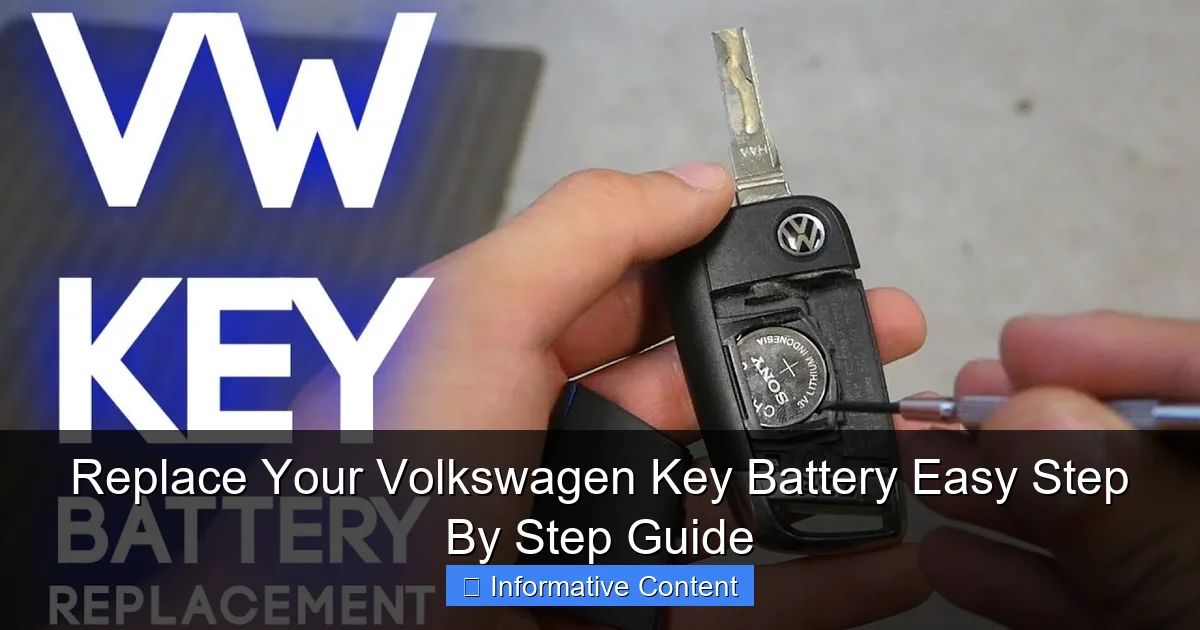
Visual guide about How Do You Change The Battery In A Volkswagen Key
Image source: vwofdaphne.com
Removing the Old Volkswagen Key Battery
Inside, you’ll see the circular battery held in a small compartment. Look closely at how it’s seated. It will either be in a simple plastic cradle or under a small metal clip.
- If it’s in a cradle, you can often just tip the key fob and let it fall out into your hand, or use a non-metallic tool to nudge it out.
- If it’s under a clip, gently use your screwdriver or fingernail to slide the battery out from under the clip. It should pop out easily.
Important: Take note of which side of the battery is facing up! The positive side (+) is almost always facing you, towards the buttons. A quick photo with your phone at this stage is a brilliant insurance policy.
Installing the New Battery
- Take your new battery. Use a dry cloth to handle it—oils from your skin aren’t great for the contacts.
- Place it into the compartment in the exact same orientation as the old one. The positive (+) side should be facing the same direction (usually up).
- If there’s a clip, gently press the battery down so it snaps under the clip.
- You should hear or feel a slight click when it’s seated properly.
Putting Your Volkswagen Key Back Together
This is just the opening process in reverse.
- For the Flip Key: Align the two halves carefully and press them together until you hear a firm click on all sides.
- For the Smart Key Fob: Align the back cover and press firmly around the edges until all the clips snap back into place. Then, slide the emergency metal key back into its slot until it clicks.
That’s it! The physical job is done. Your Volkswagen key battery has been replaced.
Volkswagen Key Battery Types: A Quick Reference
While the CR2032 is the champion, here’s a handy reference table for some popular Volkswagen models. This can help you buy the right battery before you even open your key. Remember, always verify with the battery currently in your fob.
| Volkswagen Model (Typical Years) | Key Fob Style | Likely Battery Type |
|---|---|---|
| Golf, Jetta, Passat (2006-2014) | Classic Flip Key | CR2032 |
| Tiguan, CC (2009-2016) | Classic Flip Key / Early Smart Fob | CR2032 or CR2450 |
| Atlas, Tiguan, Taos, ID.4 (2018-Present) | Modern Smart Key Fob | CR2032 |
| Golf GTI, Golf R (Mk7, Mk7.5) | Kessy Smart Key Fob | CR2032 |
| Beetle (2012-2019) | Classic Flip Key | CR2032 |
| Various Older Models | Square 3-Button Fob | CR2025 |
Testing and Troubleshooting Your New Key Battery
Don’t just assume it worked. Let’s test it and make sure everything is perfect.
The Simple Test
Stand near your Volkswagen and press any button on the key—lock, unlock, or trunk release. You should see the car’s lights flash immediately and hear the locks cycle. If you have a keyless model, get in the car and press the brake pedal, then the start button. The car should start right up. This instant response confirms your Volkswagen key battery replacement was a success.
What to Do If It Still Doesn’t Work
Don’t worry. This happens sometimes, and it’s usually an easy fix.
- Double-check the battery orientation: This is the #1 culprit. Open the key back up and make sure the battery is facing the right way (+ side up).
- Check for plastic film: Did your new battery have a clear plastic film on it? Sometimes they come with a protective coating you need to peel off.
- Re-seat the battery: Take it out and put it back in, ensuring it’s making solid contact with the metal terminals.
- Clean the contacts: If the key is old, the little metal contacts inside might be dirty. Gently rub them with a clean pencil eraser or a cotton swab dipped in a tiny bit of rubbing alcohol.
- Try another new battery: It’s rare, but you could have gotten a dud. Try a battery from a different pack.
If none of this works, there might be an issue with the key fob itself (like a damaged circuit board from moisture) or the car’s receiver. But 99% of the time, a careful re-do of the steps solves the problem.
Conclusion: Empowerment in Your Pocket
And just like that, you’re done. What felt like a minor crisis—a dead key fob—is now just a simple, solved problem. You didn’t have to schedule a dealership appointment, pay a premium for a “service call,” or wait around. You took a few minutes, a few dollars, and a little bit of know-how, and you fixed it yourself.
Replacing your Volkswagen key battery is more than just maintenance; it’s a reminder that many things on our cars are within our reach to handle. That sense of self-reliance is priceless. I recommend tossing an extra CR2032 battery in your glove compartment or junk drawer. Next time your key feels sluggish, or a friend mentions their VW key is dying, you’ll be ready. You’ve got this.
So, go ahead—press that button, hear the chirp, and enjoy the smooth start. Your Volkswagen is waiting, and now you hold the key, with a fresh battery and newfound confidence.
Frequently Asked Questions
What battery does my Volkswagen key use?
Most Volkswagen keys use a CR2032 lithium coin battery, which is widely available. You can verify this by checking the old battery or your owner’s manual for specific model information.
How do I open my Volkswagen key fob to replace the battery?
Look for a small seam on the key fob and gently insert a flat tool, like a screwdriver, to pry it open. Take care not to force it, as the plastic clips can break, and always work on a soft surface to prevent losing small parts.
Do I need any special tools to change the battery in my Volkswagen key?
Typically, no special tools are needed; a small flat-head screwdriver or even a coin can work. For some models, a plastic prying tool is recommended to avoid scratching the key fob casing during the process.
Can I replace the Volkswagen key battery myself, or do I need a professional?
Yes, replacing the Volkswagen key battery is a simple DIY task that most owners can do in minutes. Just follow a step-by-step guide, ensure you have the correct battery, and handle the electronics carefully to avoid damage.
What are the signs that my Volkswagen key battery is dying?
Common indicators include decreased range for locking/unlocking, intermittent operation, or the key not responding on the first press. If you experience these issues, it’s a good time to check and replace the battery soon.
Do I need to reprogram my Volkswagen key after changing the battery?
Generally, no reprogramming is required; the key should function normally once the new battery is installed. If it doesn’t work immediately, try pressing any button a few times or refer to your vehicle’s manual for resynchronization steps.

At CarLegit, we believe information should be clear, factual, and genuinely helpful. That’s why every guide, review, and update on our website is created with care, research, and a strong focus on user experience.