
Rain sensing wipers on Hyundai vehicles automatically detect moisture and activate the windshield wipers without driver input. This guide walks you through enabling, adjusting, and troubleshooting the system for a safer, more convenient driving experience.
In This Article
- 1 Key Takeaways
- 2 📑 Table of Contents
- 3 What Are Rain Sensing Wipers and How Do They Work?
- 4 Which Hyundai Models Have Rain Sensing Wipers?
- 5 Step-by-Step Guide: How to Turn On Rain Sensing Wipers on a Hyundai
- 6 Tips for Optimal Performance of Rain Sensing Wipers
- 7 Troubleshooting Common Rain Sensing Wiper Issues
- 8 Rain Sensing Wipers vs. Manual Wipers: Which Is Better?
- 9 Conclusion: Make the Most of Your Hyundai’s Rain Sensing Wipers
- 10 Frequently Asked Questions
- 10.1 How do I know if my Hyundai has rain sensing wipers?
- 10.2 Can I adjust how sensitive the rain sensing wipers are?
- 10.3 Why aren’t my rain sensing wipers working in light rain?
- 10.4 Do rain sensing wipers work in snow or ice?
- 10.5 Can I turn off rain sensing wipers once they’re on?
- 10.6 Do all Hyundai models come with rain sensing wipers?
Key Takeaways
- Rain sensing wipers use optical sensors to detect rain or moisture on the windshield and automatically activate the wipers.
- Enable the feature via the wiper stalk by turning the control dial to the “AUTO” position for hands-free operation.
- Adjust sensitivity using the stalk dial to match weather conditions and personal preference.
- Ensure the windshield is clean for accurate sensor performance—dirt or debris can interfere with detection.
- Not all Hyundai models include rain sensing wipers—check your owner’s manual or vehicle specs to confirm availability.
- Regular maintenance improves reliability—clean the sensor area and replace worn wiper blades as needed.
- The system works best in light to moderate rain—manual override is recommended during heavy downpours or snow.
📑 Table of Contents
- What Are Rain Sensing Wipers and How Do They Work?
- Which Hyundai Models Have Rain Sensing Wipers?
- Step-by-Step Guide: How to Turn On Rain Sensing Wipers on a Hyundai
- Tips for Optimal Performance of Rain Sensing Wipers
- Troubleshooting Common Rain Sensing Wiper Issues
- Rain Sensing Wipers vs. Manual Wipers: Which Is Better?
- Conclusion: Make the Most of Your Hyundai’s Rain Sensing Wipers
What Are Rain Sensing Wipers and How Do They Work?
Imagine driving through a sudden afternoon shower. You’re focused on the road, adjusting the radio, or talking to a passenger—and then *splat*, rain hits your windshield. Instead of fumbling for the wiper controls, your Hyundai’s wipers spring to life on their own. That’s the magic of rain sensing wipers.
Rain sensing wipers are an advanced driver assistance feature designed to improve safety and convenience. They use an optical sensor, typically located near the rearview mirror on the inside of the windshield, to detect moisture. When the sensor picks up water droplets, it sends a signal to the vehicle’s control module, which activates the wipers at an appropriate speed.
This system isn’t just about convenience—it’s about reducing driver distraction. According to the National Highway Traffic Safety Administration (NHTSA), distracted driving contributes to nearly 3,000 deaths annually in the U.S. Features like rain sensing wipers help keep your hands on the wheel and your eyes on the road.
How the Sensor Detects Rain
The core of the rain sensing system is an infrared LED and a photodetector. These components are housed in a small module behind the windshield, usually near the top center. The LED emits infrared light at an angle toward the glass. When the windshield is dry, most of the light reflects back into the sensor. But when water droplets land on the glass, they scatter the light, reducing the amount that returns to the photodetector.
The system interprets this change as moisture and triggers the wipers. The more water present, the faster the wipers move. It’s a smart, responsive system that adapts in real time.
Benefits of Rain Sensing Wipers
Beyond the obvious “wow” factor, rain sensing wipers offer real-world benefits:
– **Enhanced safety**: You don’t have to take your hands off the wheel to adjust wipers.
– **Improved visibility**: Wipers activate instantly when rain starts, reducing the risk of obscured vision.
– **Reduced driver fatigue**: No need to constantly monitor and adjust wiper speed.
– **Better performance in changing weather**: The system adjusts automatically as rain intensity changes.
For Hyundai owners, this feature is especially useful in regions with unpredictable weather—like the Pacific Northwest or the Southeast U.S., where sudden downpours are common.
Which Hyundai Models Have Rain Sensing Wipers?
Visual guide about How Do You Turn on Rain Sensing Wipers Hyundai
Image source: i.ebayimg.com
Not every Hyundai comes equipped with rain sensing wipers. This feature is typically found on higher trim levels or as part of an optional technology package. It’s more common in newer models and premium trims.
Hyundai Models with Rain Sensing Wipers (2020–2024)
Here are some Hyundai models that may include rain sensing wipers, depending on trim and options:
– **Hyundai Sonata (SEL Plus, Limited trims)**
– **Hyundai Elantra (Limited, N Line trims)**
– **Hyundai Tucson (SEL Convenience, Limited, XRT trims)**
– **Hyundai Santa Fe (SEL Premium, Limited, Calligraphy trims)**
– **Hyundai Palisade (SEL, Limited, Calligraphy trims)**
– **Hyundai Ioniq 5 (SEL, Limited trims)**
– **Hyundai Kona Electric (Limited trim)**
Always check your owner’s manual or the vehicle’s window sticker (Monroney label) to confirm if your specific model and trim include this feature. You can also look for a small sensor module near the rearview mirror—usually a black or dark gray rectangle about the size of a postage stamp.
How to Confirm If Your Hyundai Has Rain Sensing Wipers
If you’re unsure whether your Hyundai has rain sensing wipers, here’s how to check:
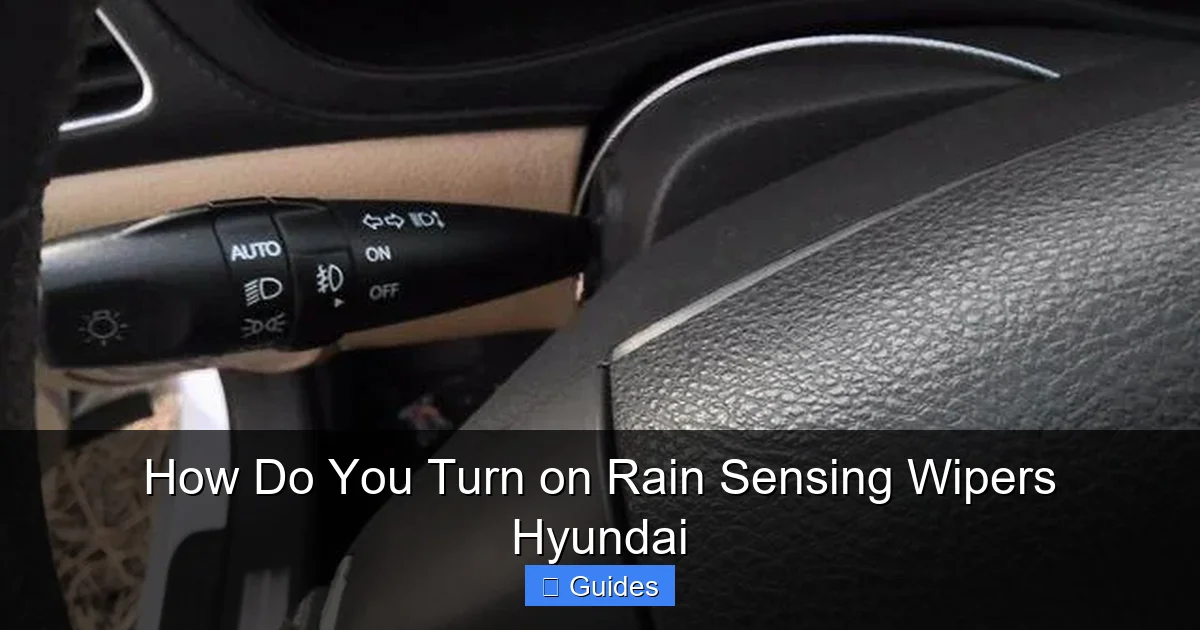
1. **Look at the wiper stalk**: If there’s an “AUTO” position on the wiper control dial, your vehicle likely has the feature.
2. **Check the owner’s manual**: Search for “rain sensing wipers” or “automatic wipers.”
3. **Inspect the windshield**: Look for a small sensor module near the rearview mirror.
4. **Use the Hyundai website**: Enter your VIN on Hyundai’s official site to view your vehicle’s specifications.
If your car doesn’t have rain sensing wipers, don’t worry—many aftermarket systems are available, though they may not integrate as seamlessly as factory-installed ones.
Step-by-Step Guide: How to Turn On Rain Sensing Wipers on a Hyundai
Visual guide about How Do You Turn on Rain Sensing Wipers Hyundai
Image source: honda-mideast.com
Turning on rain sensing wipers in your Hyundai is simple—once you know where to look. The process is consistent across most models, but always refer to your owner’s manual for model-specific details.
Locate the Wiper Control Stalk
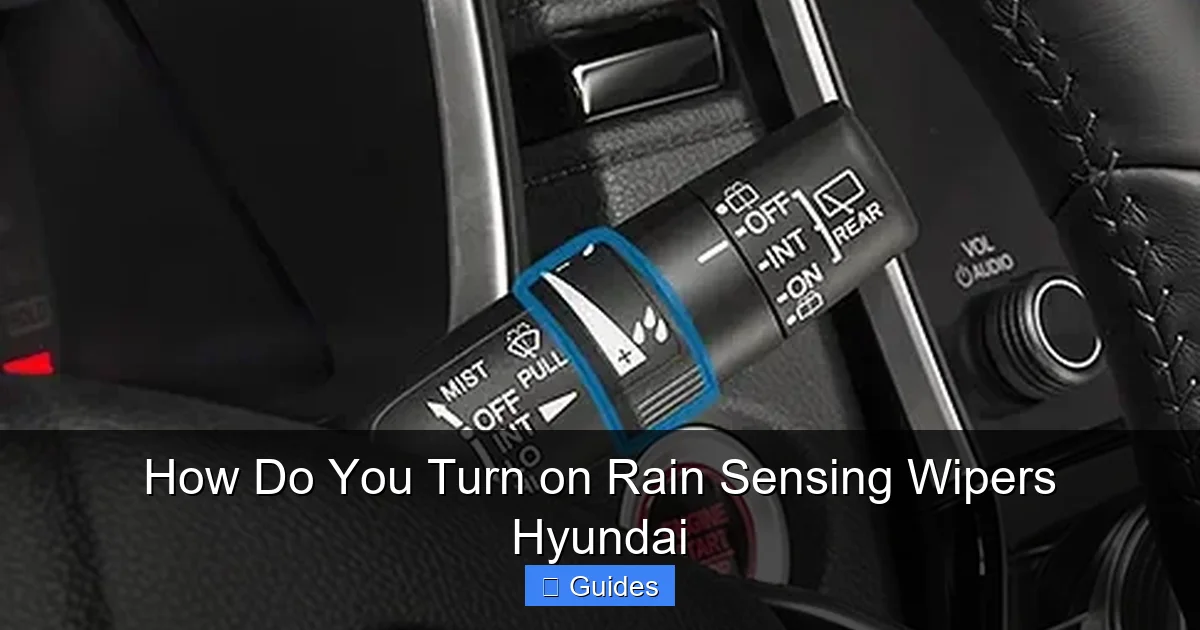
The wiper control stalk is typically on the right side of the steering column. It’s the lever you pull to activate the wipers manually. On most Hyundai models, this stalk has multiple positions:
– **OFF**: Wipers are off.
– **INT (Intermittent)**: Wipers move at set intervals.
– **LO (Low)**: Continuous slow speed.
– **HI (High)**: Continuous fast speed.
– **MIST**: Single wipe when pulled toward you.
– **AUTO**: Automatic mode—this is what you want for rain sensing.
Activate Auto Mode
To turn on rain sensing wipers:
1. **Ensure the vehicle is on**: The ignition must be in the “ON” or “ACC” position.
2. **Turn the wiper stalk dial to “AUTO”**: Rotate the dial at the end of the stalk until it clicks into the “AUTO” position.
3. **Wait for activation**: The wipers will remain off until the sensor detects moisture.
Once in “AUTO” mode, the system will monitor the windshield and activate the wipers when needed. No further input is required from the driver.
Adjusting Wiper Sensitivity
One of the best features of rain sensing wipers is the ability to adjust sensitivity. This lets you control how quickly the wipers respond to light rain or mist.
To adjust sensitivity:
1. **With the wipers in “AUTO” mode**, use the small rotary dial on the wiper stalk (usually near the base).
2. **Turn the dial up** (toward “+” or “H”) for higher sensitivity—wipers activate faster in light rain.
3. **Turn the dial down** (toward “–” or “L”) for lower sensitivity—wipers wait for heavier rain before activating.
For example, if you’re driving in a light drizzle and the wipers aren’t activating, increase the sensitivity. Conversely, if the wipers are constantly swiping in light mist, reduce the sensitivity.
Practical Example: Driving in Changing Weather
Let’s say you’re driving on a highway when a light rain begins. You’ve set your wipers to “AUTO” with medium sensitivity. The sensor detects the first few drops and activates the wipers at a slow, intermittent speed. As the rain intensifies, the wipers automatically speed up. When the rain stops, they slow down and eventually stop.
This seamless adjustment keeps your windshield clear without requiring you to touch the controls—perfect for maintaining focus on the road.
Tips for Optimal Performance of Rain Sensing Wipers
Visual guide about How Do You Turn on Rain Sensing Wipers Hyundai
Image source: i.ytimg.com
While rain sensing wipers are smart, they’re not perfect. A few simple tips can help ensure they work reliably in all conditions.
Keep the Windshield Clean
Dirt, grime, bug splatter, and road film can interfere with the optical sensor. Even a thin layer of residue can scatter light and cause false readings or delayed responses.
**Tip**: Wash your windshield regularly, both inside and out. Use a glass cleaner and a microfiber cloth to remove smudges near the sensor area. Avoid using wax or polish on the inside of the glass—these can leave a film that affects sensor performance.
Clean the Sensor Area Specifically
The sensor is usually located behind a small black or dark gray module near the rearview mirror. This area should be kept spotless.
**How to clean it**:
– Turn off the vehicle.
– Gently wipe the sensor area with a clean, damp microfiber cloth.
– Dry with a second dry cloth.
– Avoid using abrasive cleaners or paper towels—they can scratch the glass.
Replace Wiper Blades Regularly
Even the best sensor can’t compensate for worn wiper blades. Old blades leave streaks, chatter, or fail to clear water effectively—reducing visibility and potentially confusing the sensor.
**When to replace**: Every 6–12 months, or at the first sign of streaking, skipping, or noise.
**Tip**: Use high-quality OEM or premium aftermarket blades designed for your Hyundai model. Hyundai offers genuine wiper blades that are engineered for optimal performance with the rain sensing system.
Avoid Using Washer Fluid While in Auto Mode
Some drivers spray washer fluid while the wipers are in “AUTO” mode. This can cause the wipers to activate unexpectedly or at the wrong speed.
**Best practice**: Switch to “LO” or “INT” mode before using the washer fluid, then return to “AUTO” afterward.
Be Mindful in Snow or Ice
Rain sensing wipers are designed for liquid water, not snow or ice. In cold weather, the sensor may not detect frozen precipitation, and attempting to use the wipers can damage the blades or motor.
**Tip**: Always clear snow and ice from the windshield manually before driving. Use the defroster to melt ice, and avoid using the wipers until the glass is clear.
Troubleshooting Common Rain Sensing Wiper Issues
Even with proper care, you might encounter issues with your rain sensing wipers. Here’s how to diagnose and fix common problems.
Wipers Don’t Activate in Light Rain
**Possible causes**:
– Sensitivity is set too low.
– Sensor is dirty or obstructed.
– Windshield has a film or coating.
**Solutions**:
– Increase sensitivity using the stalk dial.
– Clean the sensor area and windshield.
– Check for aftermarket tint or coatings that might block infrared light.
Wipers Activate Too Often or in Dry Conditions
**Possible causes**:
– Sensitivity is set too high.
– Sensor is dirty or reflecting light incorrectly.
– Sunlight or reflections are triggering the sensor.
**Solutions**:
– Lower the sensitivity setting.
– Clean the sensor and windshield.
– Park in the shade when possible to reduce glare.
Wipers Stop Working in Auto Mode
**Possible causes**:
– Blown fuse.
– Faulty sensor or control module.
– Software glitch.
**Solutions**:
– Check the fuse box (refer to the owner’s manual for the correct fuse).
– Restart the vehicle to reset the system.
– Visit a Hyundai service center if the issue persists.
Sensor Not Detecting Rain at All
If the wipers never activate in the rain, even with high sensitivity:
– Confirm the feature is available on your model.
– Ensure the wiper stalk is in “AUTO” mode.
– Have the sensor inspected by a technician—it may be misaligned or damaged.
Rain Sensing Wipers vs. Manual Wipers: Which Is Better?
It’s natural to wonder: Are rain sensing wipers really better than manual ones? The answer depends on your driving habits and environment.
Advantages of Rain Sensing Wipers
– **Convenience**: No need to adjust wipers manually.
– **Safety**: Reduces distraction during sudden weather changes.
– **Responsiveness**: Activates instantly when rain starts.
– **Adaptability**: Adjusts speed based on rain intensity.
When Manual Wipers Might Be Better
– **Heavy rain or snow**: Manual control gives you full command.
– **Off-road or dusty conditions**: Sensors can be fooled by dirt or mud.
– **Personal preference**: Some drivers like having full control.
The Verdict
For most drivers, rain sensing wipers are a valuable upgrade. They enhance safety and comfort, especially on long drives or in unpredictable weather. However, they’re not a replacement for attentive driving—always stay alert and ready to take manual control if needed.
Conclusion: Make the Most of Your Hyundai’s Rain Sensing Wipers
Rain sensing wipers are one of those features that, once you use them, you wonder how you ever drove without them. They represent Hyundai’s commitment to innovation, safety, and driver comfort. By automatically detecting rain and adjusting wiper speed, they help keep your windshield clear and your focus on the road.
Turning on rain sensing wipers in your Hyundai is simple: just turn the wiper stalk to “AUTO” and adjust the sensitivity to your liking. Keep the sensor clean, replace wiper blades regularly, and understand the system’s limitations—especially in snow or heavy rain.
Whether you’re commuting through a spring shower or driving across the country, rain sensing wipers add a layer of confidence and convenience. So the next time the skies open up, let your Hyundai handle the wipers—you’ve got better things to focus on.
Frequently Asked Questions
How do I know if my Hyundai has rain sensing wipers?
Check your owner’s manual or look for an “AUTO” position on the wiper stalk. You can also inspect the windshield near the rearview mirror for a small sensor module.
Can I adjust how sensitive the rain sensing wipers are?
Yes, use the rotary dial on the wiper stalk to increase or decrease sensitivity. Higher settings activate wipers in lighter rain, while lower settings wait for heavier precipitation.
Why aren’t my rain sensing wipers working in light rain?
The sensitivity may be set too low, or the sensor could be dirty. Clean the windshield and sensor area, then increase the sensitivity setting.
Do rain sensing wipers work in snow or ice?
No, they’re designed for liquid water. Use manual wipers or defrost the windshield first in snowy or icy conditions.
Can I turn off rain sensing wipers once they’re on?
Yes, simply turn the wiper stalk to “OFF,” “INT,” “LO,” or “HI” to override automatic mode and use manual control.
Do all Hyundai models come with rain sensing wipers?
No, this feature is typically available on higher trim levels or as part of optional packages. Check your vehicle’s specifications to confirm.

At CarLegit, we believe information should be clear, factual, and genuinely helpful. That’s why every guide, review, and update on our website is created with care, research, and a strong focus on user experience.