
Changing the battery in your Acura MDX key fob is easier than you think—and you don’t need a mechanic to do it. With just a few tools and a couple of minutes, you can restore full functionality to your remote. This guide walks you through the entire process, from identifying the right battery to testing your fob afterward.
If you’ve ever stood in your driveway pressing the lock button on your Acura MDX key fob only to hear a faint click—or worse, nothing at all—you know how frustrating a dead battery can be. It’s one of those small inconveniences that quickly escalates into a major annoyance, especially when you’re running late or caught in bad weather. The good news? You don’t have to visit a dealership or pay $50+ for a simple battery swap. With a little know-how and the right tools, you can change the battery in your Acura MDX key fob in under five minutes.
This comprehensive guide is designed for everyday drivers—not mechanics or tech experts. Whether you’re a first-time DIYer or just need a refresher, we’ll walk you through every step with clear instructions, practical tips, and real-world advice. We’ll cover everything from identifying your key fob model and choosing the correct replacement battery to safely opening the fob, replacing the old cell, and testing the result. By the end, you’ll not only have a working key fob but also the confidence to handle this common maintenance task anytime.
In This Article
- 1 Key Takeaways
- 2 📑 Table of Contents
- 3 Why Your Acura MDX Key Fob Battery Dies (And How to Spot It)
- 4 Tools and Materials You’ll Need
- 5 Step-by-Step Guide to Replacing the Battery
- 6 Troubleshooting Common Issues
- 7 Tips for Maintaining Your Key Fob
- 8 When to Seek Professional Help
- 9 Conclusion
- 10 Frequently Asked Questions
- 10.1 What type of battery does an Acura MDX key fob use?
- 10.2 Do I need to reprogram my key fob after changing the battery?
- 10.3 How often should I replace the key fob battery?
- 10.4 Can I use a different battery if I don’t have a CR2032?
- 10.5 What if my key fob still doesn’t work after replacing the battery?
- 10.6 Is it safe to open the key fob myself?
Key Takeaways
- Use the correct battery type: Most Acura MDX key fobs require a CR2032 3V lithium coin cell battery. Using the wrong type can damage the fob or cause poor performance.
- Handle the fob gently: The plastic casing and internal components are delicate. Avoid using excessive force when prying open the fob to prevent cracking.
- Keep track of small parts: The fob contains tiny screws and a circuit board. Work over a clean, well-lit surface and use a magnetic tray to avoid losing parts.
- Test the fob after replacement: Always verify that all buttons (lock, unlock, trunk, panic) work properly before reassembling completely.
- Replace batteries proactively: If your key fob range shortens or buttons respond slowly, it’s likely time for a new battery—don’t wait until it dies completely.
- Avoid moisture and static: Keep the fob dry and handle the circuit board by its edges to prevent static discharge that could damage electronics.
- No programming needed: Unlike some car remotes, most Acura MDX key fobs don’t require reprogramming after a battery change—just snap it back together.
📑 Table of Contents
Why Your Acura MDX Key Fob Battery Dies (And How to Spot It)
Key fobs are built to last, but like any electronic device, their batteries eventually run out. Most Acura MDX key fobs use a CR2032 lithium coin cell, which typically lasts between 3 to 5 years depending on usage. However, several factors can shorten that lifespan. Frequent use—like locking and unlocking your vehicle multiple times a day—drains the battery faster. Extreme temperatures also play a role: leaving your keys in a hot car during summer or exposing them to freezing winter conditions can degrade battery performance over time.
So how do you know it’s time for a replacement? The signs are usually subtle at first. You might notice that you have to stand closer to your vehicle for the fob to work, or that pressing the buttons requires more effort than usual. Sometimes, the LED light on the fob (if it has one) will flash weakly or not at all. In other cases, the fob may work intermittently—locking the doors one moment and failing the next. If your keyless entry system stops responding entirely, or if the remote start feature becomes unreliable, a dead battery is almost certainly the culprit.
It’s important not to ignore these warning signs. A completely dead fob means you’ll have to use the physical key to unlock your door—and possibly even start your vehicle manually if your MDX doesn’t have a backup ignition method. Worse yet, if you’re away from home and your fob dies, you could find yourself stranded. That’s why proactive battery replacement is key. Many drivers make the mistake of waiting until the fob fails completely, but replacing the battery at the first sign of weakness can save you time, stress, and potential lockout situations.
Tools and Materials You’ll Need
Visual guide about How to Change Battery in Acura Mdx Key Fob
Image source: paulstravelpictures.com
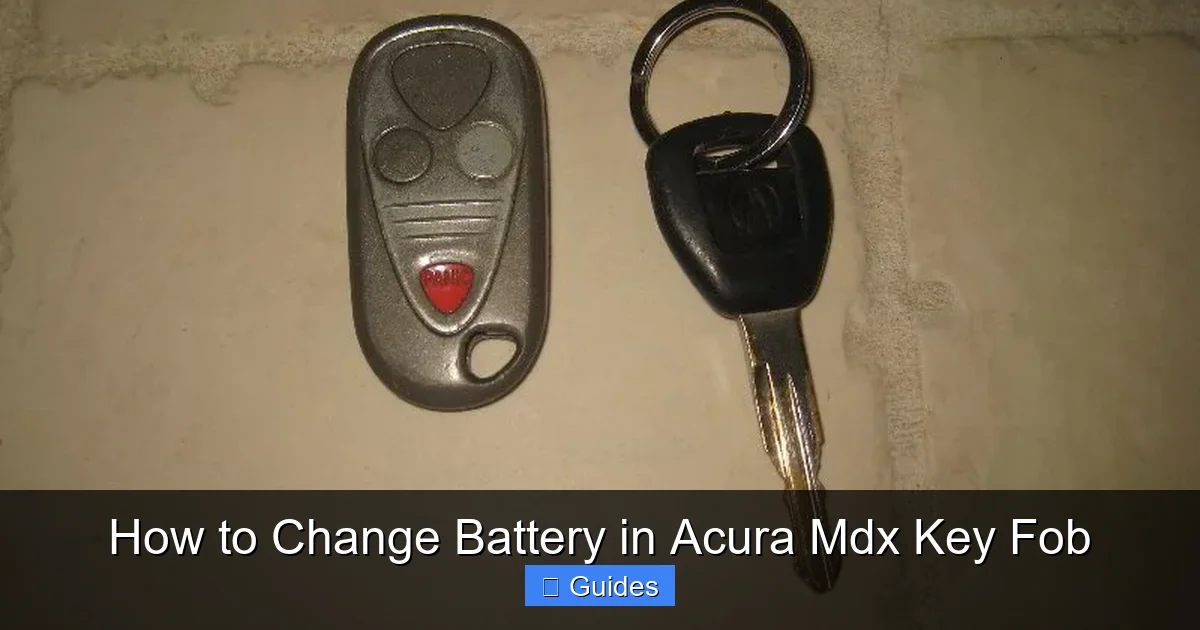
Before you begin, gather all the necessary tools and materials. Having everything ready ahead of time makes the process smoother and reduces the risk of losing small components. The good news is that you probably already have most of what you need lying around the house.
First and foremost, you’ll need a replacement battery. As mentioned earlier, the vast majority of Acura MDX key fobs—especially models from 2010 onward—use a CR2032 3V lithium coin cell. These are widely available at drugstores, electronics retailers, big-box stores like Walmart or Target, and online marketplaces such as Amazon. A single battery costs less than $5, and it’s often worth buying a pack of two or three so you have spares on hand. When purchasing, look for reputable brands like Panasonic, Energizer, or Duracell to ensure reliability and longevity.
Next, you’ll need a small flathead screwdriver or a plastic prying tool. While a metal screwdriver works, a plastic tool is safer because it’s less likely to scratch or damage the fob’s plastic casing. If you don’t have a plastic pry tool, an old credit card or a guitar pick can serve as a makeshift alternative. Avoid using sharp objects like knives or large screwdrivers, as they can crack the fob or damage the internal circuit board.
A clean, well-lit workspace is also essential. Choose a flat surface like a table or countertop, and lay down a soft cloth or paper towel to protect the fob and catch any tiny parts that might fall out. Good lighting helps you see the small components clearly, especially if you’re working with older eyes or in a dimly lit garage. If possible, use a magnifying glass or wear reading glasses to get a better view of the battery compartment and connectors.
Finally, consider using a magnetic parts tray or a small dish to hold screws and other components. Even though most Acura MDX key fobs don’t use screws (they’re typically held together by clips), some older or aftermarket models might. Keeping everything organized prevents frustration and ensures you don’t lose anything during the process.
Step-by-Step Guide to Replacing the Battery
Visual guide about How to Change Battery in Acura Mdx Key Fob
Image source: paulstravelpictures.com
Now that you’ve gathered your tools and identified the symptoms of a dying battery, it’s time to get hands-on. The process of changing the battery in an Acura MDX key fob is straightforward, but it requires patience and attention to detail. Follow these steps carefully to avoid damaging your fob or injuring yourself.
Step 1: Locate the Battery Compartment
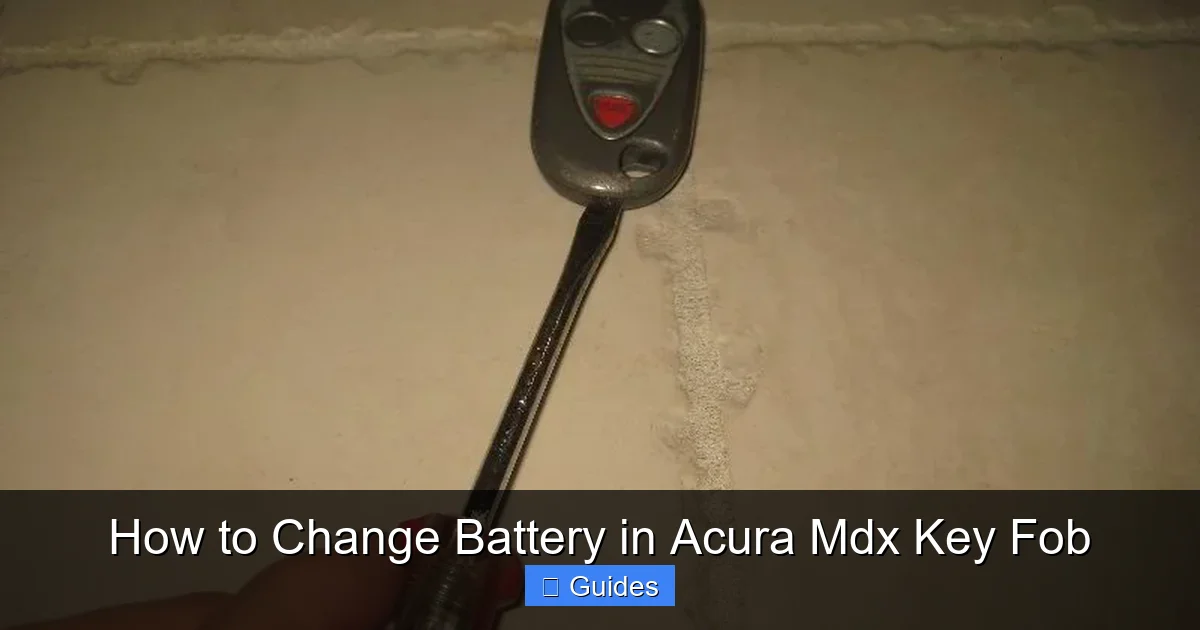
The first step is finding where the battery is housed inside your key fob. Most Acura MDX key fobs have a two-piece plastic shell that snaps together. Look for a small seam running around the edge of the fob—this is where the two halves meet. On many models, there’s also a small indentation or notch on one side, often near the key ring loop, which serves as a starting point for prying the fob open.
Some newer MDX fobs (particularly those from 2017 and later) feature a more streamlined design with no visible seams. In these cases, the battery compartment is usually accessed by sliding or pressing a release button. Check your owner’s manual if you’re unsure—it will have a diagram showing exactly how your specific fob opens.
Step 2: Open the Key Fob Safely
Once you’ve located the seam or release mechanism, it’s time to open the fob. Insert your plastic pry tool or flathead screwdriver into the seam at the designated notch. Gently twist the tool to create a small gap between the two halves. Work your way around the edge slowly, applying even pressure. Don’t force it—if it doesn’t budge easily, you might be missing a hidden clip or screw.
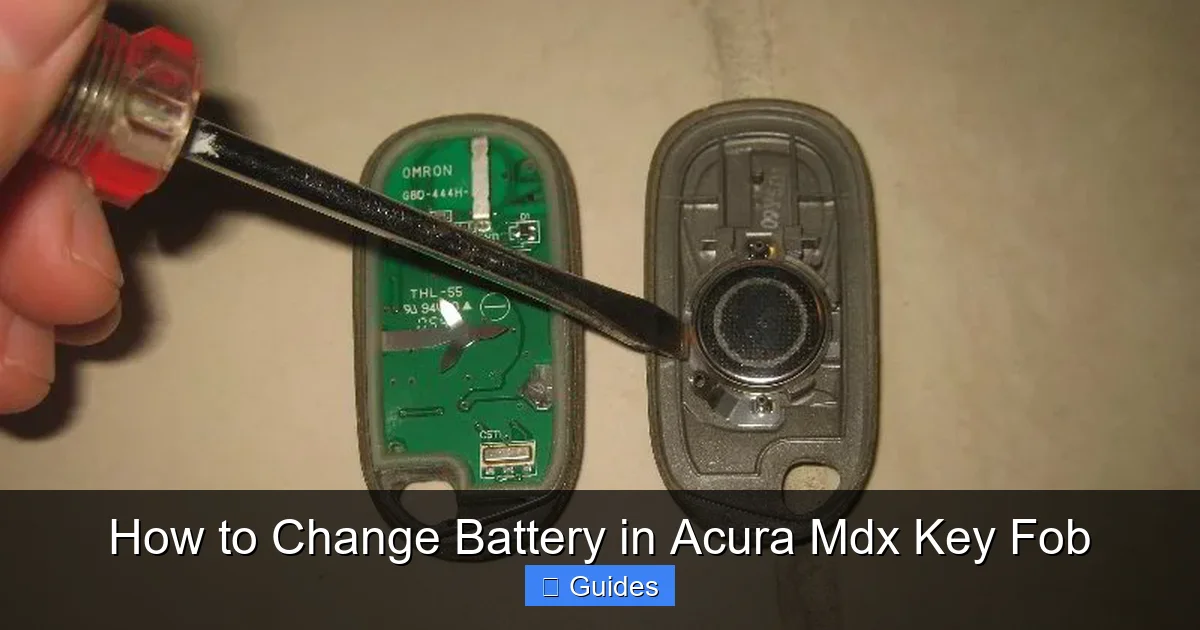
As you separate the halves, be mindful of the internal components. Inside, you’ll see the circuit board, the battery, and possibly a rubber button pad. The circuit board is delicate and should never be touched with bare fingers, as oils from your skin can cause corrosion over time. If the two halves are still connected by a thin ribbon cable (rare but possible on some models), do not pull them apart completely—just enough to access the battery.
Step 3: Remove the Old Battery
With the fob open, locate the battery. It’s usually held in place by a small metal clip or a plastic bracket. Note its orientation—most CR2032 batteries have the positive (+) side facing up, but double-check the markings on the old battery or the diagram inside the fob to be sure.
Use your fingernail, a plastic tool, or the tip of the screwdriver to gently lift the battery out of its housing. Avoid using metal tools directly on the battery terminals, as this can cause a short circuit or damage the contacts. If the battery is stuck, wiggle it slightly from side to side until it loosens.
Once removed, inspect the battery compartment for any signs of corrosion, dirt, or moisture. If you see white powdery residue (a sign of battery leakage), clean it carefully with a cotton swab dipped in rubbing alcohol. Let the area dry completely before inserting the new battery.
Step 4: Insert the New Battery
Take your new CR2032 battery and align it correctly in the compartment. The positive (+) side should match the marking inside the fob—usually indicated by a “+” symbol or a raised metal contact. Press the battery firmly into place until it sits flat and secure. You should hear a slight click or feel it snap into position.
Double-check that the battery is seated properly. A loose or misaligned battery can cause intermittent operation or prevent the fob from working altogether. If your fob has a retaining clip, make sure it’s closed over the battery to hold it in place.
Step 5: Reassemble the Key Fob
Carefully align the two halves of the fob and press them together until you hear a series of clicks. Start at one end and work your way around, ensuring all clips engage properly. Avoid using excessive force—if it doesn’t close easily, check that the battery and internal components are positioned correctly and that nothing is blocking the seam.
Once closed, give the fob a gentle squeeze to confirm it’s fully sealed. There should be no gaps or loose edges. If your fob has a physical key blade (used for manual door entry), make sure it swings freely and locks into place.
Step 6: Test the Fob
Before you celebrate, test every function of your key fob. Stand near your vehicle and press the lock, unlock, trunk release, and panic buttons. Listen for the corresponding sounds from your MDX—doors locking, horn honking, etc. If all buttons respond promptly and consistently, you’ve successfully replaced the battery.
If a button doesn’t work, don’t panic. First, reopen the fob and verify that the battery is installed correctly. Sometimes, a slightly misaligned battery or dirty contact can cause issues. Clean the battery terminals with a dry cloth and reinsert the battery. If problems persist, the fob itself may have a deeper issue—but this is rare after a simple battery change.
Troubleshooting Common Issues
Visual guide about How to Change Battery in Acura Mdx Key Fob
Image source: paulstravelpictures.com
Even with careful execution, things don’t always go perfectly. Here are a few common problems you might encounter—and how to fix them.
One frequent issue is the fob not working after reassembly. This is usually due to incorrect battery orientation. Flip the battery over and try again. Also, ensure the fob is fully closed—partially snapped halves can break the electrical connection.
Another problem is difficulty opening the fob. If you’re struggling to pry it apart, double-check that you’re using the right starting point. Some fobs have hidden release mechanisms or require a specific technique. Refer to your owner’s manual or look up a video tutorial for your exact model year.
In rare cases, the fob may stop working entirely after a battery change. This could indicate a damaged circuit board or a faulty battery. Try a different CR2032 battery from a new pack. If that doesn’t help, the fob may need professional repair or replacement.
Finally, if your keyless entry range seems shorter than before, it might not be the battery at all. Interference from electronic devices, low tire pressure sensors, or even a weak car battery can affect fob performance. Rule out these factors before assuming the fob is defective.
Tips for Maintaining Your Key Fob
To extend the life of your Acura MDX key fob and avoid future battery issues, follow these simple maintenance tips.
First, keep your fob clean. Wipe it down regularly with a slightly damp cloth to remove dirt, grease, and grime. Avoid using harsh chemicals or submerging the fob in water—even if it’s water-resistant, prolonged exposure can damage internal components.
Second, protect your fob from extreme temperatures. Don’t leave it in direct sunlight inside your car on a hot day, and avoid placing it near heaters or in freezing conditions. Extreme heat can warp the plastic, while cold can reduce battery efficiency.
Third, store your keys in a safe, dry place. A designated key dish or drawer prevents accidental drops and exposure to moisture. If you have multiple key fobs, label them to avoid confusion.
Fourth, replace the battery proactively. Instead of waiting for failure, consider changing the battery every 3–4 years as part of your regular vehicle maintenance routine. This is especially important if you rely heavily on keyless entry or remote start features.
Finally, avoid overloading your keychain. Heavy keychains can stress the fob’s internal structure and cause premature wear. If possible, keep your fob separate or use a lightweight lanyard.
When to Seek Professional Help
While changing the battery in your Acura MDX key fob is a simple DIY task, there are situations where professional assistance is warranted.
If your fob has visible damage—cracks, water intrusion, or a non-responsive circuit board—it may be beyond a simple battery fix. Similarly, if you’ve replaced the battery correctly but the fob still doesn’t work, the internal electronics could be faulty. In these cases, visit an Acura dealership or a qualified locksmith. They can diagnose the issue and either repair or replace the fob.
Additionally, if your MDX uses a smart key system with advanced features like push-button ignition or proximity sensors, reprogramming may be required after certain repairs. While basic battery changes don’t typically need reprogramming, more complex issues might. A professional can ensure everything is configured correctly.
Lastly, if you’re uncomfortable performing the replacement yourself—or if you’ve tried and failed—don’t hesitate to seek help. It’s better to pay a small fee than risk damaging an expensive key fob.
Conclusion
Changing the battery in your Acura MDX key fob is a quick, cost-effective way to restore full functionality to your vehicle’s remote system. With just a CR2032 battery, a plastic tool, and a few minutes of your time, you can avoid dealership visits and keep your keys working reliably for years to come. By following the steps outlined in this guide—and heeding the tips for maintenance and troubleshooting—you’ll save money, reduce frustration, and gain valuable DIY confidence.
Remember, a little prevention goes a long way. Keep spare batteries on hand, test your fob regularly, and don’t ignore early warning signs like reduced range or slow response. Your Acura MDX is a sophisticated machine, and its key fob is an essential part of that experience. Treat it with care, and it will serve you well.
So the next time your key fob starts acting up, don’t panic—grab a new battery and give it a try. You might be surprised at how easy it is.
Frequently Asked Questions
What type of battery does an Acura MDX key fob use?
Most Acura MDX key fobs use a CR2032 3V lithium coin cell battery. This is a standard size available at most stores. Always check your owner’s manual or the old battery to confirm before purchasing a replacement.
Do I need to reprogram my key fob after changing the battery?
No, you typically don’t need to reprogram your Acura MDX key fob after a battery change. The fob retains its programming, and it should work normally once the new battery is installed and the fob is reassembled.
How often should I replace the key fob battery?
Most CR2032 batteries last 3 to 5 years. Replace the battery when you notice reduced range, slow response, or intermittent operation. Proactive replacement every 3–4 years can prevent unexpected failures.
Can I use a different battery if I don’t have a CR2032?
No, you should not use a different battery type. The CR2032 is specifically designed for key fobs and provides the correct voltage and size. Using an incompatible battery can damage the fob or cause it to malfunction.
What if my key fob still doesn’t work after replacing the battery?
First, double-check the battery orientation and ensure the fob is fully closed. If it still doesn’t work, the fob may have internal damage or a faulty circuit board. Consider visiting an Acura dealer for diagnosis and repair.
Is it safe to open the key fob myself?
Yes, it’s generally safe if you use the right tools and handle the fob gently. Use a plastic pry tool, avoid forcing the casing, and work over a clean surface to prevent damage or loss of small parts.

At CarLegit, we believe information should be clear, factual, and genuinely helpful. That’s why every guide, review, and update on our website is created with care, research, and a strong focus on user experience.