
Changing the battery in your Cadillac key fob is a simple DIY task that takes just minutes and costs under $10. With the right tools and a few easy steps, you can restore full functionality to your keyless entry system without visiting a dealership.
In This Article
- 1 Key Takeaways
- 2 📑 Table of Contents
- 3 Why Your Cadillac Key Fob Battery Needs Replacing
- 4 Signs It’s Time to Replace the Battery
- 5 Tools and Materials You’ll Need
- 6 Step-by-Step Guide to Replacing the Battery
- 7 Tips for Maintaining Your Key Fob
- 8 Common Mistakes to Avoid
- 9 When to Seek Professional Help
- 10 Conclusion
- 11 Frequently Asked Questions
- 11.1 What type of battery does a Cadillac key fob use?
- 11.2 Can I change the key fob battery myself?
- 11.3 How often should I replace my key fob battery?
- 11.4 Will replacing the battery reset my key fob?
- 11.5 What if my key fob still doesn’t work after changing the battery?
- 11.6 Can I use a different battery size in my Cadillac key fob?
Key Takeaways
- Most Cadillac key fobs use a CR2032 coin cell battery: This common 3-volt battery is widely available at drugstores, electronics shops, and online retailers.
- No special tools are required: A small flathead screwdriver or a butter knife is usually enough to pry open the key fob casing.
- Always handle the circuit board gently: Avoid touching the electronic components with wet or dirty hands to prevent damage.
- Reassemble carefully to maintain water resistance: Ensure the casing snaps back together securely to protect internal parts from moisture.
- Test all functions after replacement: Lock, unlock, trunk release, and panic button should all respond immediately.
- Replace batteries proactively: If your key fob range weakens or buttons feel sluggish, it’s likely time for a new battery.
- Keep spare batteries on hand: Store an extra CR2032 in your glove box or emergency kit for unexpected failures.
📑 Table of Contents
Why Your Cadillac Key Fob Battery Needs Replacing
Your Cadillac key fob is more than just a remote—it’s your gateway to convenience, security, and peace of mind. From locking your doors from 50 feet away to starting your car remotely on a cold winter morning, this small device plays a big role in your daily routine. But like any electronic gadget, it relies on power. And when that power fades, so does its performance.
Most Cadillac key fobs are powered by a small, round lithium battery known as the CR2032. These batteries typically last between 3 to 5 years, depending on usage frequency and environmental conditions. Over time, the battery loses its charge, leading to symptoms like reduced range, delayed response, or complete failure to operate. You might notice that you have to stand right next to your car for the fob to work, or that pressing the buttons multiple times is necessary to get a response. These are classic signs that your key fob battery is nearing the end of its life.
Ignoring these warning signs can lead to frustration—especially when you’re in a hurry or caught in bad weather. Worse, a dead key fob could leave you locked out of your vehicle if the mechanical key isn’t easily accessible. Fortunately, replacing the battery is a quick, inexpensive fix that anyone can do at home. You don’t need to be a mechanic or tech expert. With just a few minutes and a basic tool, you can restore your key fob to full working order and avoid the hassle and cost of a dealership visit.
Signs It’s Time to Replace the Battery
Knowing when to replace your Cadillac key fob battery can save you from unexpected lockouts and inconvenient moments. While the lifespan of a CR2032 battery varies, there are several telltale signs that indicate it’s time for a swap.
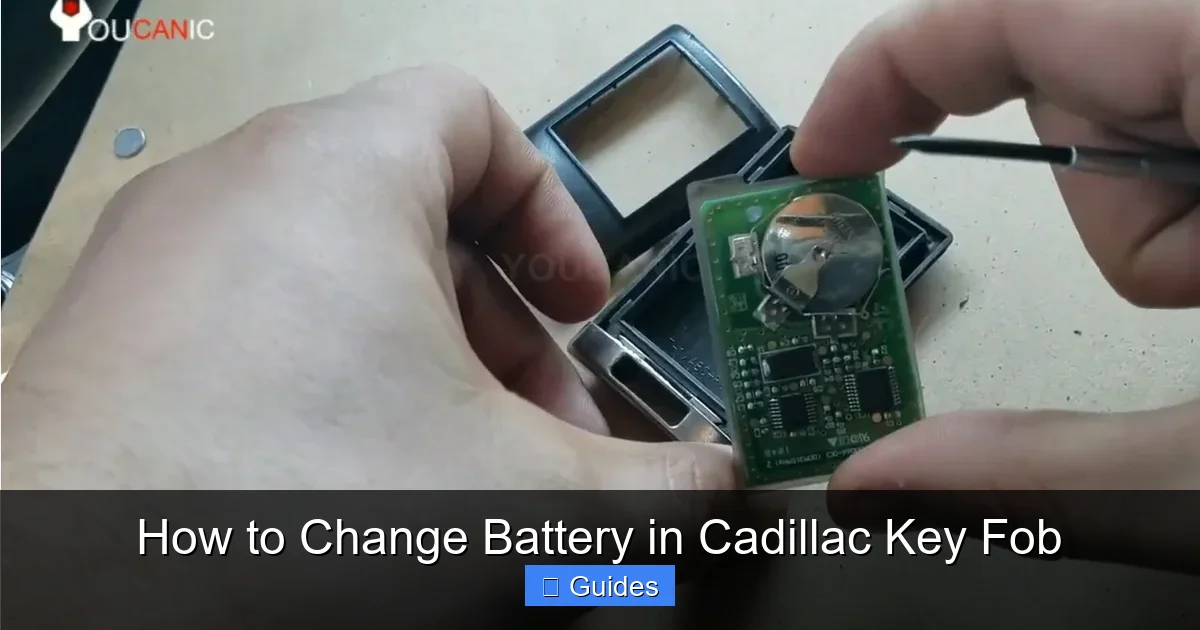
Visual guide about How to Change Battery in Cadillac Key Fob
Image source: youcanic.com
Reduced Range
One of the earliest signs is a noticeable drop in the effective range of your key fob. If you used to be able to unlock your car from across the parking lot but now have to be within a few feet, the battery is likely weakening. This happens because the transmitter inside the fob requires sufficient power to send a strong signal to your vehicle’s receiver.
Delayed or Inconsistent Responses
Does your key fob take a few seconds to respond after pressing a button? Or do you have to press it multiple times before the car reacts? These delays are often caused by low battery voltage, which affects the speed and reliability of signal transmission. While software glitches or interference can sometimes cause similar issues, a weak battery is the most common culprit.
Buttons Feel “Sticky” or Unresponsive
As the battery loses power, the internal circuitry may not receive enough energy to register button presses consistently. You might notice that the buttons feel less tactile or require extra force to activate. In some cases, the fob may stop working altogether until you press and hold a button for several seconds.
Warning Light on the Dashboard
Some newer Cadillac models display a key fob battery warning on the instrument cluster when the charge is critically low. If you see a message like “Key Fob Battery Low” or a similar alert, it’s a clear signal that replacement is needed soon. Don’t wait until the fob dies completely—act promptly to avoid being stranded.
Physical Inspection
If your key fob has been dropped or exposed to moisture, the battery compartment may have been compromised. Check for corrosion, swelling, or leakage around the battery tray. These signs indicate that the battery has degraded and should be replaced immediately to prevent damage to the fob’s internal components.
Tools and Materials You’ll Need
One of the best things about changing a Cadillac key fob battery is that you don’t need a toolbox full of specialized equipment. Most of what you need is likely already in your home. Here’s a simple list of tools and materials to gather before you begin:

Visual guide about How to Change Battery in Cadillac Key Fob
Image source: fobbattery.com
Replacement Battery (CR2032)
The CR2032 is a 3-volt lithium coin cell battery that fits most Cadillac key fobs, including models like the Escalade, XT5, CT6, and ATS. You can find these batteries at pharmacies, big-box stores, electronics retailers, or online. A pack of two or three costs less than $10 and ensures you have a spare on hand. When purchasing, look for reputable brands like Energizer, Duracell, or Panasonic for reliable performance.
Small Flathead Screwdriver or Butter Knife
A small flathead screwdriver is ideal for prying open the key fob casing. If you don’t have one, a butter knife or a plastic prying tool (like those used for opening smartphones) works well too. Avoid using sharp or metal tools that could scratch or damage the plastic housing. The goal is to gently separate the two halves without forcing them.
Clean, Well-Lit Workspace
Choose a flat, stable surface with good lighting—like a kitchen table or desk. This helps prevent small parts from getting lost and ensures you can see the internal components clearly. A clean workspace also reduces the risk of dust or debris entering the fob during the process.
Soft Cloth or Towel
Lay down a soft cloth or microfiber towel to protect the key fob’s surface from scratches. This is especially important if your fob has a metallic finish or decorative trim that could be damaged by hard surfaces.
Optional: Tweezers
Tweezers can be helpful for removing the old battery, especially if your fingers are too large to reach into the small compartment. They also help avoid touching the battery terminals directly, which can transfer oils from your skin and reduce battery life.
Step-by-Step Guide to Replacing the Battery
Now that you’ve gathered your tools and identified the need for a new battery, it’s time to get to work. Follow these detailed steps to safely and effectively replace the battery in your Cadillac key fob. The process typically takes less than 10 minutes and requires no technical expertise.
Visual guide about How to Change Battery in Cadillac Key Fob
Image source: carmiddleeast.com
Step 1: Locate the Battery Compartment
Most Cadillac key fobs have a seam running along the side or bottom of the device. This seam indicates where the two halves of the casing meet. Look for a small indentation or groove that allows you to insert a tool. On some models, like the Cadillac XT4 or Escalade, the battery compartment is accessed by sliding out the mechanical key first. If your fob has a physical key, gently pull it out using the release button or tab.
Step 2: Open the Key Fob Casing
Insert the tip of your flathead screwdriver or butter knife into the seam. Apply gentle pressure and slowly twist the tool to pry the two halves apart. Work your way around the edge, applying even pressure to avoid cracking the plastic. The casing should pop open with minimal force. If it feels stuck, double-check that you’re using the correct seam—some fobs have decorative panels that shouldn’t be forced.
Step 3: Remove the Old Battery
Once the casing is open, you’ll see the battery seated in a small circular tray. Note the orientation of the battery—most CR2032 batteries have the positive (+) side facing up. Use your fingers or tweezers to carefully lift the old battery out. Avoid touching the metal contacts with your fingers, as oils can interfere with conductivity.
Step 4: Insert the New Battery
Take your new CR2032 battery and place it into the tray with the positive (+) side facing up, matching the orientation of the old battery. Press it down gently until it sits flush in the compartment. Make sure it’s secure and doesn’t wobble—this ensures proper contact with the terminals.
Step 5: Reassemble the Key Fob
Carefully align the two halves of the casing and press them together until you hear a series of clicks. Make sure all edges are flush and there are no gaps. If your fob has a mechanical key, reinsert it by sliding it back into place until it locks. Avoid forcing the casing—if it doesn’t close easily, double-check that the battery is seated correctly and no wires are pinched.
Step 6: Test the Key Fob
Stand near your Cadillac and press each button: lock, unlock, trunk release, and panic. The car should respond immediately. If any function doesn’t work, open the fob again and verify the battery orientation and connection. Sometimes a loose battery or misaligned casing can cause intermittent issues.
Tips for Maintaining Your Key Fob
Once your new battery is installed, a little maintenance can go a long way in extending its life and keeping your key fob in top condition. Here are some practical tips to help you get the most out of your Cadillac key fob.
Avoid Exposure to Moisture and Extreme Temperatures
Key fobs are not fully waterproof, and prolonged exposure to rain, snow, or humidity can damage the internal circuitry. Avoid leaving your fob in wet pockets, on rainy dashboards, or near sinks. Similarly, extreme heat—like inside a car on a summer day—can degrade the battery and plastic components. Store your fob in a cool, dry place when not in use.
Keep It Clean
Dirt, dust, and grime can accumulate in the button crevices and affect performance. Use a soft, dry cloth to wipe the exterior regularly. For stubborn grime, lightly dampen the cloth with water or isopropyl alcohol, but avoid getting liquid inside the fob. Never submerge the key fob in water or cleaning solutions.
Use a Protective Case
Consider investing in a silicone or rubber key fob cover. These cases protect against drops, scratches, and moisture while adding a personalized touch. They’re inexpensive and widely available online or at auto accessory stores. Just make sure the case doesn’t interfere with button function or signal transmission.
Replace Batteries Proactively
Don’t wait for your key fob to die completely. If you notice any of the early warning signs—like reduced range or delayed responses—replace the battery as soon as possible. Keeping a spare CR2032 in your glove box or emergency kit ensures you’re never caught off guard.
Avoid Stacking Keys
Hanging your key fob on a heavy keychain with multiple keys can put stress on the fob’s internal components and increase the risk of damage. If possible, use a lightweight lanyard or keep the fob separate from other keys. This reduces wear and tear and helps maintain signal strength.
Common Mistakes to Avoid
Even though changing a key fob battery is simple, a few common mistakes can lead to frustration or damage. Being aware of these pitfalls can help you complete the task smoothly and avoid costly repairs.
Forcing the Casing Open
One of the most frequent errors is using too much force when prying open the key fob. This can crack the plastic housing or damage the internal clips that hold the casing together. Always use gentle, even pressure and work slowly around the seam. If it doesn’t open easily, double-check that you’re using the correct seam.
Installing the Battery Backward
Placing the battery with the wrong side up is a common oversight. The positive (+) side must face up in most Cadillac key fobs. Installing it backward can prevent the fob from working and, in rare cases, damage the circuitry. Always double-check the orientation before closing the casing.
Using the Wrong Battery Type
While the CR2032 is standard for most Cadillac models, some older or specialized fobs may use different batteries like the CR2025 or CR2016. Using the wrong size can result in a poor fit or no function at all. Always verify your fob’s battery type in the owner’s manual or by inspecting the old battery.
Not Testing After Replacement
Skipping the final test is a missed opportunity to catch issues early. Always test all buttons after reassembly to ensure full functionality. If one button doesn’t work, it could indicate a loose connection or misaligned component that needs adjustment.
Ignoring Water Resistance
After reassembly, make sure the casing is fully sealed. Gaps or loose edges can allow moisture to enter, leading to corrosion and malfunction. If your fob was previously water-resistant, improper reassembly can compromise that protection.
When to Seek Professional Help
While most Cadillac key fob battery replacements are straightforward, there are situations where professional assistance may be necessary. If you encounter any of the following issues, it’s best to consult a dealership or certified locksmith.
Damaged or Broken Casing
If the plastic housing is cracked or the internal clips are broken, the fob may not close properly or could fail prematurely. In such cases, a replacement fob may be required. Dealerships can often order exact matches and program them to your vehicle.
Persistent Malfunction After Battery Replacement
If your key fob still doesn’t work after installing a new battery, the issue may be more complex. It could involve a faulty circuit board, damaged antenna, or synchronization problems. A professional can diagnose and repair these issues using specialized equipment.
Lost or Stolen Key Fob
If your key fob is lost or stolen, simply replacing the battery won’t solve the problem. You’ll need a new fob programmed to your vehicle, which typically requires a visit to a Cadillac dealership. They can also disable the old fob to prevent unauthorized access.
Advanced Features Not Working
Some Cadillac models include advanced features like remote start, hands-free liftgate, or proximity sensors. If these functions stop working after a battery change, it may indicate a deeper issue that requires professional attention.
Conclusion
Changing the battery in your Cadillac key fob is a quick, cost-effective way to restore full functionality and avoid the inconvenience of a dead remote. With just a few simple tools and a new CR2032 battery, you can complete the task in under 10 minutes—no dealership visit required. By recognizing the signs of a dying battery, following the correct steps, and maintaining your fob properly, you’ll ensure reliable performance for years to come.
Remember, proactive maintenance is key. Keep a spare battery on hand, avoid exposing your fob to harsh conditions, and test it regularly. If you ever run into issues beyond a simple battery swap, don’t hesitate to seek professional help. Your Cadillac key fob is a vital part of your driving experience—treat it well, and it will continue to serve you reliably, mile after mile.
Frequently Asked Questions
What type of battery does a Cadillac key fob use?
Most Cadillac key fobs use a CR2032 3-volt lithium coin cell battery. This is a standard size available at most stores. Always check your owner’s manual or the old battery to confirm.
Can I change the key fob battery myself?
Yes, absolutely. Changing the battery is a simple DIY task that requires only a small flathead screwdriver and a new CR2032 battery. No special skills or tools are needed.
How often should I replace my key fob battery?
Typically every 3 to 5 years, depending on usage. Replace it sooner if you notice reduced range, delayed responses, or warning messages on your dashboard.
Will replacing the battery reset my key fob?
No, replacing the battery does not reset or reprogram your key fob. It will retain all its programmed functions and continue to work with your vehicle.
What if my key fob still doesn’t work after changing the battery?
Double-check the battery orientation and ensure the casing is fully closed. If it still doesn’t work, the issue may be internal damage or a faulty circuit board—consult a professional.
Can I use a different battery size in my Cadillac key fob?
No, using the wrong battery size can damage the fob or prevent it from working. Always use the exact type specified—usually CR2032—unless your model requires a different one.

At CarLegit, we believe information should be clear, factual, and genuinely helpful. That’s why every guide, review, and update on our website is created with care, research, and a strong focus on user experience.