
Checking your tire pressure using the Toyota App is a quick, convenient way to stay on top of your vehicle’s safety and performance. With real-time alerts and easy-to-read data, you can ensure your tires are always properly inflated—no tools or gas station visits required.
In This Article
- 1 Key Takeaways
- 2 📑 Table of Contents
- 3 Why Tire Pressure Matters for Your Toyota
- 4 What Is the Toyota App and How Does It Work?
- 5 Step-by-Step Guide: How to Check Tire Pressure on Toyota App
- 5.1 Step 1: Download and Install the Toyota App
- 5.2 Step 2: Create or Log In to Your Toyota Owner Account
- 5.3 Step 3: Pair Your Vehicle with the App
- 5.4 Step 4: Enable Tire Pressure Monitoring
- 5.5 Step 5: Read and Interpret the Results
- 5.6 Step 6: Respond to Low Pressure Alerts
- 5.7 Step 7: Recheck After Inflating
- 6 Tips for Accurate Tire Pressure Readings
- 7 Common Issues and Troubleshooting
- 8 Benefits of Using the Toyota App for Tire Pressure
- 9 Best Practices for Long-Term Tire Health
- 10 Conclusion
- 11 Frequently Asked Questions
- 11.1 Can I check tire pressure on the Toyota App if my car doesn’t have TPMS?
- 11.2 How often should I check my tire pressure using the app?
- 11.3 Why does the app show different pressure than my manual gauge?
- 11.4 Does the Toyota App work when my car is off?
- 11.5 Can I inflate my tires using the app?
- 11.6 What should I do if the app keeps showing a low pressure warning?
Key Takeaways
- Use the Toyota App for real-time tire pressure monitoring: The app connects to your vehicle’s Tire Pressure Monitoring System (TPMS) to display current pressure levels for all four tires.
- Receive low-pressure alerts directly on your phone: Get instant notifications when tire pressure drops below the recommended level, helping prevent unsafe driving conditions.
- No need for a manual gauge: The app eliminates the guesswork and hassle of using a physical tire pressure gauge, especially when you’re on the go.
- Maintain optimal fuel efficiency and tire life: Properly inflated tires improve gas mileage and extend the lifespan of your tires, saving you money over time.
- Check tire pressure anytime, anywhere: As long as your phone and vehicle are connected, you can monitor tire pressure remotely—perfect for pre-trip checks.
- Ensure compatibility with your Toyota model: Most Toyota vehicles from 2016 onward with TPMS are supported by the app, but always verify your model’s features.
- Combine app checks with regular manual inspections: While the app is reliable, it’s still wise to manually check tire pressure monthly for the most accurate results.
📑 Table of Contents
- Why Tire Pressure Matters for Your Toyota
- What Is the Toyota App and How Does It Work?
- Step-by-Step Guide: How to Check Tire Pressure on Toyota App
- Tips for Accurate Tire Pressure Readings
- Common Issues and Troubleshooting
- Benefits of Using the Toyota App for Tire Pressure
- Best Practices for Long-Term Tire Health
- Conclusion
Why Tire Pressure Matters for Your Toyota
You might not think about your tires every day, but they’re one of the most critical components of your Toyota vehicle. Proper tire pressure affects everything from fuel efficiency and handling to safety and tire longevity. Underinflated tires can reduce gas mileage, increase stopping distances, and even lead to blowouts—especially during long drives or in hot weather. Overinflated tires, on the other hand, can cause a harsh ride and uneven tread wear.
That’s why keeping your tires at the recommended pressure is so important. The good news? You don’t need to be a mechanic or carry around a bulky tire gauge to stay on top of it. Thanks to modern technology, Toyota has made it easier than ever to monitor your tire pressure—right from your smartphone. With the Toyota App, you can check tire pressure in seconds, get alerts when something’s off, and even prepare for road trips with confidence.
What Is the Toyota App and How Does It Work?
The Toyota App is a free mobile application designed to help Toyota owners stay connected to their vehicles. Available for both iOS and Android devices, the app offers a range of features including remote start, lock/unlock, vehicle status, maintenance reminders, and—most importantly for this guide—tire pressure monitoring.
Visual guide about How to Check Tire Pressure on Toyota App
Image source: themegavehicle.com
How the App Connects to Your Vehicle
The app communicates with your Toyota through a secure wireless connection, typically using Bluetooth or cellular data, depending on your vehicle model and subscription plan. Once paired, the app can access real-time data from your car’s onboard systems, including the Tire Pressure Monitoring System (TPMS).
Understanding TPMS Technology
Most Toyota vehicles manufactured after 2008 come equipped with TPMS, a safety feature that monitors the air pressure in your tires. If the pressure drops below a certain threshold—usually 25% below the recommended level—the system triggers a warning light on your dashboard. The Toyota App takes this a step further by displaying the exact pressure for each tire and sending push notifications to your phone.
App Features Related to Tire Pressure
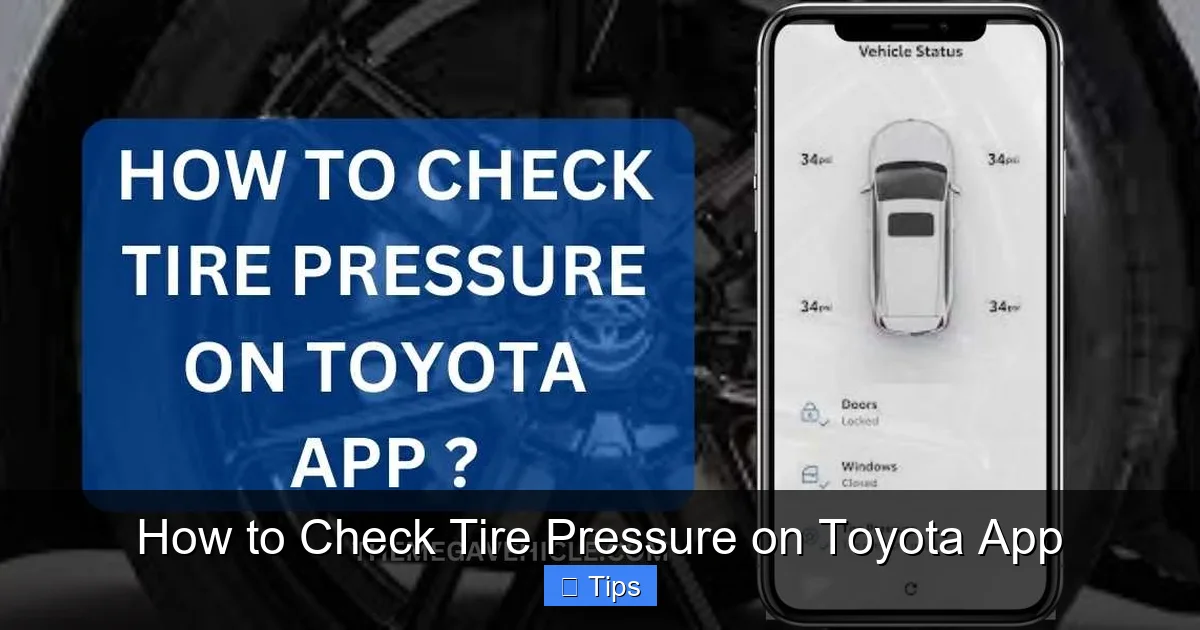
When you open the Toyota App and navigate to the “Vehicle Status” or “Tire Pressure” section, you’ll see a clear breakdown of each tire’s current pressure. The app typically shows:
- Front left (FL) tire pressure
- Front right (FR) tire pressure
- Rear left (RL) tire pressure
- Rear right (RR) tire pressure
Pressures are displayed in PSI (pounds per square inch), which is the standard unit used in the U.S. Some models may also show temperature readings, which can affect pressure levels.
Step-by-Step Guide: How to Check Tire Pressure on Toyota App
Now that you understand the basics, let’s walk through the actual process of checking your tire pressure using the Toyota App. It’s simpler than you might think—and takes less than a minute once you’re set up.
Visual guide about How to Check Tire Pressure on Toyota App
Image source: tacomaexplorer.com
Step 1: Download and Install the Toyota App
If you haven’t already, download the official Toyota App from the Apple App Store or Google Play Store. Make sure you’re getting the real app—look for “Toyota” as the developer and check the reviews to avoid fake versions.
Step 2: Create or Log In to Your Toyota Owner Account
Open the app and sign in using your Toyota Owner account credentials. If you don’t have an account, you’ll need to create one. This usually involves providing your vehicle identification number (VIN), email address, and some basic personal information. The VIN ensures the app connects to the correct vehicle.
Step 3: Pair Your Vehicle with the App
Once logged in, follow the on-screen prompts to link your Toyota to the app. This may require entering a security code sent to your phone or confirming the connection via the vehicle’s infotainment system. Some newer models support automatic pairing when your phone is near the car.
Step 4: Enable Tire Pressure Monitoring
After pairing, go to the “Vehicle Status” or “Maintenance” tab. Look for an option labeled “Tire Pressure” or “TPMS Status.” Tap it to view the current readings. If you don’t see this option, make sure your vehicle is equipped with TPMS and that the feature is activated in your app settings.
Step 5: Read and Interpret the Results
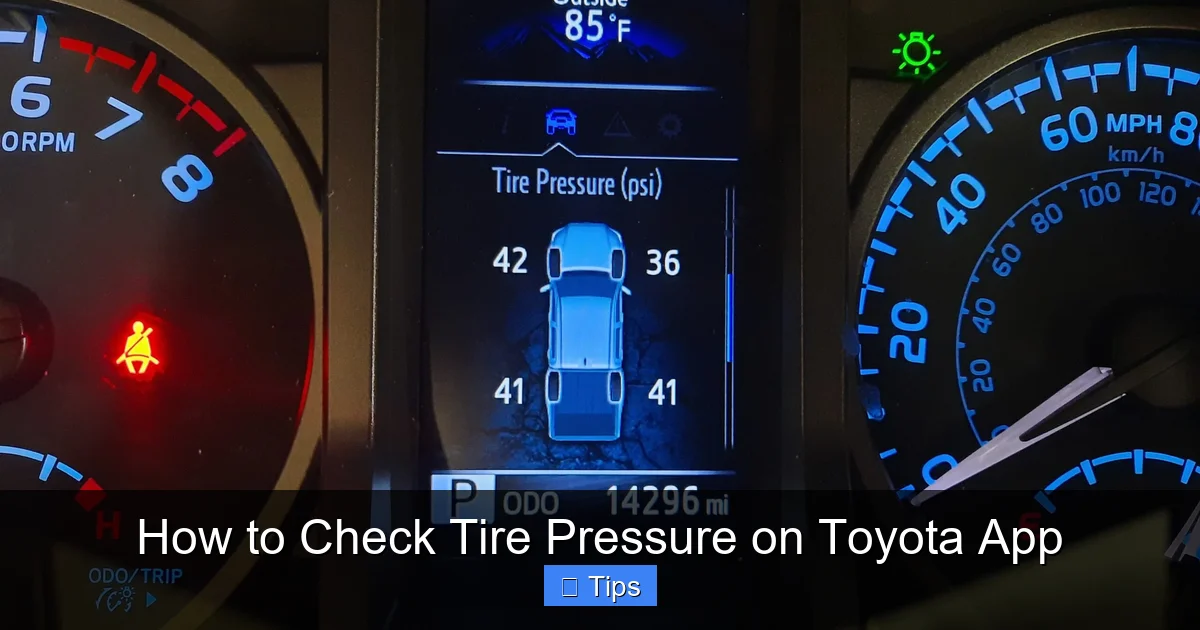
The app will display the pressure for each tire. Compare these numbers to the recommended PSI listed in your owner’s manual or on the sticker inside the driver’s side door jamb. Most Toyota models recommend between 30 and 35 PSI, but this can vary by trim and tire size.
Step 6: Respond to Low Pressure Alerts
If any tire shows low pressure, the app will usually highlight it in red or yellow and may send a push notification. Don’t ignore this! Low pressure can lead to poor handling, reduced fuel economy, and increased risk of tire failure. Add air as soon as possible using a gas station air pump or portable inflator.
Step 7: Recheck After Inflating
After adding air, wait a few minutes and check the pressure again using the app. Tires can take a little time to stabilize, especially if they were recently driven. Make sure all tires are within the recommended range before hitting the road.
Tips for Accurate Tire Pressure Readings
While the Toyota App is a fantastic tool, it’s not foolproof. To get the most accurate readings and avoid common pitfalls, keep these tips in mind.
Visual guide about How to Check Tire Pressure on Toyota App
Image source: i.ytimg.com
Check Tire Pressure When Tires Are Cold
Tire pressure increases as tires heat up from driving. For the most accurate reading, check your tires when they’ve been sitting for at least three hours or before you’ve driven more than a mile. This is known as a “cold” reading and gives you a true baseline.
Understand the Difference Between Dashboard Lights and App Readings
The TPMS warning light on your dashboard only alerts you when pressure is significantly low—usually 25% below recommended. The Toyota App, however, shows exact PSI values, so you can catch small drops before they become serious. Use the app for proactive monitoring and the dashboard light as a last-resort warning.
Be Aware of Temperature Changes
Air pressure fluctuates with temperature. For every 10°F drop in temperature, tire pressure can decrease by about 1 PSI. This means your tires may read low in winter even if they were fine in summer. Check pressure more frequently during seasonal changes.
Don’t Rely Solely on the App
While the Toyota App is convenient, it’s not a replacement for manual checks. Sensors can malfunction, batteries can die, and software glitches can occur. Make it a habit to manually check tire pressure with a reliable gauge at least once a month.
Use a Quality Tire Pressure Gauge for Manual Checks
If you do a manual check, invest in a good digital or analog tire pressure gauge. Stick it onto the valve stem of each tire and read the PSI. Compare this to the app reading—if there’s a big difference, the app or sensor may need attention.
Keep Valve Caps On
Valve caps may seem small, but they prevent dirt and moisture from entering the valve stem, which can cause slow leaks. Always replace the cap after checking or inflating your tires.
Common Issues and Troubleshooting
Even with advanced technology, things can go wrong. Here are some common problems you might encounter when using the Toyota App to check tire pressure—and how to fix them.
If the app says tire pressure data is unavailable, it could mean your vehicle isn’t equipped with TPMS, the sensors are offline, or the app isn’t properly connected. First, confirm your Toyota model supports TPMS. Then, try restarting the app, your phone, and your vehicle. If the issue persists, contact Toyota customer support.
Inconsistent or Inaccurate Readings
Sometimes the app may show fluctuating numbers or values that don’t match a manual gauge. This could be due to a weak sensor battery (most last 5–10 years), interference, or a software bug. Try recalibrating the TPMS system through your vehicle’s settings menu. If problems continue, have a technician inspect the sensors.
Delayed Alerts or Notifications
Push notifications rely on a stable internet connection. If your phone is in airplane mode or has poor signal, alerts may be delayed. Make sure notifications are enabled for the Toyota App in your phone’s settings. Also, check that your vehicle is within range if using Bluetooth.
App Won’t Connect to Vehicle
Connection issues are common, especially after software updates. Ensure your phone’s Bluetooth and location services are on. If using a cellular connection, verify your Toyota Connect subscription is active. Re-pairing the vehicle in the app settings often resolves the problem.
One Tire Always Shows Low
If the same tire consistently shows low pressure, it may have a slow leak. Check for nails, cracks, or damage to the tire or wheel. Even small punctures can cause gradual air loss. Visit a tire shop for a professional inspection.
Benefits of Using the Toyota App for Tire Pressure
Using the Toyota App to monitor tire pressure offers several advantages over traditional methods. Let’s explore why this digital approach is a game-changer for Toyota owners.
Convenience and Time Savings
No more searching for a gas station with a working air pump or fumbling with a tire gauge in the rain. With the app, you can check tire pressure from your couch, office, or driveway. It’s especially helpful during busy mornings or before long trips.
Proactive Maintenance
The app helps you catch issues early. Instead of waiting for a dashboard warning, you can spot a slow leak or pressure drop before it becomes dangerous. This proactive approach can prevent breakdowns, improve safety, and reduce repair costs.
Improved Fuel Efficiency
Properly inflated tires reduce rolling resistance, which means your engine doesn’t have to work as hard. Studies show that underinflated tires can reduce fuel economy by up to 3%. Over time, that adds up to significant savings at the pump.
Extended Tire Life
Tires wear unevenly when underinflated. The edges wear down faster than the center, shortening the tire’s lifespan. By maintaining correct pressure, you ensure even wear and get more miles out of each set of tires.
Enhanced Safety
Underinflated tires are more prone to overheating, blowouts, and loss of control—especially at high speeds. The app helps you avoid these risks by keeping your tires in the optimal range.
Peace of Mind
Whether you’re driving across town or across the country, knowing your tires are properly inflated gives you confidence behind the wheel. The app acts like a digital co-pilot, quietly watching over your vehicle’s health.
Best Practices for Long-Term Tire Health
While the Toyota App is a powerful tool, it works best when combined with good habits. Here are some best practices to keep your tires in top shape year-round.
Check Tire Pressure Monthly
Make it a routine to check tire pressure at least once a month—even if the app shows everything is fine. This helps you catch slow leaks and ensures sensors are working properly.
Rotate Your Tires Regularly
Tire rotation promotes even wear. Most Toyota models recommend rotating tires every 5,000 to 7,500 miles. Check your owner’s manual for specifics.
Inspect Tires for Damage
Look for cuts, bulges, cracks, or embedded objects during your monthly checks. These can lead to air leaks or blowouts if ignored.
Keep Spare Tire Inflated
Don’t forget your spare! Many drivers only check it when they need it—and by then, it’s often flat. Use the app or a manual gauge to ensure your spare is ready when you need it.
Adjust for Heavy Loads
If you’re carrying extra weight—like luggage, gear, or passengers—you may need to increase tire pressure slightly. Refer to your owner’s manual for load-specific recommendations.
Use the Correct Tire Type
Always use tires recommended by Toyota for your specific model. Using the wrong size or type can affect handling, safety, and TPMS accuracy.
Conclusion
Checking your tire pressure on the Toyota App is one of the smartest, easiest ways to keep your vehicle safe, efficient, and reliable. With just a few taps on your phone, you can monitor all four tires, receive instant alerts, and take action before small issues become big problems. It’s a simple habit that pays off in better gas mileage, longer tire life, and safer drives.
Of course, no app is perfect. Always combine digital monitoring with manual checks and regular maintenance. But for Toyota owners, the app is a powerful ally in vehicle care. So download it, pair it, and start using it today. Your tires—and your wallet—will thank you.
Frequently Asked Questions
Can I check tire pressure on the Toyota App if my car doesn’t have TPMS?
No, the Toyota App can only display tire pressure data if your vehicle is equipped with a Tire Pressure Monitoring System (TPMS). Most Toyota models from 2008 onward have TPMS, but older vehicles may not support this feature.
How often should I check my tire pressure using the app?
It’s a good idea to check your tire pressure at least once a month using the app. Also, check it before long trips or when there are significant temperature changes, as cold weather can reduce tire pressure.
Why does the app show different pressure than my manual gauge?
Small differences are normal due to sensor calibration or timing. However, if the difference is more than 2–3 PSI, have your TPMS sensors checked. Sensor batteries can weaken over time, affecting accuracy.
Does the Toyota App work when my car is off?
Yes, the app can display the last known tire pressure reading even when the vehicle is off. However, real-time updates require the car to be on or recently driven, depending on the model and connection type.
Can I inflate my tires using the app?
No, the app only monitors pressure—it cannot inflate tires. You’ll need to use a gas station air pump or a portable tire inflator to add air when pressure is low.
What should I do if the app keeps showing a low pressure warning?
First, manually check the tire with a gauge to confirm. If it’s truly low, add air. If the warning persists despite correct pressure, there may be a sensor issue. Visit a Toyota service center for diagnosis and repair.

At CarLegit, we believe information should be clear, factual, and genuinely helpful. That’s why every guide, review, and update on our website is created with care, research, and a strong focus on user experience.