
Resetting the maintenance light on your 2019 Toyota Highlander is simple and takes just a few minutes. This guide walks you through the exact steps using the dashboard controls—no tools or dealership visit needed. Stay on top of your vehicle’s service schedule with confidence.
So, you’ve just changed the oil in your 2019 Toyota Highlander—great job! But now, that little yellow wrench or “Maintenance Required” light is still blinking on your dashboard. You know the service is done, but the car doesn’t seem to realize it. Don’t worry—you’re not alone. This is one of the most common questions Toyota owners ask, and the good news is, it’s incredibly easy to fix.
Resetting the maintenance light on your 2019 Toyota Highlander doesn’t require a trip to the dealership, a special scan tool, or even opening the hood. It’s all done through the vehicle’s onboard computer system using buttons on the steering wheel and dashboard. Whether you’ve just rotated your tires, replaced your cabin air filter, or completed a full oil change, resetting this light ensures your SUV continues to track your maintenance schedule accurately.
In this guide, we’ll walk you through the exact steps to reset the maintenance light on your 2019 Toyota Highlander. We’ll explain what the light means, why it comes on, and how to turn it off—quickly and safely. Plus, we’ll share tips to help you stay on top of your vehicle’s health long after the light is gone. By the end, you’ll feel confident handling this task like a pro.
In This Article
- 1 Key Takeaways
- 2 📑 Table of Contents
- 3 Understanding the Maintenance Light on Your 2019 Toyota Highlander
- 4 Tools and Preparation: What You’ll Need
- 5 Step-by-Step Guide to Reset the Maintenance Light
- 5.1 Step 1: Turn the Ignition to the “ON” Position
- 5.2 Step 2: Locate the Trip Meter Button
- 5.3 Step 3: Press and Hold the Trip Button
- 5.4 Step 4: Turn the Ignition Off and Back On
- 5.5 Step 5: Release the Button and Check the Display
- 5.6 Step 6: Press and Hold the Trip Button Again
- 5.7 Step 7: Confirm the Light Is Off
- 5.8 Alternative Method: Using the Steering Wheel Controls
- 6 Troubleshooting Common Issues
- 7 Tips for Maintaining Your Toyota Highlander
- 8 When to Seek Professional Help
- 9 Conclusion
- 10 Frequently Asked Questions
- 10.1 Can I reset the maintenance light without turning on the engine?
- 10.2 How often should I reset the maintenance light?
- 10.3 What if the maintenance light won’t turn off?
- 10.4 Is the reset process the same for all Toyota models?
- 10.5 Can a mechanic reset the light for me?
- 10.6 Does resetting the light affect my warranty?
Key Takeaways
- Reset the maintenance light using only dashboard buttons: No OBD2 scanner or special tools required—just follow the menu navigation.
- Timing matters: Always reset the light after completing scheduled maintenance to ensure accurate future reminders.
- Two types of maintenance lights: Understand the difference between the “Maintenance Required” light and other warning indicators.
- Use the trip meter and info button: These are key controls for accessing the reset menu on the 2019 Highlander.
- Double-check your work: Confirm the light is off after resetting to avoid confusion during your next service.
- Keep a maintenance log: Track oil changes, tire rotations, and other services to stay proactive about vehicle care.
- When to see a professional: If the light won’t reset or keeps coming back, it may signal a deeper issue needing expert attention.
📑 Table of Contents
Understanding the Maintenance Light on Your 2019 Toyota Highlander
Before diving into the reset process, it’s important to understand what that little light actually means. On the 2019 Toyota Highlander, the “Maintenance Required” light—often shown as a yellow wrench icon or the words “MAINT REQD”—is part of Toyota’s Intelligent Maintenance System. This system tracks your driving habits, mileage, and time since the last service to determine when routine maintenance is due.
Unlike a check engine light, which signals a potential mechanical issue, the maintenance light is purely a reminder. It’s designed to prompt you to schedule routine services like oil changes, tire rotations, brake inspections, and fluid top-offs. Toyota recommends servicing your Highlander every 5,000 to 10,000 miles, depending on driving conditions. The system calculates this based on a combination of mileage and time (usually every 6 months), so even if you don’t drive much, the light may still come on.
It’s also worth noting that there are two types of maintenance reminders on the 2019 Highlander: the standard “Maintenance Required” light and, in some models, a more detailed maintenance menu that shows individual service items (like oil life percentage). The reset process we’ll cover applies to the standard light, but understanding the difference helps you interpret what your vehicle is telling you.
One common misconception is that the maintenance light only comes on for oil changes. While oil changes are a major trigger, the system also accounts for other services. For example, if you’ve recently rotated your tires or replaced your engine air filter, the light may still appear until it’s manually reset. This is why it’s crucial to reset the light only after you’ve completed the required service—otherwise, you might miss the next reminder.
Another thing to keep in mind: the maintenance light is not the same as the “Check Engine” light or other warning symbols like the tire pressure monitor or ABS light. Those indicate potential problems that may require immediate attention. The maintenance light, on the other hand, is purely informational. That said, ignoring it for too long could lead to missed services, which over time might affect your vehicle’s performance, fuel efficiency, and longevity.
So, when should you reset the light? Ideally, right after you’ve completed the service. Whether you did it yourself or had it done at a shop, taking a few minutes to reset the light ensures your Highlander’s computer knows the work is done and can start counting down to the next service interval. This simple step helps you stay organized and proactive about vehicle care.
Tools and Preparation: What You’ll Need
The best part about resetting the maintenance light on your 2019 Toyota Highlander? You don’t need any special tools. No OBD2 scanner, no laptop, no trip to the mechanic. Everything you need is already built into your vehicle’s dashboard and steering wheel controls.
All you’ll need is:
– Your vehicle keys (to turn the ignition)
– About 2–3 minutes of your time
– A clear view of the instrument cluster
That’s it. The process uses the standard buttons on your steering wheel and the trip meter reset button near the speedometer. These controls allow you to navigate the vehicle’s information display and access the maintenance reset menu.
Before you begin, make sure your vehicle is parked on a level surface and the engine is off. You don’t need to start the car—just turn the ignition to the “ON” position (also known as “IGN” or “ACC”). This powers up the dashboard electronics without starting the engine, which is perfect for accessing the reset menu.
It’s also a good idea to have your owner’s manual handy, just in case. While the steps are straightforward, having the manual nearby can help if you run into any unexpected issues or want to double-check a detail. However, most 2019 Highlander owners find they don’t need it—the process is intuitive and well-designed.
One tip: if you’ve just had your vehicle serviced at a dealership or repair shop, ask them to reset the light for you. Many shops do this automatically, but it’s always good to confirm. If they didn’t, or if you did the service yourself, now’s the time to take care of it.
Another preparation step is to make sure you’ve actually completed the required maintenance. Resetting the light prematurely—before changing the oil, for example—defeats the purpose of the reminder system. The light is there to help you stay on schedule, so only reset it once the work is done.
Finally, take a moment to check your instrument cluster. Make sure the maintenance light is actually on. Sometimes, drivers confuse it with other indicators. The “Maintenance Required” light typically appears as a yellow wrench or the words “MAINT REQD” in the display. If you see a red warning light or a different symbol, that may indicate a more serious issue, and you should consult your owner’s manual or a professional.
Step-by-Step Guide to Reset the Maintenance Light
Now that you’re prepared, let’s walk through the exact steps to reset the maintenance light on your 2019 Toyota Highlander. This process uses the trip meter and information buttons on the steering wheel to access the reset menu. Follow each step carefully, and you’ll have that light turned off in just a few minutes.
Step 1: Turn the Ignition to the “ON” Position
Insert your key into the ignition and turn it to the “ON” position. You’ll hear the dashboard lights come on, and the instrument cluster will illuminate. Do not start the engine—just leave it in “ON.” This powers up the vehicle’s electronics so you can access the menu system.

Visual guide about How to Reset Maintenance Light on Toyota Highlander 2019
Image source: i.ytimg.com
Visual guide about How to Reset Maintenance Light on Toyota Highlander 2019
Image source: oilreset.com
Step 2: Locate the Trip Meter Button
Look at your instrument cluster, just below the speedometer. You’ll see a small button labeled “TRIP” or “ODO/TRIP.” This button cycles through your trip odometer readings (Trip A, Trip B, and total odometer). Press it once to make sure Trip A is displayed. This is important because the reset menu is accessed through the trip meter display.
Step 3: Press and Hold the Trip Button
With the ignition on and Trip A displayed, press and hold the trip meter button. Keep holding it down. After about 5–10 seconds, you’ll notice the display change. The odometer numbers will begin to flash or reset, and eventually, the “Maintenance Required” light may blink or the display will show “—” or “000000.” This indicates the system is preparing to reset.
Step 4: Turn the Ignition Off and Back On
While still holding the trip button, turn the ignition back to the “OFF” position. Wait about 3–5 seconds, then turn it back to “ON.” Continue holding the trip button the entire time. You’re essentially performing a soft reset of the maintenance system by cycling the power while the button is pressed.
Step 5: Release the Button and Check the Display
After turning the ignition back to “ON,” release the trip button. The display should now show “MAINT REQD” or the wrench icon, and it may begin to flash. This is normal—it means the system is ready to accept the reset command.
Step 6: Press and Hold the Trip Button Again
Now, press and hold the trip button once more. Hold it for about 10–15 seconds. During this time, the “MAINT REQD” message should disappear, and the display may show “—” or return to the normal odometer reading. This indicates the maintenance light has been successfully reset.
Step 7: Confirm the Light Is Off
Release the button and observe the instrument cluster. The maintenance light should no longer be illuminated. If it’s still on, repeat the process from Step 1. Sometimes it takes a second attempt, especially if the timing wasn’t exact.
Alternative Method: Using the Steering Wheel Controls
Some 2019 Highlander models with the multi-information display (MID) allow you to reset the light using the steering wheel buttons. Here’s how:
- Turn the ignition to “ON.”
- Use the arrow buttons on the left side of the steering wheel to navigate to the “Settings” or “Vehicle Settings” menu.
- Scroll to “Maintenance” or “Oil Maintenance.”
- Select “Reset” and confirm when prompted.
This method is more intuitive for drivers who prefer menu navigation over button-holding sequences. Check your owner’s manual to see if your model supports this feature.
Troubleshooting Common Issues
Even with clear instructions, sometimes the reset process doesn’t go as planned. Don’t panic—most issues are easy to fix with a little patience. Here are some common problems and how to solve them.
The Light Won’t Turn Off After Reset
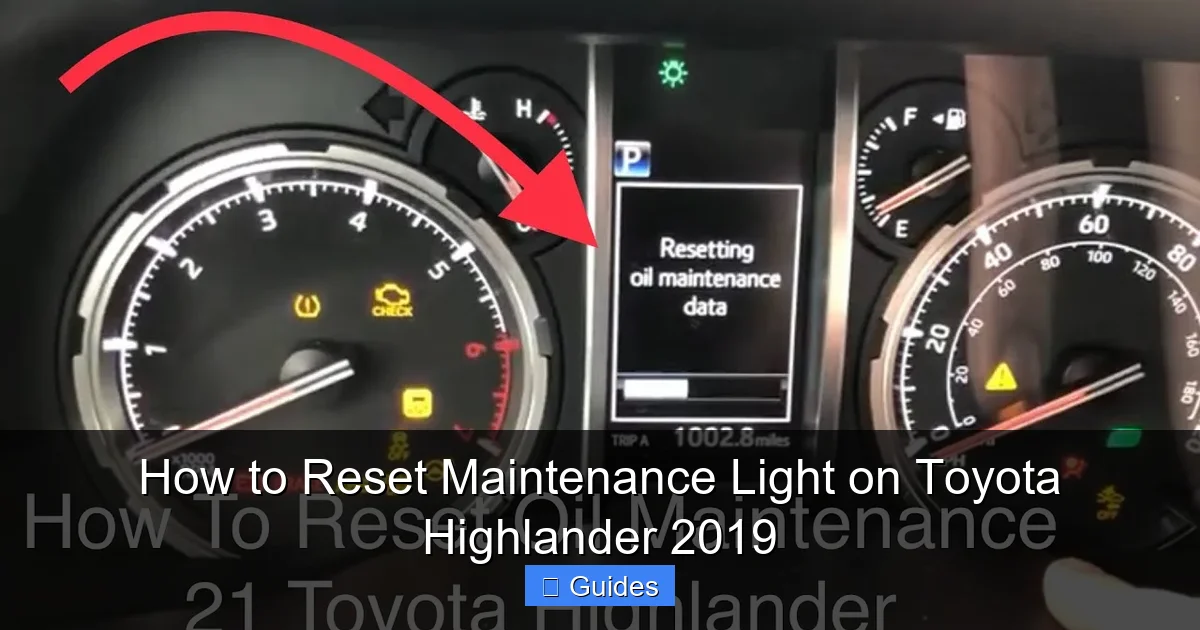
If the maintenance light remains on after following the steps, try repeating the process. Timing is critical—holding the button too short or too long can interrupt the reset. Make sure you’re holding the trip button consistently and turning the ignition off and on smoothly. Also, ensure the ignition is fully in the “ON” position (not just “ACC”) during the process.
Visual guide about How to Reset Maintenance Light on Toyota Highlander 2019
Image source: i.ytimg.com
The Display Doesn’t Respond
If pressing the trip button does nothing, check that the ignition is on and the dashboard is powered. If the display is blank or dim, the battery may be low. Try starting the engine briefly to charge the system, then turn it off and attempt the reset again.
The Light Comes Back On Immediately
If the light resets but returns the next time you drive, it could mean the system didn’t register the reset properly. This sometimes happens if the vehicle’s computer detects incomplete data. Try the reset process one more time, and consider visiting a Toyota service center if it persists. There may be a software glitch or sensor issue.
Confusion with Other Warning Lights
Make sure you’re resetting the correct light. The “Maintenance Required” light is yellow and informational. If you see a red light or a different symbol (like an engine icon), that’s a different issue. Consult your owner’s manual or a professional mechanic.
Battery Disconnection Doesn’t Work
Some drivers try disconnecting the battery to reset the light, but this rarely works for the maintenance reminder. It may reset other systems, but the maintenance light is stored in the vehicle’s computer and requires the proper menu sequence to clear.
Tips for Maintaining Your Toyota Highlander
Resetting the maintenance light is just one part of keeping your Highlander in top shape. Here are some practical tips to help you stay ahead of service needs and extend the life of your vehicle.
Follow the Recommended Maintenance Schedule
Your owner’s manual includes a detailed schedule based on mileage and time. Stick to it—whether it’s every 5,000 miles for severe driving conditions or 10,000 miles for normal use. Regular oil changes, tire rotations, and fluid checks keep your Highlander running smoothly.
Keep a Service Log
Use a notebook, app, or digital calendar to track when services were performed. Note the date, mileage, and type of service. This helps you stay organized and provides proof of maintenance if you ever sell the vehicle.
Check Fluids Monthly
Even between services, check engine oil, coolant, brake fluid, and windshield washer fluid. Low levels can lead to bigger problems down the road.
Rotate Tires Every 5,000–7,500 Miles
Tire rotation promotes even wear and extends tire life. It’s a simple service that makes a big difference in handling and safety.
Listen to Your Vehicle
Unusual noises, vibrations, or changes in performance can signal issues before the maintenance light comes on. Address them early to avoid costly repairs.
When to Seek Professional Help
While resetting the maintenance light is a DIY-friendly task, there are times when it’s best to consult a professional. If the light won’t reset after multiple attempts, or if it keeps coming back despite recent service, there may be an underlying issue. For example, a faulty sensor or software glitch could prevent the system from recognizing the reset.
Additionally, if you’re unsure whether the required maintenance was completed—or if you’re not comfortable performing the reset yourself—visit a Toyota service center. Their technicians can reset the light and perform a full inspection to ensure everything is in order.
Finally, if you notice other warning lights or experience performance issues, don’t ignore them. The maintenance light is just one part of your vehicle’s health monitoring system. Regular check-ups and prompt attention to problems keep your Highlander reliable for years to come.
Conclusion
Resetting the maintenance light on your 2019 Toyota Highlander is a quick, simple task that every owner should know how to do. With just a few button presses and a little patience, you can clear that persistent reminder and keep your vehicle’s service schedule on track. Whether you’re a seasoned DIYer or a first-time Toyota owner, this guide gives you the confidence to handle it yourself.
Remember, the maintenance light is there to help you—not hassle you. By resetting it after each service, you ensure your Highlander continues to perform at its best. Combine this with regular check-ups, fluid monitoring, and a solid maintenance log, and you’ll enjoy a smooth, reliable ride for miles to come.
So the next time that little yellow wrench appears, don’t stress. Grab your keys, follow the steps, and get back on the road with peace of mind. Your Toyota Highlander will thank you.
Frequently Asked Questions
Can I reset the maintenance light without turning on the engine?
Yes, you only need to turn the ignition to the “ON” position—no need to start the engine. This powers the dashboard so you can access the reset menu.
How often should I reset the maintenance light?
Only reset the light after completing the scheduled maintenance, such as an oil change or tire rotation. Do not reset it prematurely.
What if the maintenance light won’t turn off?
Try repeating the reset process. If it still won’t turn off, there may be a sensor or software issue—consult a Toyota service center.
Is the reset process the same for all Toyota models?
No, the steps vary by model and year. Always refer to your owner’s manual or a model-specific guide for accuracy.
Can a mechanic reset the light for me?
Yes, most dealerships and repair shops will reset the maintenance light as part of their service. Just ask them to do it when you pick up your vehicle.
Does resetting the light affect my warranty?
No, resetting the maintenance light does not affect your warranty. It’s a standard procedure and does not alter any vehicle systems.

At CarLegit, we believe information should be clear, factual, and genuinely helpful. That’s why every guide, review, and update on our website is created with care, research, and a strong focus on user experience.