
Setting cruise control in your Nissan Rogue is simple and enhances long-distance driving comfort. This guide walks you through every step, from locating the controls to troubleshooting common issues, so you can enjoy a smoother, more relaxed ride.
In This Article
- 1 Key Takeaways
- 2 📑 Table of Contents
- 3 Introduction: Why Cruise Control Matters in Your Nissan Rogue
- 4 Understanding the Cruise Control System in Nissan Rogue
- 5 Step-by-Step Guide: How to Set Cruise Control in Nissan Rogue
- 6 Advanced Tips for Using Cruise Control Effectively
- 7 Troubleshooting Common Cruise Control Issues
- 8 Conclusion: Drive Smarter with Cruise Control
- 9 Frequently Asked Questions
- 9.1 Can I use cruise control in the rain or snow?
- 9.2 Why won’t my cruise control turn on?
- 9.3 Can I accelerate manually while cruise control is on?
- 9.4 Does cruise control save gas?
- 9.5 What happens if I press the brake while cruise control is active?
- 9.6 Is cruise control the same as adaptive cruise control?
Key Takeaways
- Locate the cruise control buttons: They’re on the right side of the steering wheel and include ON/OFF, SET, RES, and CANCEL.
- Activate cruise control safely: Only engage it on highways or open roads at speeds above 25 mph.
- Use SET to lock your speed: Press SET once you reach your desired speed to maintain it automatically.
- Adjust speed with RES and CANCEL: Tap RES to increase or CANCEL to pause—then resume later.
- Deactivate with brake or OFF: Pressing the brake pedal or turning off the system stops cruise control instantly.
- Understand limitations: Avoid using cruise control in rain, snow, or heavy traffic for safety.
- Practice in safe conditions: Try it first on empty highways to build confidence before regular use.
📑 Table of Contents
- Introduction: Why Cruise Control Matters in Your Nissan Rogue
- Understanding the Cruise Control System in Nissan Rogue
- Step-by-Step Guide: How to Set Cruise Control in Nissan Rogue
- Advanced Tips for Using Cruise Control Effectively
- Troubleshooting Common Cruise Control Issues
- Conclusion: Drive Smarter with Cruise Control
Introduction: Why Cruise Control Matters in Your Nissan Rogue
Driving long distances can be tiring, especially when you’re constantly pressing the accelerator to maintain a steady speed. That’s where cruise control comes in—a smart feature that helps reduce driver fatigue and improves fuel efficiency by keeping your speed consistent. If you drive a Nissan Rogue, you’re in luck: this popular compact SUV comes equipped with an intuitive cruise control system designed to make highway driving more comfortable and less stressful.
Whether you’re commuting daily or heading out on a road trip, knowing how to set cruise control in your Nissan Rogue can make a big difference. It’s not just about convenience—it’s about safety and control. When used correctly, cruise control helps you maintain a safe following distance, avoid unintentional speeding, and stay focused on the road. Plus, it reduces the strain on your right foot, especially during long drives.
But here’s the thing: many drivers either don’t use cruise control at all or aren’t sure how to use it properly. Maybe you’ve glanced at the buttons on your steering wheel and felt confused. Or perhaps you’ve tried it once and it didn’t work as expected. Don’t worry—you’re not alone. This guide will walk you through everything you need to know, from finding the controls to mastering advanced features like resume and acceleration. By the end, you’ll feel confident using cruise control like a pro.
Understanding the Cruise Control System in Nissan Rogue

Visual guide about How to Set Cruise Control in Nissan Rogue
Image source: voyagerinfo.com
Before diving into the steps, it helps to understand how the cruise control system works in your Nissan Rogue. Unlike older systems that required mechanical linkages, modern Nissan Rogues use electronic throttle control and sensors to maintain speed. This means the car communicates with the engine and transmission to keep your speed steady without constant input from your foot.
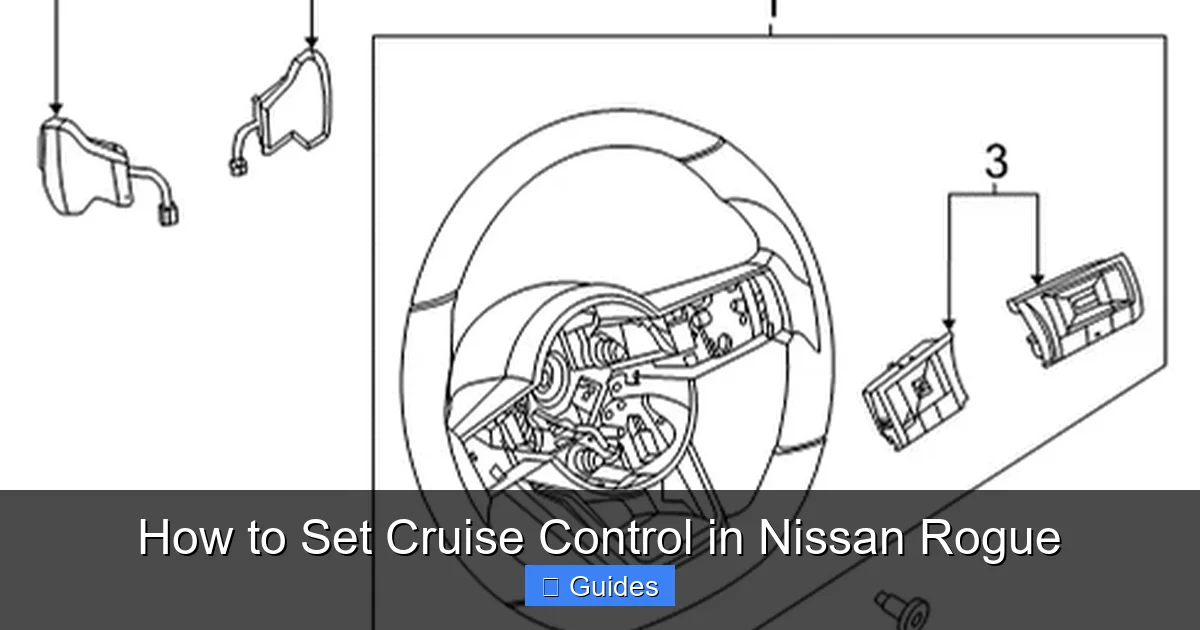
The system is activated and controlled entirely through buttons on the steering wheel—specifically, the right-hand side. These buttons are designed to be easily accessible without taking your hands off the wheel, which is crucial for safety. The main controls include:
– **CRUISE ON/OFF**: Turns the entire system on or off.
– **SET/–**: Sets the current speed or decreases it when active.
– **RES/+**: Resumes the last set speed or increases it when active.
– **CANCEL**: Temporarily disengages cruise control without turning it off.
It’s important to note that cruise control in the Nissan Rogue is not adaptive by default (unless you have the optional Intelligent Cruise Control). This means it won’t automatically adjust your speed based on traffic ahead. Instead, it simply maintains the speed you set until you brake, cancel, or turn it off.
Another key feature is the speed range. Cruise control only works when you’re driving at or above 25 mph (40 km/h). Below that, the system won’t activate—this is a safety measure to prevent accidental use in city driving or heavy traffic. Once engaged, the system will maintain your speed even on slight inclines or declines, though you may notice minor variations depending on road conditions.
How the System Communicates with Your Vehicle
Your Nissan Rogue’s cruise control system relies on a network of sensors and the vehicle’s onboard computer. When you press the SET button, the system records your current speed and sends a signal to the engine control unit (ECU). The ECU then adjusts the throttle position to maintain that speed, even if the road starts to slope upward.
For example, imagine you’re driving at 65 mph on a flat highway. You set cruise control, and the car holds that speed. Now, if you start climbing a hill, the engine will automatically increase power to keep you at 65 mph. When you descend, it reduces throttle input to prevent speeding. This seamless adjustment happens in real time, giving you a smooth ride without constant pedal adjustments.
However, the system isn’t perfect. In steep hills or strong headwinds, you might notice a slight drop in speed before the engine compensates. This is normal and doesn’t mean the system is malfunctioning. It’s also why it’s important to stay alert—even with cruise control on, you’re still responsible for monitoring traffic and road conditions.
Safety Features and Limitations
While cruise control is a helpful tool, it’s not a substitute for active driving. The Nissan Rogue’s system includes several built-in safety features to prevent misuse:
– **Automatic deactivation**: The system turns off immediately when you press the brake pedal.
– **Speed floor**: It won’t engage below 25 mph.
– **Manual override**: You can always accelerate manually by pressing the gas pedal—the system won’t fight you.
Despite these safeguards, there are situations where cruise control should not be used. Avoid using it in:
– Heavy rain or snow (reduced traction)
– Icy or slippery roads
– Stop-and-go traffic
– Winding or mountainous roads
In these conditions, maintaining manual control is safer. Remember: cruise control is designed for steady, predictable driving—not for navigating complex or hazardous environments.
Step-by-Step Guide: How to Set Cruise Control in Nissan Rogue
Visual guide about How to Set Cruise Control in Nissan Rogue
Image source: nissanpartsdeal.com
Now that you understand how the system works, let’s walk through the actual process of setting cruise control in your Nissan Rogue. It’s simpler than it looks, and once you’ve done it a few times, it’ll become second nature.
Step 1: Ensure You’re in the Right Conditions
Before you even touch the buttons, make sure you’re driving on a highway or open road with minimal traffic. Your speed should be at least 25 mph (40 km/h)—this is the minimum required for cruise control to activate. Also, check that the road is dry and visibility is good. If it’s raining heavily or the road is icy, skip cruise control for safety.
Step 2: Turn On the Cruise Control System
Look at the right side of your steering wheel. You’ll see a cluster of buttons labeled with icons. Find the one that says “CRUISE” or has a speedometer symbol—this is the ON/OFF button. Press it once to turn the system on. You’ll know it’s active when a green cruise control indicator light appears on your dashboard (usually near the speedometer).
At this point, the system is ready but not yet engaged. Think of it like turning on a TV—it’s powered up, but you haven’t selected a channel yet.
Step 3: Accelerate to Your Desired Speed
Use the accelerator pedal to reach the speed you want to maintain. For example, if the speed limit is 65 mph, drive at that speed for a few seconds to stabilize. Make sure you’re not accelerating or braking—just cruising steadily.
Tip: Pick a speed that’s safe for current traffic conditions. Don’t set it too high just because you can. Consistency is key.
Step 4: Press the SET Button
Once you’re at your target speed, press the “SET/–” button (usually located just below the ON/OFF button). This locks in your current speed. You’ll feel the car ease off the accelerator slightly, and the speedometer will show that the system is now maintaining your speed.
You can now take your foot off the gas pedal. The car will continue at the same speed, even if the road begins to incline.
Step 5: Adjust Speed as Needed
If you want to go faster, press and hold the “RES/+” button. The car will gradually accelerate. Release it when you reach your new speed—the system will automatically set and maintain that speed.
To slow down, press and hold the “SET/–” button. The car will decelerate smoothly. Again, release it at your desired speed.
You can also tap the “RES/+” or “SET/–” buttons briefly to increase or decrease speed in small increments (usually 1 mph or 1 km/h per tap). This is great for fine-tuning your speed without overcorrecting.
Step 6: Temporarily Disengage or Cancel
If traffic slows down or you need to slow down quickly, press the “CANCEL” button. This pauses cruise control without turning it off completely. The green light on your dashboard will remain on, indicating the system is still ready to resume.
Alternatively, simply press the brake pedal. This also disengages cruise control immediately. The system remembers your last set speed, so you can resume it later.
Step 7: Resume or Turn Off
To get back to your previous speed, press the “RES/+” button. The car will accelerate back to the last set speed (as long as it was above 25 mph).
When you’re done using cruise control—say, you’re exiting the highway—press the “CRUISE” button again to turn the system off completely. The dashboard light will go out, and the system will no longer be active.
Advanced Tips for Using Cruise Control Effectively
Visual guide about How to Set Cruise Control in Nissan Rogue
Image source: voyagerinfo.com
Now that you know the basics, let’s explore some advanced techniques to get the most out of your Nissan Rogue’s cruise control system.
Use Resume Wisely
The “RES” (Resume) feature is one of the most useful tools in your cruise control arsenal. After canceling or braking, you can press “RES” to return to your last set speed. This is especially helpful when you slow down for a toll booth, construction zone, or traffic and then want to get back up to speed quickly.
For example, imagine you’re driving at 70 mph, slow down to 50 mph for a merge, and then traffic clears. Instead of manually accelerating and resetting, just press “RES”—your Rogue will smoothly accelerate back to 70 mph.
Just remember: the system only resumes speeds above 25 mph. If you canceled at a lower speed, “RES” won’t work.
Combine with Manual Acceleration
You don’t have to rely solely on the cruise control buttons to adjust speed. You can press the accelerator pedal manually to pass a slower vehicle or merge into faster traffic. The system won’t interfere—it will simply pause and resume once you release the pedal.
This hybrid approach gives you flexibility. For instance, if a truck is blocking your lane, press the gas to pass, then release and let cruise control take over again.
Use Cruise Control to Improve Fuel Efficiency
One of the hidden benefits of cruise control is better gas mileage. By maintaining a steady speed, your engine operates more efficiently, especially on long highway drives. Studies show that consistent speeds can improve fuel economy by up to 10–15% compared to frequent acceleration and braking.
To maximize this benefit, set your speed slightly below the limit (e.g., 68 mph in a 70 mph zone) and avoid unnecessary speed changes. This reduces engine strain and saves fuel over time.
Avoid Overuse in Hilly Terrain
While cruise control handles gentle hills well, it can struggle on steep inclines. If you’re driving through mountainous areas, you might notice the engine working harder to maintain speed. In these cases, it’s okay to let the system do its job—but stay alert.
If the car starts to slow significantly or the engine revs loudly, consider disengaging cruise control and manually controlling your speed. This gives you better control and prevents unnecessary wear on the engine.
Practice in Safe Conditions
If you’re new to cruise control, don’t try it for the first time during rush hour or in bad weather. Find an empty stretch of highway on a clear day and practice setting, adjusting, and canceling. Get comfortable with the buttons and how the car responds.
Start with short sessions—maybe 10–15 minutes—and gradually increase as you gain confidence. The more familiar you are with the system, the safer and more effective your drives will be.
Troubleshooting Common Cruise Control Issues
Even with a well-designed system, you might run into occasional problems. Here are some common issues and how to fix them.
Cruise Control Won’t Turn On
If pressing the “CRUISE” button doesn’t activate the system, check the following:
– Is your speed above 25 mph? The system won’t engage below this threshold.
– Is the brake pedal fully released? Sometimes a stuck pedal switch can prevent activation.
– Is there a warning light on the dashboard? A check engine light or ABS warning could indicate a deeper issue.
If none of these apply, try turning the ignition off and on again. This resets the system and often resolves minor glitches.
System Won’t Maintain Speed
If cruise control turns on but doesn’t hold your speed, it could be due to:
– A faulty throttle position sensor
– Low engine power (e.g., due to altitude or load)
– A malfunctioning cruise control module
In most cases, this requires a diagnostic scan at a Nissan service center. Don’t ignore it—driving with an unreliable system can be dangerous.
Buttons Feel Stiff or Unresponsive
Over time, the steering wheel buttons can accumulate dirt or wear out. If they feel sticky or don’t respond, try cleaning them gently with a soft cloth and compressed air. Avoid using liquids near the buttons.
If cleaning doesn’t help, the switch assembly may need replacement. This is a job best left to a professional.
Dashboard Light Flashes or Stays On
A flashing or persistent cruise control light usually indicates a fault. Check your owner’s manual for specific codes, but common causes include:
– A blown fuse
– A disconnected sensor
– A software glitch
Resetting the system (turning the car off and on) may help. If the light remains, visit a service center.
Conclusion: Drive Smarter with Cruise Control
Mastering how to set cruise control in your Nissan Rogue is more than just a convenience—it’s a smart driving habit that enhances safety, comfort, and efficiency. From reducing fatigue on long trips to improving fuel economy, this feature is designed to make your time behind the wheel more enjoyable.
By following the steps in this guide, you’ll be able to activate, adjust, and deactivate cruise control with confidence. Remember to use it responsibly: only on highways, in good weather, and when traffic allows. And always stay alert—no system can replace an attentive driver.
Whether you’re a daily commuter or a weekend road-tripper, cruise control is a valuable tool in your Nissan Rogue. Take the time to practice, understand its limits, and use it wisely. Your feet—and your focus—will thank you.
Frequently Asked Questions
Can I use cruise control in the rain or snow?
It’s not recommended. Wet or icy roads reduce traction, and cruise control can cause loss of control if the wheels slip. Always drive manually in adverse weather conditions.
Why won’t my cruise control turn on?
Check if your speed is above 25 mph and the brake pedal is fully released. If the system still won’t activate, there may be a sensor or electrical issue requiring professional diagnosis.
Can I accelerate manually while cruise control is on?
Yes. Pressing the accelerator will override cruise control temporarily. When you release the pedal, the system will resume maintaining the set speed.
Does cruise control save gas?
Yes, by maintaining a steady speed, it reduces unnecessary acceleration and braking, which can improve fuel efficiency by up to 15% on long drives.
What happens if I press the brake while cruise control is active?
The system disengages immediately. The last set speed is saved, so you can resume it later by pressing the RES button.
Is cruise control the same as adaptive cruise control?
No. Standard cruise control maintains a fixed speed. Adaptive cruise control (if equipped) adjusts speed based on traffic ahead using sensors and radar.

At CarLegit, we believe information should be clear, factual, and genuinely helpful. That’s why every guide, review, and update on our website is created with care, research, and a strong focus on user experience.