
Turning off lane departure on your 2022 Honda Civic is simple and can be done quickly using the dashboard controls. Whether you’re driving on winding roads or prefer full control, this guide walks you through the process safely and effectively.
In This Article
- 1 Key Takeaways
- 2 📑 Table of Contents
- 3 Understanding Lane Departure Warning in the 2022 Honda Civic
- 4 Why You Might Want to Turn Off Lane Departure Warning
- 5 How to Turn Off Lane Departure Warning on the 2022 Honda Civic
- 6 What Happens When You Turn Off Lane Departure Warning?
- 7 Tips for Managing Lane Departure Warning Effectively
- 8 Common Misconceptions About Turning Off LDW
- 9 Conclusion
- 10 Frequently Asked Questions
- 10.1 Can I permanently turn off lane departure warning on my 2022 Honda Civic?
- 10.2 Will turning off LDW disable other safety features?
- 10.3 Why does my LDW keep turning back on after I turn it off?
- 10.4 Can bad weather affect the LDW system?
- 10.5 Is it legal to drive with LDW turned off?
- 10.6 How do I know if my LDW is working properly?
Key Takeaways
- Lane Departure Warning (LDW) can be turned off temporarily or permanently using the steering wheel or dashboard buttons, depending on your trim level.
- The system uses a front-facing camera to detect lane markings and alerts you if you drift without signaling.
- Disabling LDW doesn’t affect other safety features like Collision Mitigation Braking or Road Departure Mitigation.
- It’s recommended to re-enable LDW after parking to maintain safety, especially on highways or unfamiliar roads.
- Some trims require using the touchscreen menu to access driver assistance settings, while others use physical buttons.
- Regular maintenance of the windshield camera ensures accurate lane detection and system performance.
- Understanding when to disable LDW—like during heavy rain or construction zones—can improve your driving experience.
📑 Table of Contents
- Understanding Lane Departure Warning in the 2022 Honda Civic
- Why You Might Want to Turn Off Lane Departure Warning
- How to Turn Off Lane Departure Warning on the 2022 Honda Civic
- What Happens When You Turn Off Lane Departure Warning?
- Tips for Managing Lane Departure Warning Effectively
- Common Misconceptions About Turning Off LDW
- Conclusion
Understanding Lane Departure Warning in the 2022 Honda Civic
The 2022 Honda Civic comes equipped with a suite of advanced driver assistance systems (ADAS), and one of the most prominent is the Lane Departure Warning (LDW). This feature is designed to help keep you safe by alerting you when your vehicle begins to drift out of its lane without using a turn signal. It’s part of Honda’s commitment to safety, especially as more drivers rely on technology to assist with everyday driving.
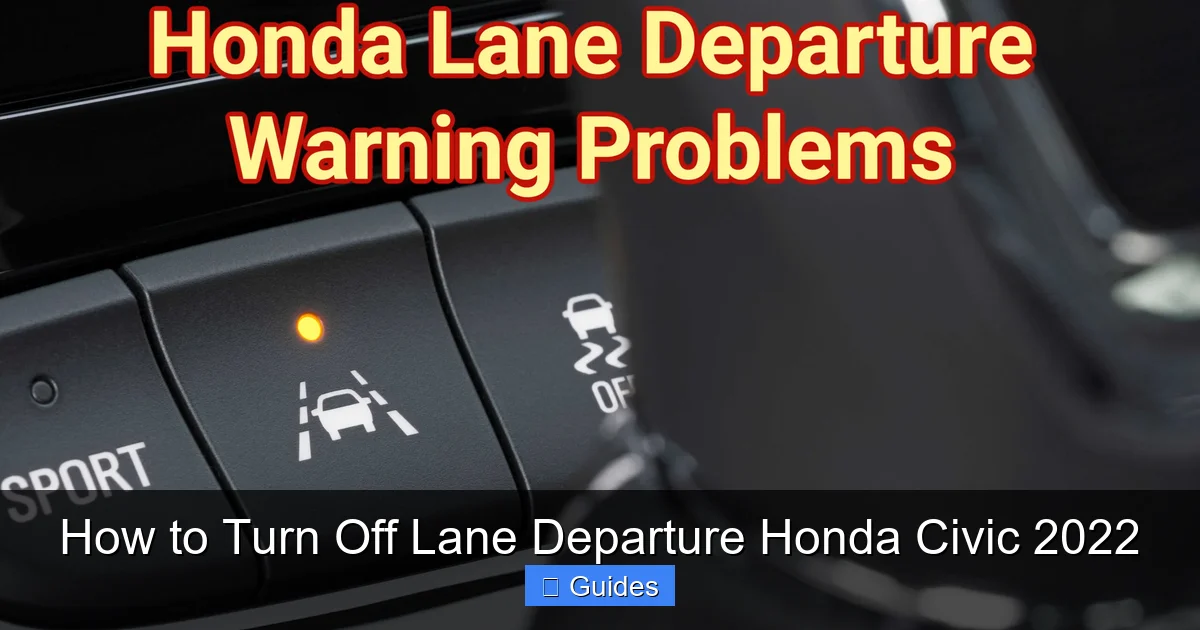
So, how does it work? The LDW system uses a small camera mounted near the rearview mirror, typically behind the windshield. This camera constantly scans the road ahead, looking for painted lane markings. If the system detects that your Civic is crossing a lane line without a turn signal activated, it triggers a warning. This usually comes in the form of a visual alert on the dashboard—often a flashing icon—and sometimes an audible beep or vibration in the steering wheel, depending on your trim level.
It’s important to note that LDW is not the same as Lane Keeping Assist System (LKAS), which actively steers the car back into the lane. LDW only warns you—it doesn’t take control. That distinction is crucial because it means you’re still fully responsible for steering. However, for many drivers, even the warning can feel intrusive, especially on rural roads with faded markings or during heavy rain when visibility is poor.
The good news? You can turn it off. Whether you find the alerts distracting, are driving in challenging conditions, or simply prefer to be in full control, the 2022 Honda Civic allows you to disable Lane Departure Warning. And the process is straightforward, though it varies slightly depending on your vehicle’s trim and infotainment setup.
Why You Might Want to Turn Off Lane Departure Warning
Visual guide about How to Turn Off Lane Departure Honda Civic 2022
Image source: mylemon.com
While Lane Departure Warning is a helpful safety feature, it’s not always ideal for every driving situation. There are several valid reasons why you might want to turn it off temporarily—or even disable it for longer periods.
One common scenario is driving on rural or poorly marked roads. In many parts of the country, especially in older neighborhoods or less-traveled highways, lane markings may be faded, covered in snow, or completely absent. When the camera can’t detect clear lines, the system may trigger false alarms—beeping or flashing even when you’re driving straight down the center of the road. This can be annoying and distracting, pulling your attention away from the actual road.
Another situation is during construction zones. Temporary lane shifts, cones, and uneven pavement often confuse the LDW system. You might be driving perfectly within the new traffic pattern, but because the camera sees conflicting or missing lane lines, it assumes you’re drifting. The result? Constant warnings that can make you second-guess your driving.
Some drivers also find the alerts disruptive during normal driving. For example, if you frequently change lanes without signaling—say, when merging into traffic or adjusting position in slow-moving lines—the system will keep alerting you. While this is technically the point of the feature (to encourage safe signaling habits), it can feel overbearing for experienced drivers who are fully aware of their surroundings.
Additionally, drivers who frequently tow trailers or drive modified vehicles might experience false triggers. The added weight or altered aerodynamics can slightly change the car’s handling, and in some cases, the camera’s perspective, leading to inaccurate readings.
Lastly, personal preference plays a role. Just like some people disable seatbelt chimes or turn off automatic start-stop systems, others prefer to drive without electronic nannies. If you’re confident in your lane discipline and want a more “analog” driving experience, turning off LDW can make your time behind the wheel more enjoyable.
How to Turn Off Lane Departure Warning on the 2022 Honda Civic
Visual guide about How to Turn Off Lane Departure Honda Civic 2022
Image source: vehicle-images.dealerinspire.com
Now that you understand why you might want to disable Lane Departure Warning, let’s get into the actual steps. The method varies slightly depending on your Civic’s trim level and whether it has a traditional instrument cluster or the newer digital display. But don’t worry—we’ll cover both.
Method 1: Using the Steering Wheel Controls (Most Common)
For most 2022 Honda Civic models—especially LX, Sport, and EX trims—you can turn off LDW directly from the steering wheel. Here’s how:
1. Start your car and ensure the ignition is on.
2. Look at your instrument cluster. You should see various icons and indicators.
3. Locate the “LDW” or “Lane Departure Warning” button on your steering wheel. It’s usually on the left side, near the cruise control buttons, and may have a small car icon with lane lines.
4. Press and hold this button for about 2–3 seconds.
5. You’ll see a message on the dashboard: “Lane Departure Warning OFF” or a similar notification.
6. The system is now disabled.
To turn it back on, simply press and hold the same button again until you see the “Lane Departure Warning ON” message.
This method is quick, easy, and doesn’t require navigating through menus. It’s ideal for temporary disabling—like when you’re driving through a construction zone and know you’ll want the feature back on later.
Method 2: Using the Touchscreen (Touring and Higher Trims)
If you have a 2022 Honda Civic Touring or another high-end trim with the 8-inch touchscreen infotainment system, the process is a bit different. These models often integrate driver assistance settings into the main menu.
Here’s how to do it:
1. Turn on the car and wait for the touchscreen to fully load.
2. Tap the “Settings” icon (usually a gear or wrench symbol) on the home screen.
3. Scroll down and select “Vehicle” or “Driver Assistance.”
4. Look for “Lane Departure Warning” or “LDW” in the list.
5. Toggle the switch to “Off.”
6. A confirmation message may appear—tap “OK” to confirm.
To re-enable it, just reverse the steps and toggle it back to “On.”
One thing to note: on some models, the LDW setting may be grouped with other safety features like Road Departure Mitigation or Lane Keeping Assist. Make sure you’re only turning off LDW and not disabling multiple systems by accident.
Method 3: Using the Multi-Information Display (MID)
Some mid-level trims, like the EX, use a combination of physical buttons and the Multi-Information Display (the screen between the speedometer and tachometer). Here’s how to access LDW settings through the MID:
1. Press the “INFO” or “DISP” button on the steering wheel to cycle through display options.
2. Navigate to the “Settings” or “Vehicle Settings” menu.
3. Use the arrow buttons to scroll to “Driver Assistance” or “Safety.”
4. Select “Lane Departure Warning.”
5. Choose “Off” and confirm.
This method takes a few extra seconds but gives you more control over individual settings. It’s also useful if your steering wheel doesn’t have a dedicated LDW button.
Important Notes
– Turning off LDW is usually temporary. The system will re-enable itself the next time you start the car, unless you’ve set it to stay off in the menu (available on some trims).
– If you can’t find the LDW button or menu option, consult your owner’s manual. Honda sometimes changes button layouts between model years or regions.
– Always re-enable LDW when driving on highways or unfamiliar roads for maximum safety.
What Happens When You Turn Off Lane Departure Warning?
Visual guide about How to Turn Off Lane Departure Honda Civic 2022
Image source: carglassadvisor.com
So, you’ve successfully turned off Lane Departure Warning—what now? Understanding what changes (and what doesn’t) can help you drive more confidently.
First, the most obvious difference: no more alerts. You won’t see flashing icons on the dashboard, hear beeps, or feel steering wheel vibrations when drifting out of your lane. This can be a relief if you were constantly getting false warnings.
However, it’s important to remember that turning off LDW does not disable other safety systems. Features like Collision Mitigation Braking System (CMBS), Adaptive Cruise Control (ACC), and Road Departure Mitigation (RDM) will continue to operate normally. These systems rely on different sensors and logic, so disabling one doesn’t affect the others.
For example, if you’re approaching a stopped car too quickly, CMBS will still warn you and even apply the brakes if necessary. Similarly, if you’re about to drive off the road, RDM may still gently steer you back or apply braking—even with LDW off.
Another thing to consider: your driving habits. Without the LDW reminder, it’s easier to unintentionally drift, especially on long highway drives or when you’re tired. That’s why it’s a good idea to re-enable the feature after parking or when you’re back on well-marked roads.
Also, keep in mind that some insurance companies and safety organizations recommend keeping ADAS features active. While you’re not breaking any laws by turning off LDW, doing so might affect your eligibility for certain safety discounts or ratings.
Tips for Managing Lane Departure Warning Effectively
Disabling LDW isn’t just about pressing a button—it’s about using the feature wisely. Here are some practical tips to help you get the most out of your 2022 Honda Civic’s safety systems.
1. Use It Situationally
Instead of leaving LDW off all the time, consider turning it off only when needed. For example:
– Turn it off when driving on gravel roads, dirt paths, or areas with no lane markings.
– Disable it during heavy rain, snow, or fog when visibility is low and the camera may struggle.
– Re-enable it when you return to highways or city streets with clear markings.
This balanced approach keeps you safe when it matters most while avoiding unnecessary alerts.
2. Clean the Windshield Camera Regularly
The LDW camera is mounted behind the windshield, usually near the rearview mirror. Dirt, snow, ice, or even a small crack can block its view and cause malfunctions. Make it a habit to clean this area when you wash your car. Use a soft cloth and glass cleaner—avoid abrasive materials that could scratch the lens.
If you notice the system acting up frequently, check the camera area first. A simple wipe can often fix the problem.
3. Update Your Vehicle’s Software
Honda periodically releases software updates that improve ADAS performance. These updates can fix bugs, enhance camera sensitivity, and reduce false alerts. Check with your local Honda dealer to see if your Civic has the latest software. Some updates can even be done remotely via HondaLink, the brand’s connected car service.
4. Know Your Trim’s Capabilities
Not all 2022 Civics have the same features. Base models may have basic LDW, while higher trims include Lane Keeping Assist, Traffic Jam Assist, or even hands-free highway driving (on certain models). Understanding what your car can and can’t do helps you use the systems more effectively.
For example, if your Civic has LKAS, turning off LDW won’t disable the steering assistance—only the warning. Make sure you’re adjusting the right setting.
5. Practice Defensive Driving
Even with advanced safety tech, nothing replaces good driving habits. Always use your turn signals, check blind spots, and stay focused on the road. LDW is a helpful tool, but it’s not a substitute for attention and skill.
Common Misconceptions About Turning Off LDW
There are a few myths and misunderstandings about disabling Lane Departure Warning. Let’s clear them up.
Myth 1: Turning Off LDW Is Dangerous
Some people believe that disabling any safety feature is reckless. While it’s true that LDW can prevent accidents, it’s not essential for safe driving. Millions of drivers operate vehicles without ADAS every day. As long as you’re attentive and follow traffic laws, turning off LDW is perfectly safe—especially in conditions where it’s more of a hindrance than a help.
Myth 2: It Voids Your Warranty
No, turning off LDW does not void your warranty. You’re simply using a feature as intended—adjusting settings based on your needs. Honda designs these systems to be user-configurable for a reason.
Myth 3: It’s Hard to Turn Back On
As we’ve shown, re-enabling LDW is just as easy as turning it off. Whether you use a button or the touchscreen, it takes just a few seconds. There’s no need to visit a dealer or reset the system.
Myth 4: It Affects Resale Value
Disabling a safety feature temporarily has no impact on your car’s resale value. Buyers care more about maintenance records, mileage, and overall condition than whether LDW was turned off at some point.
Conclusion
The 2022 Honda Civic’s Lane Departure Warning system is a valuable safety tool, but it’s not perfect for every situation. Whether you’re driving on poorly marked roads, navigating construction zones, or simply prefer more control, knowing how to turn off LDW gives you flexibility and peace of mind.
The process is simple: use the steering wheel button, navigate the touchscreen menu, or access the Multi-Information Display—depending on your trim. Just remember to re-enable the feature when conditions improve, and keep the camera clean for optimal performance.
Ultimately, the goal is to use technology to enhance your driving experience, not hinder it. By understanding how and when to disable LDW, you can enjoy the best of both worlds: advanced safety when you need it, and uninterrupted control when you don’t.
So the next time you’re behind the wheel of your 2022 Honda Civic, don’t let unnecessary alerts distract you. Take charge, stay safe, and drive with confidence.
Frequently Asked Questions
Can I permanently turn off lane departure warning on my 2022 Honda Civic?
Yes, on most trims you can set Lane Departure Warning to stay off between drives by using the touchscreen or MID menu. However, some models reset to “on” after each ignition cycle, so check your owner’s manual for specifics.
Will turning off LDW disable other safety features?
No, disabling Lane Departure Warning only affects that specific system. Other features like Collision Mitigation Braking, Adaptive Cruise Control, and Road Departure Mitigation will continue to work normally.
Why does my LDW keep turning back on after I turn it off?
This is normal on many 2022 Civic models. The system is designed to re-enable after each restart for safety reasons. To keep it off permanently, use the settings menu (if available) to change the default behavior.
Can bad weather affect the LDW system?
Yes, heavy rain, snow, fog, or dirt on the windshield can interfere with the camera’s ability to detect lane markings, leading to false alerts or system inactivity. Cleaning the camera area often resolves the issue.
Is it legal to drive with LDW turned off?
Yes, it is completely legal to disable Lane Departure Warning in the United States and most countries. It’s a driver-assist feature, not a mandatory safety system like airbags or seatbelts.
How do I know if my LDW is working properly?
Test the system on a well-marked road. Drive near a lane line without signaling—if you see a warning light or hear a beep, it’s working. If not, check the camera for obstructions or consult your dealer.

At CarLegit, we believe information should be clear, factual, and genuinely helpful. That’s why every guide, review, and update on our website is created with care, research, and a strong focus on user experience.