
The red car symbol on your Nissan dashboard is a critical warning light that typically indicates an issue with the vehicle’s forward collision system, automatic emergency braking, or adaptive cruise control. It should never be ignored—prompt attention can prevent accidents and costly repairs.
Have you ever been driving your Nissan—maybe cruising down the highway or navigating city traffic—when suddenly a bright red car icon flashes on your dashboard? Your heart skips a beat. You glance around, wondering if someone just cut you off. But no—there’s no immediate danger. So what does it mean?
That little red car symbol isn’t just a random warning. It’s your Nissan’s way of saying, “Hey, something’s not right with one of my most important safety systems.” And while it might look alarming (and honestly, a bit dramatic), understanding what it means—and what to do next—can keep you safe, save you money, and give you peace of mind.
In this guide, we’ll break down everything you need to know about the red car symbol on your Nissan dashboard. From what it represents to why it appears, how to troubleshoot it, and when to seek professional help, we’ve got you covered. Whether you drive a sleek Altima, a rugged Rogue, or a sporty Sentra, this warning light can show up across many Nissan models equipped with advanced driver-assistance systems (ADAS). So let’s dive in—and turn that red light from a source of stress into a signal for smart action.
In This Article
- 1 Key Takeaways
- 2 📑 Table of Contents
- 3 What Does the Red Car Symbol Mean on a Nissan Dashboard?
- 4 Common Causes of the Red Car Warning Light
- 5 How to Troubleshoot the Red Car Symbol
- 6 When to Visit a Nissan Dealership or Mechanic
- 7 Preventing Future Red Car Warnings
- 8 Real-World Examples and User Experiences
- 9 Conclusion
- 10 Frequently Asked Questions
- 10.1 What does the red car symbol mean on a Nissan dashboard?
- 10.2 Can I drive my Nissan with the red car light on?
- 10.3 Why did the red car light come on after a windshield replacement?
- 10.4 How much does it cost to fix the red car symbol issue?
- 10.5 Will disconnecting the battery reset the red car light?
- 10.6 Does the red car symbol appear on all Nissan models?
Key Takeaways
- It’s a safety system warning: The red car symbol usually relates to Nissan’s Intelligent Forward Collision Warning (IFCW) or Automatic Emergency Braking (AEB) systems.
- Don’t ignore it: This light signals a malfunction that could reduce your vehicle’s ability to detect and respond to potential front-end collisions.
- Common causes include sensor blockage: Dirt, snow, ice, or debris on the front grille or windshield camera can trigger the warning.
- Software glitches may be to blame: Sometimes, a simple system reset or software update from a dealership resolves the issue.
- Professional diagnosis is recommended: While some fixes are DIY, others require specialized tools and expertise only available at authorized service centers.
- Driving with the light on reduces safety: Your car may not brake automatically in an emergency, increasing accident risk.
- Regular maintenance helps prevent it: Keeping sensors clean and ensuring software is up to date minimizes the chance of false alerts.
📑 Table of Contents
What Does the Red Car Symbol Mean on a Nissan Dashboard?
The red car symbol on your Nissan dashboard is part of the vehicle’s Advanced Driver Assistance Systems (ADAS) suite. Specifically, it’s tied to technologies designed to help prevent front-end collisions. When this light illuminates—often accompanied by a chime or message like “Forward Collision Warning Malfunction” or “AEB System Off”—it means the system responsible for detecting vehicles ahead of you isn’t working properly.
This isn’t just a minor glitch. These systems are engineered to scan the road ahead using a combination of radar, cameras, and sometimes LiDAR. If they detect an imminent collision—say, the car in front brakes suddenly—they can alert you with visual and audio warnings. In some cases, they’ll even apply the brakes automatically to avoid or mitigate impact.
So when that red car icon pops up, your Nissan is essentially saying: “I can’t see the road ahead clearly right now, so I can’t help protect you.” That’s why it’s critical not to dismiss it as just another dashboard light. Unlike a low fuel warning or tire pressure alert, this one directly affects your safety.
Which Nissan Systems Trigger the Red Car Light?
Nissan uses several branded names for its collision avoidance tech, but they all fall under the umbrella of forward collision protection. Here are the main systems that can trigger the red car symbol:
– **Intelligent Forward Collision Warning (IFCW):** Alerts you audibly and visually if a collision risk is detected.
– **Automatic Emergency Braking (AEB):** Applies brakes automatically if you don’t respond in time.
– **Intelligent Cruise Control (ICC):** Maintains a set distance from the vehicle ahead, slowing or accelerating as needed.
– **ProPILOT Assist:** A semi-autonomous driving feature that combines ICC and lane-keeping assist (available on newer models like the Rogue, Altima, and Ariya).
All these systems rely on sensors—typically mounted behind the front grille (for radar) and near the rearview mirror (for the camera). If either sensor is blocked, misaligned, or malfunctioning, the red car light may appear.
Is It Safe to Drive with the Red Car Light On?
Technically, yes—your car will still run. But should you? That’s a different question.
Driving with the red car symbol illuminated means your vehicle’s front-facing safety systems are offline. You lose the benefit of automatic braking in emergencies, adaptive cruise control, and collision warnings. In heavy traffic or poor weather conditions, this could significantly increase your risk of a front-end collision.
Imagine you’re driving in fog or heavy rain. Normally, your Nissan might detect slowed traffic ahead and gently apply the brakes. But with the system disabled, you’re relying solely on your own reaction time—which, let’s be honest, isn’t always fast enough.
So while it’s not an immediate mechanical failure like an overheating engine, it’s still a serious safety concern. Think of it like driving with your seatbelt off—you *can* do it, but you really shouldn’t.
Common Causes of the Red Car Warning Light

Visual guide about What Is the Red Car Symbol on Dashboard Nissan
Image source: symbolismdesk.com
Now that you know what the red car symbol means, let’s explore why it might appear in the first place. The good news? Many causes are simple and fixable. The bad news? Some require professional intervention. Here are the most common reasons this warning light shows up.
1. Sensor Blockage or Obstruction
This is by far the most frequent cause. The radar sensor behind your Nissan’s front grille and the camera near the windshield need a clear line of sight to function. Even minor obstructions can throw them off.
Common culprits include:
– Mud, snow, or ice buildup on the grille
– Road salt or grime covering the sensor area
– A dirty windshield, especially around the rearview mirror
– Parking too close to a wall or barrier (which can confuse the radar)
– Aftermarket accessories like bull bars, grille guards, or wraps that cover the sensor zone
For example, if you’ve just driven through a snowstorm and parked outside overnight, ice might have formed over the radar sensor. The next morning, your Nissan boots up, the system runs a self-check, and—bam—the red car light appears because it can’t “see” through the ice.
2. Sensor Misalignment
Even if your sensors are clean, they might not be pointing in the right direction. This can happen after:
– A minor fender bender (even a parking lot scrape)
– Hitting a deep pothole at speed
– Replacing the windshield (if the camera wasn’t recalibrated)
– Suspension work or alignment changes
Modern ADAS systems are incredibly precise. The radar and camera must be aligned within millimeters and degrees. A slight tilt—say, from a bent bumper bracket—can cause the system to misread distances or fail entirely.
3. Electrical or Software Glitches
Like any computer-driven system, your Nissan’s safety tech can experience bugs. Temporary software hiccups, corrupted data, or communication errors between modules can trigger false warnings.
These glitches might resolve on their own after a restart, or they might persist until the system is reset. In some cases, a firmware update from Nissan is needed to fix known issues.
4. Faulty Sensors or Wiring
Over time, sensors can wear out or get damaged. Water intrusion, corrosion, or physical damage (like a rock chip hitting the camera lens) can render them useless. Similarly, frayed wiring or loose connectors in the sensor harness can interrupt signals.
This is less common than blockage or misalignment but more serious—it usually requires replacement parts and professional diagnostics.
5. Low Battery Voltage
Believe it or not, a weak car battery can cause ADAS malfunctions. These systems are power-hungry and sensitive to voltage drops. If your battery is old or failing, it might not provide enough stable power during startup, causing the system to shut down as a safety precaution.
You might notice other electrical quirks too—dim lights, slow window operation, or infotainment system reboots.
How to Troubleshoot the Red Car Symbol
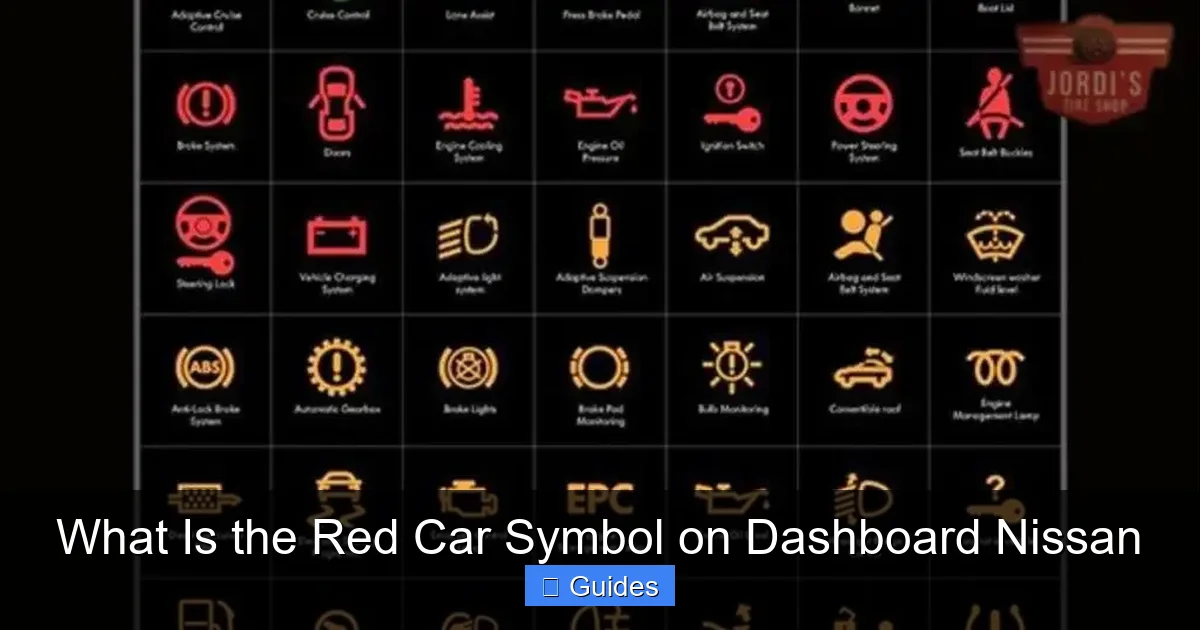
Visual guide about What Is the Red Car Symbol on Dashboard Nissan
Image source: jordistireshop.com
Before you panic or rush to the dealership, there are a few steps you can take at home to diagnose and possibly resolve the issue. Always start with the simplest solutions first.
Step 1: Clean the Sensors
Grab a soft cloth and some glass cleaner (or warm soapy water). Carefully clean:
– The front grille area, especially around the Nissan emblem (where the radar sensor is often hidden)
– The windshield, focusing on the section behind the rearview mirror
– Any plastic covers over sensors (don’t use abrasive cleaners—they can scratch lenses)
Pro tip: Use a cotton swab to gently remove debris from tight spaces around the grille. Avoid high-pressure washes directly on the sensor zones—they can force water into seals.
After cleaning, restart your car and see if the light goes away. Many drivers report immediate success with this step.
Step 2: Check for Obvious Damage
Inspect the front of your vehicle. Look for:
– Dents or bends in the bumper or grille
– Cracks in the windshield near the camera
– Loose or misaligned components
If you recently had bodywork done, ask the shop if they recalibrated the ADAS systems. Windshield replacements, in particular, almost always require camera recalibration—otherwise, the red car light will stay on.
Step 3: Restart the Vehicle
Sometimes, a simple reboot fixes software glitches. Turn off your Nissan completely (not just accessory mode), wait 30–60 seconds, then restart it. This gives the onboard computers a fresh start.
If the light disappears temporarily but returns after driving, it’s likely a persistent issue—not a one-time glitch.
Step 4: Check the Battery
Use a multimeter to test your battery voltage. A healthy battery should read around 12.6 volts when the car is off and 13.7–14.7 volts when running. If it’s below 12.4 volts, consider charging or replacing it.
Many auto parts stores offer free battery testing—take advantage of it.
Step 5: Scan for Diagnostic Trouble Codes (DTCs)
While the red car light itself doesn’t always store a traditional OBD2 code, advanced scan tools (like those used by dealerships or specialized shops) can read ADAS-specific fault codes. These codes tell you exactly which sensor or module is failing.
If you’re handy with tools, you can buy or rent an advanced scanner that supports Nissan’s proprietary systems. Otherwise, a trip to the dealer or a trusted mechanic with the right equipment is your best bet.
When to Visit a Nissan Dealership or Mechanic

Visual guide about What Is the Red Car Symbol on Dashboard Nissan
Image source: symbolismdesk.com
Not every red car light can be fixed with a wipe and a restart. Here’s when it’s time to call in the pros:
The Light Persists After Cleaning and Restarting
If you’ve cleaned the sensors, checked for damage, and restarted the car multiple times—but the light remains—it’s likely a hardware or calibration issue.
You’ve Had Recent Repairs
Windshield replacement, bumper repair, or suspension work often require ADAS recalibration. Dealerships have the specialized tools (like Nissan’s CONSULT diagnostic system) to realign sensors accurately.
You Notice Other Warning Lights
If the red car symbol appears alongside warnings like “Check Engine,” “ABS,” or “Airbag,” there may be a broader electrical or communication problem affecting multiple systems.
Your Car Feels Different to Drive
Has your adaptive cruise control stopped working? Does the brake pedal feel odd? These could indicate a deeper issue with the braking or sensor systems.
You’re Uncomfortable Diagnosing It Yourself
Safety systems are complex. If you’re unsure, it’s always better to err on the side of caution. A certified Nissan technician can run a full diagnostic and ensure everything is functioning correctly.
Most dealerships offer complimentary multi-point inspections—ask them to check your ADAS systems while you’re there.
Preventing Future Red Car Warnings
An ounce of prevention is worth a pound of cure—especially when it comes to safety tech. Here’s how to keep that red car light from haunting your dashboard:
Keep Sensors Clean Year-Round
Make it a habit to wipe down the front grille and windshield camera area during every car wash. In winter, clear snow and ice thoroughly—don’t just brush the windshield and call it a day.
Avoid Unnecessary Modifications
Aftermarket parts like grille inserts, bull bars, or wraps can interfere with sensor performance. If you must install them, choose ones specifically designed for your Nissan model and ensure they don’t block sensor zones.
Schedule Regular Maintenance
Include ADAS checks in your routine service visits. Ask your mechanic to inspect sensor alignment and cleanliness, especially after seasonal changes or long road trips.
Stay Updated on Recalls and Software Updates
Nissan occasionally releases software updates to improve ADAS performance or fix bugs. Check your owner’s portal or contact your local dealer to see if your vehicle is eligible for an update.
Drive Mindfully in Extreme Conditions
In heavy rain, fog, or snow, your sensors may struggle even when working perfectly. Reduce speed, increase following distance, and stay extra alert—your Nissan’s warnings are helpful, but they’re no substitute for safe driving habits.
Real-World Examples and User Experiences
Still wondering if this applies to you? You’re not alone. Thousands of Nissan owners have encountered the red car symbol—and many have shared their stories online.
One Rogue owner from Minnesota reported the light coming on every winter morning. After weeks of frustration, they discovered that frost was forming overnight on the radar sensor behind the grille. A quick wipe with a microfiber cloth each morning solved the problem.
Another Altima driver in Arizona noticed the light after installing a custom grille wrap. The adhesive slightly covered the sensor area. Removing the wrap and cleaning the surface restored normal function.
And a Sentra owner in California found that a loose wire behind the camera module was causing intermittent failures. A trip to the dealer for a $150 repair fixed it permanently.
These stories highlight a key point: the red car symbol is often fixable—but only if you understand what’s causing it.
Conclusion
The red car symbol on your Nissan dashboard isn’t something to fear—but it is something to respect. It’s your vehicle’s way of telling you that its front collision safety systems aren’t operating at full capacity. Whether it’s a simple case of dirt on the sensor or a more complex electrical issue, addressing it promptly keeps you and others safer on the road.
Start with the basics: clean the sensors, check for damage, and restart your car. If the light persists, don’t hesitate to visit a Nissan dealership or qualified mechanic. With proper care and attention, you can keep your ADAS systems running smoothly—and that red car light firmly off your dashboard.
Remember: your Nissan’s safety features are there to help you, but they work best when they’re working properly. Stay informed, stay proactive, and drive with confidence.
Frequently Asked Questions
What does the red car symbol mean on a Nissan dashboard?
The red car symbol indicates a malfunction in your Nissan’s forward collision warning or automatic emergency braking system. It means the vehicle can’t reliably detect vehicles ahead, reducing your safety in potential crash scenarios.
Can I drive my Nissan with the red car light on?
Yes, the car will still operate, but it’s not recommended for safety reasons. Your automatic braking and collision warnings won’t work, increasing accident risk—especially in traffic or bad weather.
Why did the red car light come on after a windshield replacement?
Windshield replacements often require recalibration of the forward-facing camera. If this step is skipped, the system can’t align properly, triggering the red car warning light.
How much does it cost to fix the red car symbol issue?
Costs vary. Cleaning sensors is free. Recalibration at a dealership typically ranges from $100–$300. Sensor replacement can cost $500–$1,500 depending on the part and labor.
Will disconnecting the battery reset the red car light?
Sometimes, yes—a full power cycle can clear temporary software glitches. However, if the underlying issue (like a blocked sensor) remains, the light will return.
Does the red car symbol appear on all Nissan models?
No, only on models equipped with advanced driver-assistance systems (ADAS), such as the Rogue, Altima, Sentra, Maxima, and Ariya. Older or base-trim models may not have this feature.

At CarLegit, we believe information should be clear, factual, and genuinely helpful. That’s why every guide, review, and update on our website is created with care, research, and a strong focus on user experience.