
If your Nissan Altima displays “No Key Detected,” it’s usually due to a weak key fob battery, signal interference, or a faulty sensor. This frustrating issue can often be resolved with simple steps like replacing the battery or repositioning the key fob.
In This Article
- 1 Key Takeaways
- 2 📑 Table of Contents
- 3 Why Does My Nissan Altima Say “No Key Detected”? Understanding the Problem
- 4 Common Causes of the “No Key Detected” Message
- 5 How to Fix the “No Key Detected” Issue: Step-by-Step Solutions
- 6 When to Visit a Nissan Dealer or Mechanic
- 7 Preventing Future “No Key Detected” Issues
- 8 Conclusion
- 9 Frequently Asked Questions
- 9.1 Why does my Nissan Altima say “No Key Detected” even with a new battery?
- 9.2 Can a dead car battery cause “No Key Detected”?
- 9.3 How do I reprogram my Nissan Altima key fob?
- 9.4 Will a damaged key fob always show physical signs?
- 9.5 Can I start my Altima without the key fob?
- 9.6 How much does it cost to replace a Nissan Altima key fob?
Key Takeaways
- Low key fob battery is the most common cause: A weak battery reduces signal strength, preventing the car from detecting the key.
- Signal interference can block detection: Electronics like phones, power lines, or other key fobs may disrupt the fob’s signal.
- The key fob may need reprogramming: After battery replacement or system glitches, the fob might lose sync with the vehicle.
- Faulty antenna or sensor issues: Internal components in the ignition or around the cabin may fail to detect the key properly.
- Damaged or worn key fob: Physical damage or internal circuit failure can stop the fob from transmitting signals.
- Vehicle software glitches: Occasionally, the car’s immobilizer system needs a reset or software update.
- Try the emergency start procedure: Most Altimas have a backup method to start the car when the key isn’t detected.
📑 Table of Contents
Why Does My Nissan Altima Say “No Key Detected”? Understanding the Problem
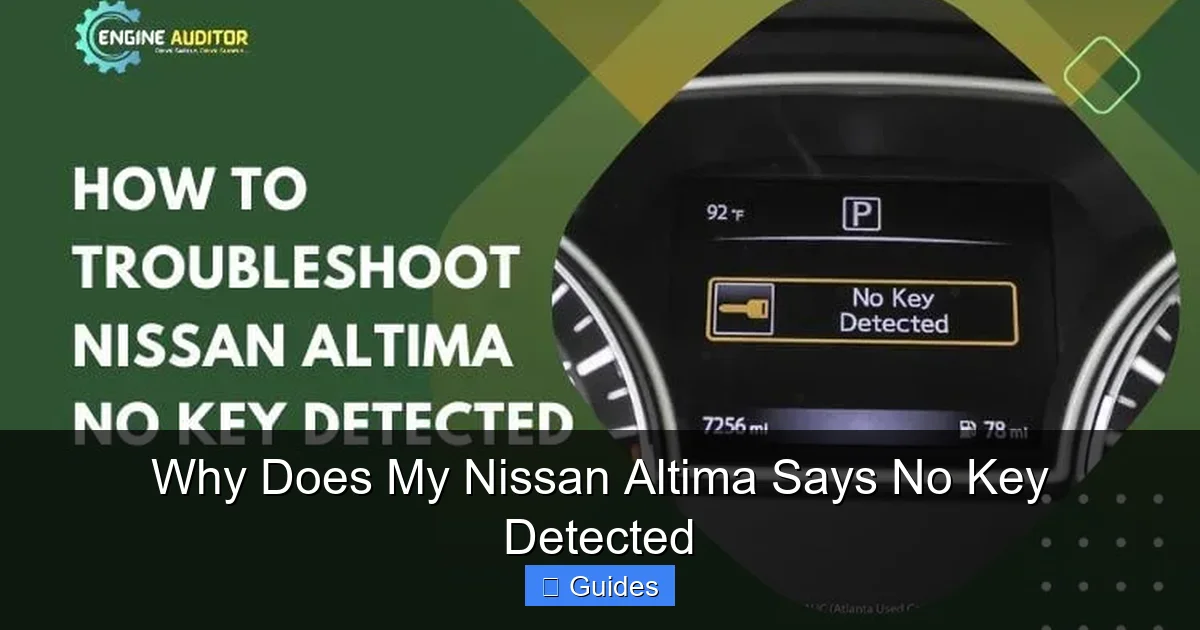
Imagine this: You’re running late for work, you grab your keys, walk up to your Nissan Altima, press the start button—and nothing happens. Instead, the dashboard flashes a frustrating message: “No Key Detected.” Your heart sinks. You try again. Same result. You’re locked out of your own car, even though the key fob is right there in your hand.
This isn’t just annoying—it’s confusing. After all, the key is right there. Why won’t the car recognize it?
The “No Key Detected” message in your Nissan Altima is a warning from the vehicle’s immobilizer system. This system is designed to prevent unauthorized starting of the car. It uses a small chip inside your key fob—called a transponder—to communicate with sensors in the car. When you press the start button, the car sends out a low-frequency signal. The key fob picks up that signal, activates the chip, and sends back a unique code. If the code matches, the engine starts. If not, you get that dreaded message.
So when your Altima says “No Key Detected,” it means the car isn’t receiving or recognizing that signal. The good news? In most cases, this isn’t a sign of a major mechanical failure. It’s usually something simple—like a dead battery or interference—that you can fix yourself.
In this guide, we’ll walk you through the most common reasons your Nissan Altima might not detect your key, how to troubleshoot each issue, and what to do if the problem persists. Whether you’re dealing with a weak fob, signal interference, or a more complex electrical issue, we’ve got you covered.
Common Causes of the “No Key Detected” Message
Visual guide about Why Does My Nissan Altima Says No Key Detected
Image source: cararac.com
There are several reasons why your Nissan Altima might not detect your key fob. Let’s break down the most common culprits so you can identify the root of the problem quickly.
1. Weak or Dead Key Fob Battery
This is by far the most frequent cause of the “No Key Detected” error. The key fob runs on a small lithium coin cell battery—typically a CR2032. Over time, this battery loses power. When it gets too weak, the fob can’t transmit a strong enough signal to the car, even if the buttons still light up.
You might notice other signs of a dying battery, like:
– The key fob buttons feel sluggish or don’t respond immediately.
– The remote lock/unlock range gets shorter.
– The car only starts when the fob is held very close to the start button.
If your fob is more than two or three years old, the battery is likely due for a replacement.
2. Signal Interference
Your key fob uses radio frequency (RF) signals to communicate with your car. But these signals can be blocked or disrupted by other electronic devices. Common sources of interference include:
– Smartphones (especially when placed near the fob)
– Power lines or electrical transformers
– Other key fobs (like from a family member’s car)
– Wireless routers or Bluetooth devices
Even being inside a metal garage or near a large metal object can weaken the signal. If you’re standing next to your car and it still won’t detect the key, try moving away from potential interference sources and test again.
3. Key Fob Needs Reprogramming
Sometimes, after replacing the battery or experiencing a power surge, the key fob loses its synchronization with the car. This doesn’t mean the fob is broken—it just needs to be “re-paired” with the vehicle’s immobilizer system.
This is especially common if:
– The car battery was recently disconnected or died.
– You’ve replaced the key fob battery and the car still doesn’t recognize it.
– You’ve used a spare fob that hasn’t been programmed.
Reprogramming is usually a simple process, but it varies by model year. We’ll cover how to do it later in this guide.
4. Damaged or Worn Key Fob
Physical damage can also cause detection issues. If your key fob has been dropped, exposed to water, or cracked, the internal circuitry—including the transponder chip—might be damaged.
Signs of a damaged fob include:
– Cracks or broken plastic
– Buttons that don’t click properly
– Water stains or corrosion inside the battery compartment
– The fob works intermittently or only at certain angles
Even if the fob appears fine, internal damage might not be visible. If you suspect damage, try using a spare fob (if you have one) to see if the problem persists.
5. Faulty Antenna or Sensor Issues
Your Nissan Altima has multiple antennas and sensors located around the cabin—especially near the steering column, center console, and ignition area. These components detect the key fob’s signal when you’re inside the car.
If one of these antennas fails or becomes disconnected, the car won’t “see” the key, even if it’s right next to the start button. This is less common than a dead battery, but it can happen due to:
– Wear and tear over time
– Water damage
– Electrical shorts
– Poor installation after repairs
A professional diagnostic scan can help identify if a sensor or antenna is malfunctioning.
6. Vehicle Software or Immobilizer Glitch
Modern cars like the Nissan Altima rely on complex software to manage security systems. Occasionally, the immobilizer system can experience a glitch—like a frozen module or corrupted data—that prevents it from recognizing the key.
This might happen after:
– A software update
– A power surge (e.g., jump-starting the car)
– Leaving the car in extreme temperatures for long periods
In these cases, a simple reset or software refresh may be needed.
How to Fix the “No Key Detected” Issue: Step-by-Step Solutions
Visual guide about Why Does My Nissan Altima Says No Key Detected
Image source: engineauditor.com
Now that you know the possible causes, let’s go over practical solutions. Most of these fixes can be done at home with minimal tools.
Step 1: Replace the Key Fob Battery
If your key fob is more than two years old, start here. Replacing the battery is quick, cheap, and solves the problem in over 60% of cases.
Here’s how:
1. Locate the small notch or seam on the side of the fob.
2. Use a flathead screwdriver or a coin to gently pry it open.
3. Remove the old battery (usually a CR2032).
4. Insert the new battery, making sure the positive side (+) is facing up.
5. Snap the fob back together.
After replacing the battery, test the fob by standing near the car and pressing the lock button. If the doors respond, try starting the car. If it still says “No Key Detected,” move to the next step.
Step 2: Try the Emergency Start Procedure
Every Nissan Altima with a push-button start has a backup method to start the car when the key isn’t detected. This is called the emergency start or “manual start” procedure.
Here’s how to do it:
1. Hold the key fob directly against the start button (some models have a marked spot on the button).
2. Press your foot firmly on the brake pedal.
3. While holding the fob against the button, press the start button.
The car should recognize the key and start. This works because the fob is close enough for the antenna to pick up its signal, even with a weak battery.
If this works, it confirms the issue is with signal strength—likely a weak battery or interference.
Step 3: Eliminate Signal Interference
If the emergency start works but the car still won’t detect the key normally, interference might be the culprit.
Try these tips:
– Remove your smartphone from your pocket or bag.
– Move away from power lines, Wi-Fi routers, or other electronics.
– Try starting the car in a different location (e.g., outside the garage).
– If you have multiple key fobs, keep them separated—don’t carry them together.
Sometimes, simply holding the fob away from your body (like in your hand instead of your pocket) can improve signal reception.
Step 4: Reprogram the Key Fob
If replacing the battery doesn’t help, the fob may need reprogramming. This process resets the communication between the fob and the car.
Note: The exact steps vary by model year. Here’s a general method that works for many 2013–2020 Nissan Altimas:
1. Sit in the driver’s seat with all doors closed.
2. Press the start button twice (without pressing the brake) to turn the ignition to “ON.”
3. Within 5 seconds, press and hold the “Lock” button on the fob for 5 seconds.
4. The hazard lights should flash once, indicating the fob is recognized.
5. Press the start button to turn off the ignition.
Repeat this process for each fob you want to program.
If this doesn’t work, consult your owner’s manual or visit a Nissan dealer. Some models require a diagnostic tool for reprogramming.
Step 5: Check for Physical Damage
Inspect your key fob for signs of damage:
– Look for cracks, dents, or water stains.
– Open the fob and check for corrosion or loose connections.
– Test the buttons—do they click firmly?
If you find damage, consider replacing the fob. You can order a new one from a Nissan dealer or an online retailer. Just make sure it’s compatible with your Altima’s year and trim.
Step 6: Reset the Vehicle’s Electrical System
Sometimes, a simple reset can clear software glitches. Here’s how:
1. Turn off the car and remove the key fob.
2. Open the hood and locate the battery.
3. Disconnect the negative terminal (black cable) using a wrench.
4. Wait 10–15 minutes to allow the system to fully reset.
5. Reconnect the terminal and tighten it securely.
6. Try starting the car again.
This reset clears temporary errors in the immobilizer system and may restore normal function.
When to Visit a Nissan Dealer or Mechanic
Visual guide about Why Does My Nissan Altima Says No Key Detected
Image source: engineauditor.com
While most “No Key Detected” issues can be fixed at home, some problems require professional help. Here’s when you should seek expert assistance:
1. The Key Fob Still Doesn’t Work After Battery Replacement
If you’ve replaced the battery, tried the emergency start, and eliminated interference—but the car still won’t detect the key—the fob itself may be faulty. A technician can test the fob’s signal strength and determine if it needs replacement.
2. Multiple Fobs Aren’t Working
If neither your primary nor spare fob is detected, the issue is likely with the car—not the fobs. This could point to a failed antenna, sensor, or immobilizer module.
3. You Hear Clicking But the Car Won’t Start
If the dashboard lights up and you hear relays clicking but the engine won’t crank, the immobilizer may be blocking the start signal. A diagnostic scan can reveal error codes related to the security system.
4. The Problem Started After a Repair or Battery Replacement
If the issue began after work was done on your car—like a battery replacement or stereo installation—something may have been disconnected or damaged. A technician can check wiring and connections.
5. You Need a New Key Fob Programmed
If you’ve purchased a new or used key fob, it must be programmed by a dealer or locksmith with the right tools. Most home methods won’t work for new fobs.
Preventing Future “No Key Detected” Issues
Once you’ve resolved the problem, take steps to avoid it happening again.
Keep the Key Fob Battery Fresh
Replace the battery every 2–3 years, even if it seems to be working. Keep a spare CR2032 battery in your glove box or emergency kit.
Avoid Signal Interference
Don’t store your key fob next to your phone, wallet with RFID cards, or other electronics. Use a Faraday pouch if you’re concerned about signal theft.
Handle the Fob with Care
Avoid dropping the fob or exposing it to water. If you live in a rainy climate, consider a protective case.
Use the Emergency Start Method Regularly
Even if your fob is working, practice the emergency start procedure occasionally. It ensures you’re familiar with it in case of a future issue.
Keep a Spare Fob Handy
If your Altima came with two fobs, keep the spare in a safe place—like at home or in your office. If one fails, you’ll have a backup.
Conclusion
The “No Key Detected” message in your Nissan Altima can be frustrating, but it’s rarely a sign of a serious problem. In most cases, it’s caused by a weak key fob battery, signal interference, or a simple sync issue. By following the steps in this guide—replacing the battery, trying the emergency start, eliminating interference, and reprogramming the fob—you can often resolve the issue yourself in under 15 minutes.
However, if the problem persists or affects multiple fobs, it’s time to visit a Nissan dealer or qualified mechanic. They have the tools and expertise to diagnose deeper electrical or software issues.
Remember: Your key fob is a small but vital part of your car’s security system. Treat it well, keep it charged, and you’ll avoid most detection problems. And the next time your Altima says “No Key Detected,” you’ll know exactly what to do.
Frequently Asked Questions
Why does my Nissan Altima say “No Key Detected” even with a new battery?
This could be due to signal interference, a need for reprogramming, or a faulty antenna in the car. Try the emergency start method and eliminate nearby electronics. If it persists, have the system scanned for errors.
Can a dead car battery cause “No Key Detected”?
Yes. A very low car battery can weaken the signals between the key fob and the car’s sensors. Jump-start the car or replace the battery, then try starting it again.
How do I reprogram my Nissan Altima key fob?
Most models allow self-reprogramming by turning the ignition on and off and pressing the lock button. Check your owner’s manual for exact steps. Some newer models require a dealer tool.
Will a damaged key fob always show physical signs?
Not always. Internal circuit damage may not be visible. If the fob works intermittently or only at certain angles, it may be failing internally.
Can I start my Altima without the key fob?
No—the key fob must be present to start the car. However, the emergency start method lets you start it even with a weak battery by holding the fob against the start button.
How much does it cost to replace a Nissan Altima key fob?
A new key fob typically costs $100–$300, plus $50–$150 for programming at a dealer. Some locksmiths offer cheaper programming services.

At CarLegit, we believe information should be clear, factual, and genuinely helpful. That’s why every guide, review, and update on our website is created with care, research, and a strong focus on user experience.